

Search
On this page
Search is a high-intent conversion tool for perfume and fragrance stores. Shoppers frequently search for specific fragrance notes (e.g., Oud, Amber, Vanilla, Rose, Sandalwood), bottle sizes, scent collections, or specific perfume names.
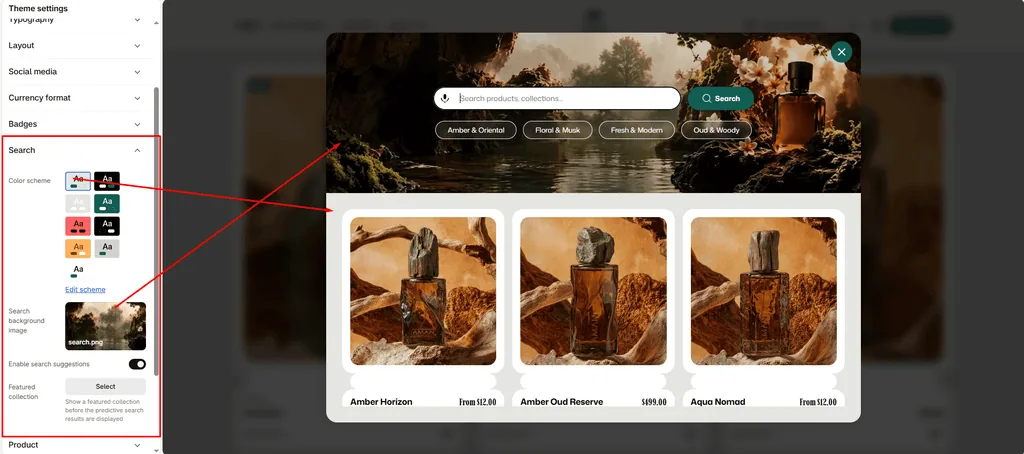
Attar features an interactive Predictive Search Modal with instant live results, voice search support, and pre-search curated product recommendations.
How to Access Search Settings
- From your Shopify Admin, navigate to Online Store > Themes.
- Click Customize on the Attar theme.
- Click the Theme settings (⚙️ gear icon) in the left sidebar.
- Select the Search tab.
- Configure your search preferences and click Save.
Available Settings & Configuration
| Setting Name | Type | Options / State | Default | Description |
|---|---|---|---|---|
| Color scheme | Color Scheme Picker | Any configured color scheme | Scheme 1 | Sets the background, text, borders, and input styling for the search popup and results panel. |
| Search background image | Image Picker | Image upload (PNG/JPG) | None | Optional background image displayed behind the search overlay for an elegant luxury aesthetic. |
| Show search suggestions | Checkbox | Enabled / Disabled | Enabled | Activates dynamic predictive search. As shoppers type, instant product matches, prices, and thumbnails appear in real time. |
| Featured collection | Collection Picker | Any collection in your store | None | Selects a curated collection to display as recommended fragrances when the search modal opens (before the customer types anything). |
Detailed Settings Breakdown
1. Color Scheme
Allows you to style the search overlay to match your store’s look. You can choose a light scheme for a clean, minimalist feel or a rich, dark scheme for a dramatic luxury boutique mood.
2. Search Background Image
Upload a subtle atmospheric image (such as botanical florals, wood textures, or amber resin) to display softly behind the search drawer.
3. Search Suggestions
- When Enabled: As soon as a customer types the first few letters of a scent or note (e.g., “Oud” or “Rose”), Attar performs a fast background search and displays matching perfumes with photos, titles, and live prices. It also supports searching across articles, pages, and collections.
- When Disabled: Renders a standard search input that only navigates to the search results page upon pressing Enter.
4. Featured Collection
Attar turns the empty search drawer into an active shopping space:
- When a visitor clicks the search icon in the header, the search drawer opens.
- Before they type anything, Attar displays recommended perfumes from your selected collection.
- Recommended Usage: Assign your “Bestsellers”, “Signature Scents”, or “New Arrivals” collection here to inspire immediate clicks.
Pro Tips for Attar Stores
- Feature Bestsellers in Search: Don’t leave the initial search screen blank. Selecting a curated collection of popular fragrances turns the search bar into an instant discovery gallery.
- Include Fragrance Notes in Product Descriptions: To make predictive search even more effective, list your key fragrance notes (Top, Heart, Base) clearly in your product descriptions and tags. Customers searching for “Sandalwood” or “Vanilla” will see matching perfumes immediately.
Was this article helpful?
Thanks for the feedback.
Still need help?
Can't find what you're looking for? Send us a message and we'll help you out.