

Related Post
On this page
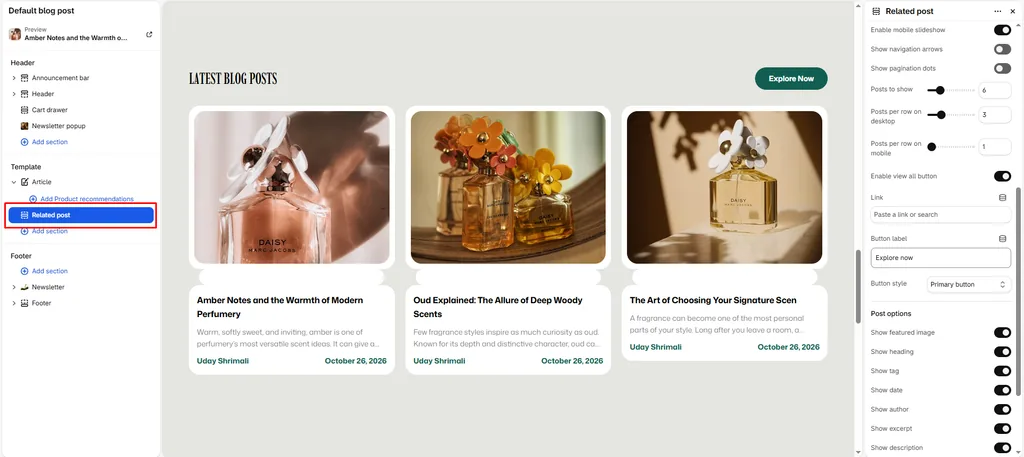
The Related Post section is designed specifically for individual Blog Post (Article) pages. When a customer finishes reading a fragrance guide, ingredient story, or scent layering tutorial, this section presents other relevant articles to keep them exploring your journal.
Attar uses smart tag matching to automatically detect the topic of the current article and serve contextually related fragrance stories.
How to Access Related Post Settings
- From your Shopify Admin, navigate to Online Store > Themes.
- Click Customize on the Attar theme.
- In the top template dropdown, select Blogs > Default article.
- In the left sidebar, scroll beneath the main article content and click Related posts (or click Add section > Related posts).
- Configure your layout, post limits, and card toggles.
- Click Save.
Layout & Heading Settings
| Setting Name | Type | Options / Range | Default | Description |
|---|---|---|---|---|
| Color scheme | Color Scheme Picker | Any configured color scheme | Scheme 1 | Sets the background and typography color palette for the section. |
| Section width | Dropdown | Page width, Full width | Page width | Determines whether the section stays within the site container or spans edge-to-edge. |
| Heading | Textarea | e.g., “Related Stories”, “More From Our Journal” | Recent Blogs | Section title displayed above related articles. |
| Heading size | Dropdown | H1 – H6 | H4 | Sets the typography size hierarchy for the section heading. |
| Description | Textarea | Formatted text | None | Optional description text displayed beneath the headline. |
| Text size | Dropdown | H1 – H6 | H3 | Sets the font size of the description text. |
| Top padding | Slider / Range | 0px – 200px (Step: 5px) | 100px | Top vertical whitespace above the section content. |
| Bottom padding | Slider / Range | 0px – 100px (Step: 1px) | 100px | Bottom vertical whitespace below the section content. |
How Attar Selects Related Articles
Attar uses intelligent contextual matching to recommend articles:
- Primary Tag Match: Attar checks the tags of the article the customer is currently reading (e.g., Oud, Amber, Floral, or Scent Care). If other articles share the same tag, Attar displays them first.
- Recent Fallback: If no other articles share that tag, Attar automatically displays the most recently published articles from the same blog.
Grid & Slideshow Controls
| Setting Name | Type | Options / State | Default | Description |
|---|---|---|---|---|
| Desktop view | Dropdown | Grid, Slideshow | Grid | Toggle between a clean multi-column card grid or a smooth horizontal slider on desktop screens. |
| Mobile slideshow for grid | Checkbox | Enabled / Disabled | Enabled | Enables horizontal touch-swipe gestures on smartphones. |
| Show navigation | Checkbox | Enabled / Disabled | Enabled | Displays previous/next slider arrows. |
| Show pagination | Checkbox | Enabled / Disabled | Enabled | Displays pagination indicator dots beneath the slider. |
| Posts limit | Slider / Range | 2 – 20 (Step: 1) | 6 | Maximum number of related articles shown. |
| Desktop posts per row | Slider / Range | 2 – 6 (Step: 1) | 3 | Number of article cards displayed side-by-side on desktop. |
| Mobile posts per row | Slider / Range | 1 – 3 (Step: 1) | 1 | Number of article cards shown per view on mobile screens. |
“View All” Button Settings
| Setting Name | Type | Default | Description |
|---|---|---|---|
| Show view all | Checkbox | Enabled | Displays a call-to-action button linking back to your main blog journal. |
| Button label | Text | Button label | The text on the button (e.g., “Read All Stories” or “Explore Fragrance Journal”). |
| Link | URL | None | Destination link (defaults to your main blog page if left blank). |
| Button style | Dropdown | Button primary, Button secondary, Button link | Button primary |
Article Card Content Toggles
Customize what details appear on related article cards:
| Setting Name | Type | Default | Description |
|---|---|---|---|
| Show image | Checkbox | Enabled | Displays the article’s featured hero image. |
| Show title | Checkbox | Enabled | Shows the article headline. |
| Show tag | Checkbox | Disabled | Displays the category tag badge pill. |
| Show date | Checkbox | Enabled | Shows the publication date. |
| Show author | Checkbox | Enabled | Displays the writer’s byline. |
| Show excerpt | Checkbox | Enabled | Shows the short summary excerpt. |
| Show description | Checkbox | Disabled | Displays body text preview if no excerpt is provided. |
Pro Tips for Attar Stores
- Tag Matching Strategy: Tag related articles under matching scent categories (like OUD, AMBER, SANDALWOOD, or APPLICATION GUIDE). When a customer finishes reading an article about applying pure attar oils, Attar will automatically recommend related application and care guides.
- Mobile Swipe Carousel: Keep Mobile posts per row set to
1with Mobile slideshow for grid enabled. This keeps article footers compact and lets mobile visitors easily swipe through related stories.
Was this article helpful?
Thanks for the feedback.
Still need help?
Can't find what you're looking for? Send us a message and we'll help you out.