

Newsletter
On this page
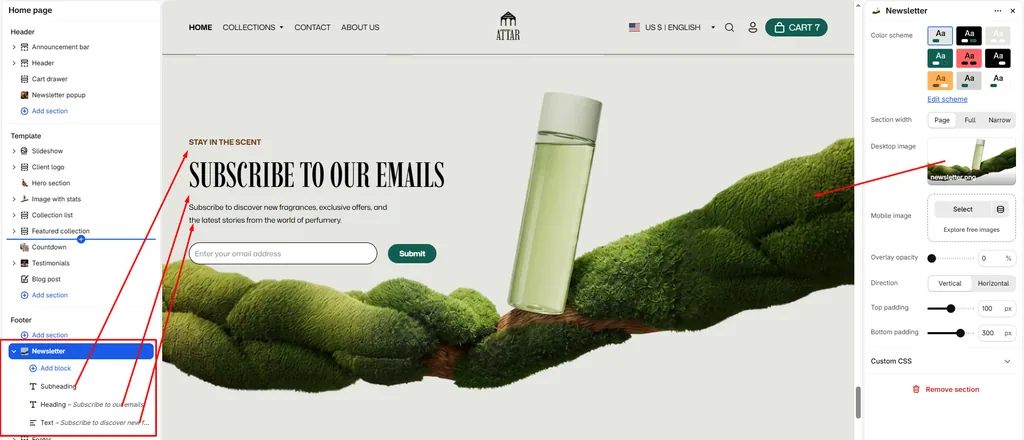
The Newsletter section is an immersive, high-converting banner designed to grow your perfume subscriber community. It allows you to showcase luxury bottle imagery or botanical backgrounds while encouraging visitors to sign up for exclusive fragrance releases, scent stories, and special offers.
How to Access Newsletter Section Settings
- From your Shopify Admin, navigate to Online Store > Themes.
- Click Customize on the Attar theme.
- In the left sidebar, click Newsletter (or scroll to the bottom and click Add section > Newsletter).
- Configure your layout, background imagery, and content blocks.
- Click Save.
Section Settings & Configuration
| Setting Name | Type | Options / Range | Default | Description |
|---|---|---|---|---|
| Color scheme | Color Scheme Picker | Any configured color scheme | Scheme 2 | Sets the background and text color scheme for the newsletter content and form buttons. |
| Section width | Dropdown | Page, Full, Narrow | Page | Controls the container width of the section across the screen. |
| Desktop image | Image Picker | Image upload (PNG/JPG) | None | Background photo displayed across desktop and laptop screens (e.g., perfume flacon on natural moss/wood). |
| Mobile image | Image Picker | Image upload (PNG/JPG) | None | Optional background image specifically cropped for vertical smartphone screens. |
| Overlay opacity | Slider / Range | 0% – 100% (Step: 1%) | 0% | Adds a darkened overlay over the background image to ensure text and form inputs remain easy to read. |
| Direction | Dropdown | Vertical, Horizontal | Vertical | Sets whether the text and email signup form align vertically or horizontally side-by-side. |
| Top padding | Slider / Range | 0px – 200px (Step: 5px) | 100px | Controls vertical whitespace above the section content. |
| Bottom padding | Slider / Range | 0px – 400px (Step: 5px) | 300px | Controls vertical whitespace below the section content. |
Content Blocks Inside the Newsletter Section
The Newsletter section uses modular blocks so you can easily customize the messaging:
1. Subheading Block
- Text: Enter a brief catchphrase above your main headline (e.g., “STAY IN THE SCENT”).
- Styling: Displays as an uppercase accent label.
2. Heading Block
- Heading: Main headline of the section (e.g., “SUBSCRIBE TO OUR EMAILS”).
- Heading size: Select the heading scale from H1 through H6 to match your visual hierarchy.
3. Text Block
- Description: Add explanatory text explaining the perks of subscribing (e.g., “Subscribe to discover new fragrances, exclusive offers, and the latest stories from the world of perfumery.”).
4. Email Signup Form
The built-in signup form automatically integrates with your Shopify Customer list:
- Email input: Clean input field with custom placeholder text.
- Submit button: Styled with your active color scheme to match your brand’s buttons.
Pro Tips for Attar Stores
- Atmospheric Bottle Imagery: Upload high-resolution background photography showing your signature perfume flacon resting on natural elements like moss, sandalwood, or stone.
- Adjust Bottom Padding: A larger bottom padding (e.g.,
200pxto300px) creates an expansive, high-end editorial feel that allows your background imagery to shine. - Use Subtle Overlay: If your background image has bright or busy areas behind the text, set the Overlay opacity to
10%–20%to ensure the headline and email input stand out clearly.
Was this article helpful?
Thanks for the feedback.
Still need help?
Can't find what you're looking for? Send us a message and we'll help you out.