

Collection List
On this page
The Collection List section allows merchants to display multiple collections in a visually engaging slider or grid layout. Each collection can feature a custom image, title, and link. Ideal for highlighting product categories or featured groups.
Section Settings
Color scheme
Choose the desired color palette for this section from the available theme schemes.
Section width
Choose how wide the section spans on the page:
- Page: Aligns section content with the page container.
- Full: Stretches the section edge-to-edge across the browser window.
Section heading
Enter a heading to introduce the collection list.
Heading size
Select the text size for the heading (e.g., H1, H2, H3, H4, H5, H6).
Layout: Choose the layout that best suits your page’s design. There are two different modes to choose from for your store Grid/ Carousel.
Product View: The maximum number of products per tab.
Desktop Grid Product View: Adjust the Products per row slider/grid to specify the number of products to display within each row inside the section. The minimum number of of collections is, and the maximum is 5. This setting applies to desktop display devices.
Mobile Grid Product View: Use the Products per row on mobile radio buttons to specify the number of products to display in each row inside the section. The options are 1 and 2. This setting applies to mobile display devices.
Enable Swipe on Mobile: Select/deselect to enable the Swipe on Mobile.
Slider Controls:
(Visible when slideshow is enabled)
- Show navigation arrows
- Show pagination dots
Text alignment
Choose the alignment of the section heading (left, center, or right).
Top padding
Add spacing above the section (in pixels).
Bottom padding
Add spacing below the section (in pixels).
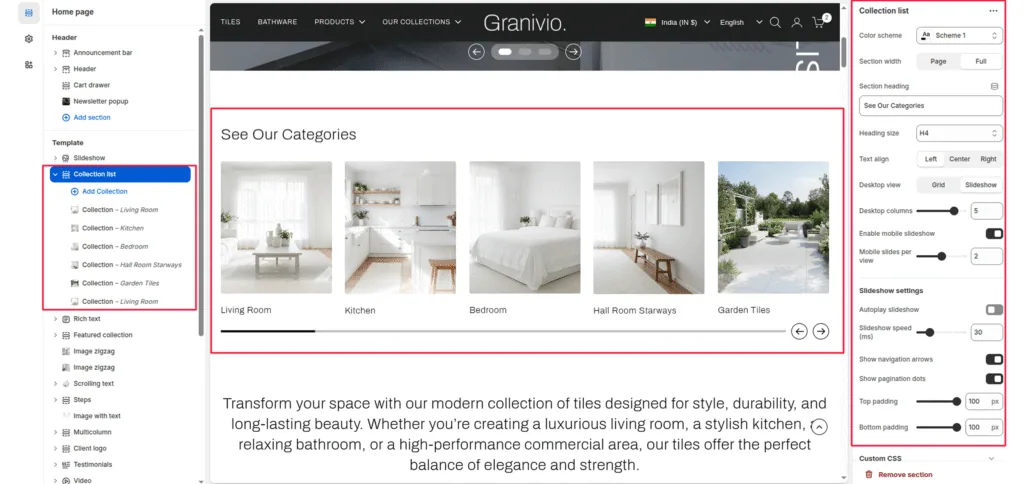
Block: Collection
Each block represents one collection item in the slider or grid.
Collection
Select the Shopify collection to be displayed.
Image
Upload a custom image for this collection (recommended if you want a unique visual instead of the default collection image).
Collection title
Enter a custom name for the collection display.
Collection URL
Add the URL handle or custom link.
Was this article helpful?
Thanks for the feedback.
Still need help?
Can't find what you're looking for? Send us a message and we'll help you out.