

Newsletter Popup
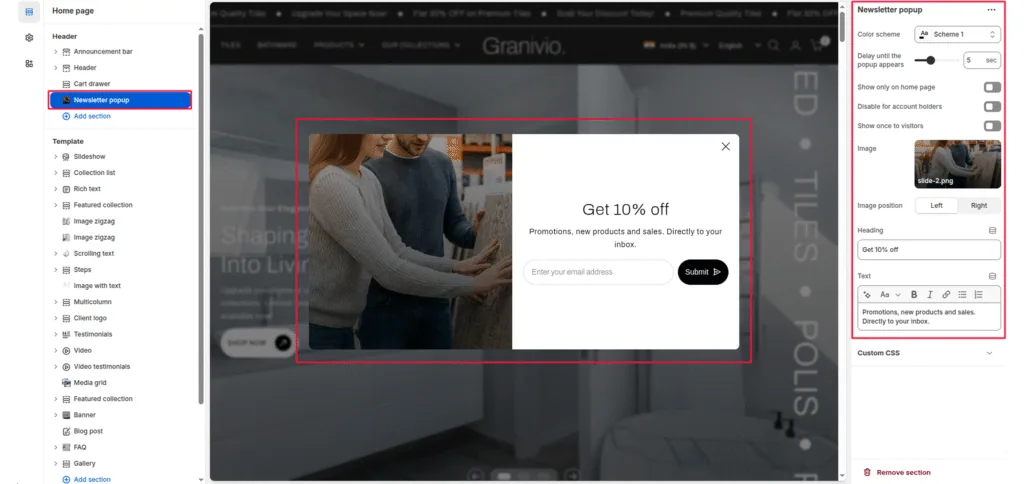
The Newsletter Popup section allows you to capture customer emails and grow your subscriber list with a stylish, customizable pop-up. It can display promotional messages such as discounts or announcements and appear automatically after a set delay when a visitor lands on your store.
Color scheme
Select the color scheme to match your theme’s design. The pop-up adapts to your chosen scheme automatically.
Delay until the pop-up appears
Set the delay (in seconds) after which the pop-up appears when the page loads. Default: 5 seconds.
Show only on the home page
Enable this to show the pop-up only on the home page and hide it on other pages.
Disable for account holders
If enabled, logged-in customers will not see the pop-up. Useful for avoiding showing the pop-up to returning customers.
Show it once to visitors
Prevents the pop-up from appearing repeatedly for the same visitor by saving their preference in the browser.
Image
Upload an image to display on one side of the pop-up. This can be used for product photography, lifestyle images, or brand visuals.
Image position
Choose whether the image appears on the left or right side of the pop-up.
Heading
Add a main heading for your pop-up (e.g., “Get 10% Off”). This is displayed prominently to attract attention.
Text
Add supporting text below the heading (e.g., “Promotions, new products, and sales”). Directly to your inbox.” Basic formatting like bold, italic, and links is supported.
Was this article helpful?
Thanks for the feedback.
Still need help?
Can't find what you're looking for? Send us a message and we'll help you out.