

Image Zigzag
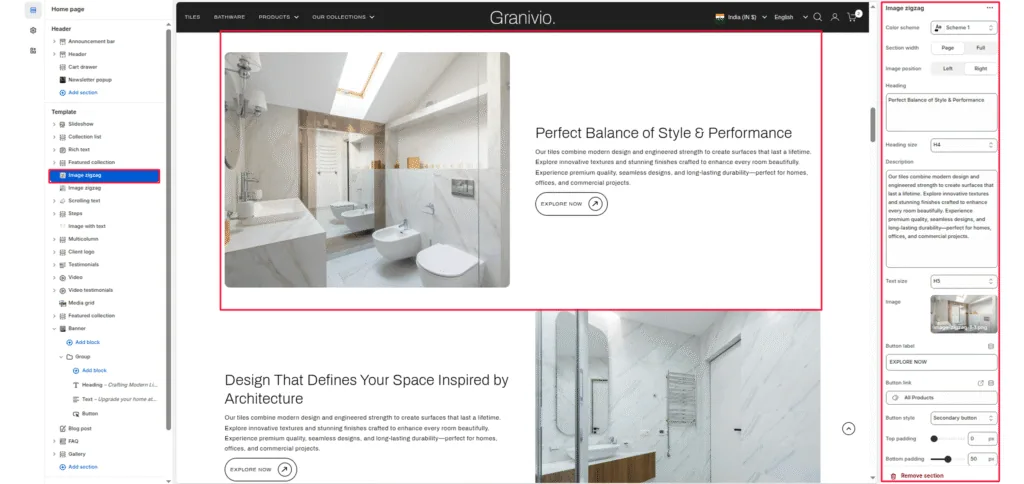
The Image Zigzag section is designed to showcase dual-column content with alternating text and images. It allows merchants to tell a story visually — pairing product imagery with descriptive text, headlines, and call-to-action buttons.
Color scheme
Choose the theme color palette for this section.
Section width
Choose how wide the section spans on the page:
- Page: Keeps the content aligned with the main page container.
- Full: Stretches the section across the full browser width.
Image
Upload an image of the section. This image is typically used to represent product quality or key visual content.
Heading
Add a heading to highlight the message related to the image.
Heading size
Select the size of the heading (e.g., H1, H2, H3, H4, H5, H6).
Description
Add descriptive text to explain more about the left-side image or content. Keep it concise and engaging.
Text size
Control the size of the left-side body text (e.g., H1, H2, H3, H4, H5, H6).
Button label
Enter the call-to-action text for the right-side button.
Button link
Choose the link destination for the button (e.g., All Products collection or a custom URL).
Top padding
Adjust the spacing above the section in pixels.
Bottom padding
Adjust the spacing below the section in pixels.
Was this article helpful?
Thanks for the feedback.
Still need help?
Can't find what you're looking for? Send us a message and we'll help you out.