

Gallery
On this page
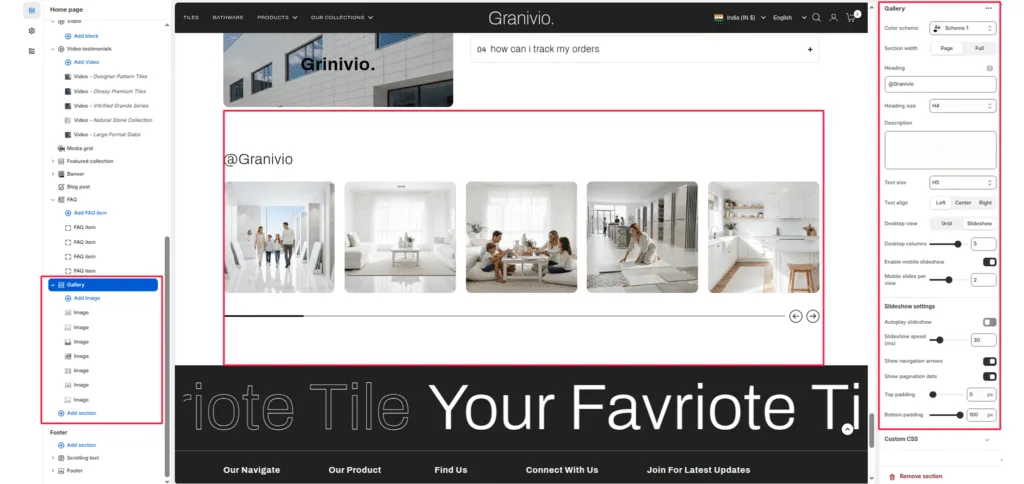
The gallery section is designed to showcase your brand’s social media presence directly on your store, helping to strengthen engagement and brand storytelling. This section displays a customizable grid or slider of images that mimic your Instagram posts, encouraging visitors to follow your brand and explore more content.
Section Settings
Color scheme
Select a predefined color palette to match your theme’s aesthetic.
Section Width
- Full: Stretches the section to the edges of the browser window.
- Page: Constrains the content to the theme’s maximum site width.
Heading
Add a section title (e.g.,@Granivio) to introduce your Instagram showcase.
Heading size
Choose the appropriate heading tag (H1-H6) to fit your design hierarchy.
Description
Optionally add a short text description to provide context or encourage visitors to follow your Instagram.
Text size
Control the font size for the description text.
Text align
Align your heading and description text to Left, Center, or Right.
Link
Add your Instagram page link so visitors can easily access your profile.
Button label
Define the button text (e.g., Instagram) displayed below the heading.
Layout settings
Desktop view
Choose between Grid or Slider layout for desktop devices.
Desktop columns
Set the number of columns to display on desktop (commonly 3-5).
Enable mobile slider
Toggle this option to activate a swipeable slider on mobile devices.
Mobile slides per view
Set how many images should be visible per slide on mobile.
Slider Settings
Enable desktop slider
Enable or disable the slider functionality on the desktop view.
Slider speed (ms)
Define the transition speed between slides (in milliseconds).
Show navigation
Display arrow controls for easy manual navigation.
Show pagination
Display small dots below the slider to indicate the current slide.
Top padding / Bottom padding
Adjust vertical spacing above and below the section for consistent layout spacing.
Blocks Settings
Each block represents an individual Instagram post image.
Image
- Upload or select an image to display within the feed.
- You can add multiple image blocks to create a visually rich gallery.
Was this article helpful?
Thanks for the feedback.
Still need help?
Can't find what you're looking for? Send us a message and we'll help you out.