

Highlight testimonial
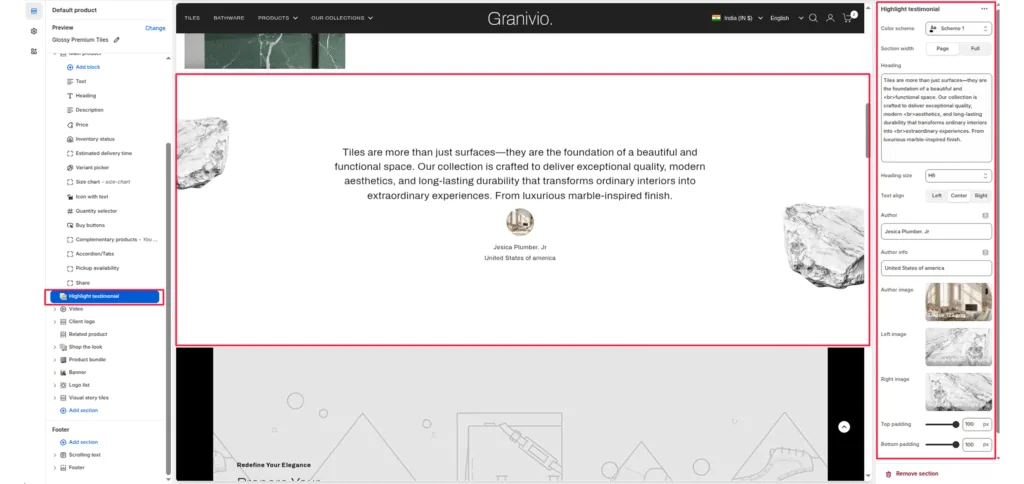
The Highlight testimonial section is designed to showcase premium customer feedback or impactful brand statements. It features a clean, centered typography layout accented by decorative floating images and detailed author attribution.
Color scheme
Select your preferred color palette for the background and text.
Section Width
- Page: Constrains the content to the theme’s maximum site width.
- Full: Stretches the section to the edges of the browser window.
Heading
Add the main promotional title. This typically appears next to the label.
Heading size
Adjust the scale of the heading from H1 to H6 to establish visual hierarchy.
Text Align
Set the alignment of the text and button to left, center, or right.
Author
Enter the name of the person being quoted (e.g., “Jessica Plumber, Jr.”).
Author info
Add secondary details like location or job title (e.g., “United States of America”).
Author image
Upload a small profile picture or avatar that appears above the author’s name.
Left image
Upload a decorative graphic (such as the “rock” element) to float on the left side of the text.
Right image
Upload a decorative graphic to float on the right side of the text to create a balanced, symmetrical look.
Top/Bottom Padding
Adjust the vertical spacing (in pixels) to give the section room to breathe.
Was this article helpful?
Thanks for the feedback.
Still need help?
Can't find what you're looking for? Send us a message and we'll help you out.