

Highlight text with image
On this page
The Highlight text with image section is ideal for “About Us” pages or brand journey narratives. It allows you to create a fluid paragraph of text where specific keywords or phrases are emphasized by small, circular supporting images.
Section Settings
Color scheme
Select your preferred color palette for the background and text.
Section Width
- Full: Stretches the section to the edges of the browser window.
- Page: Constrains the content to the theme’s maximum site width.
Top padding / Bottom padding
Adjust vertical spacing above and below the section for consistent layout spacing.
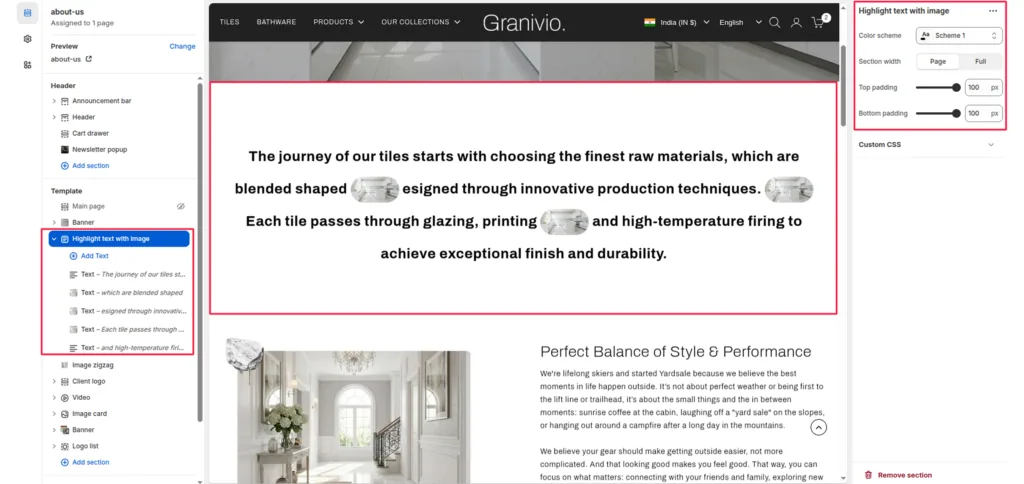
Blocks (Text)
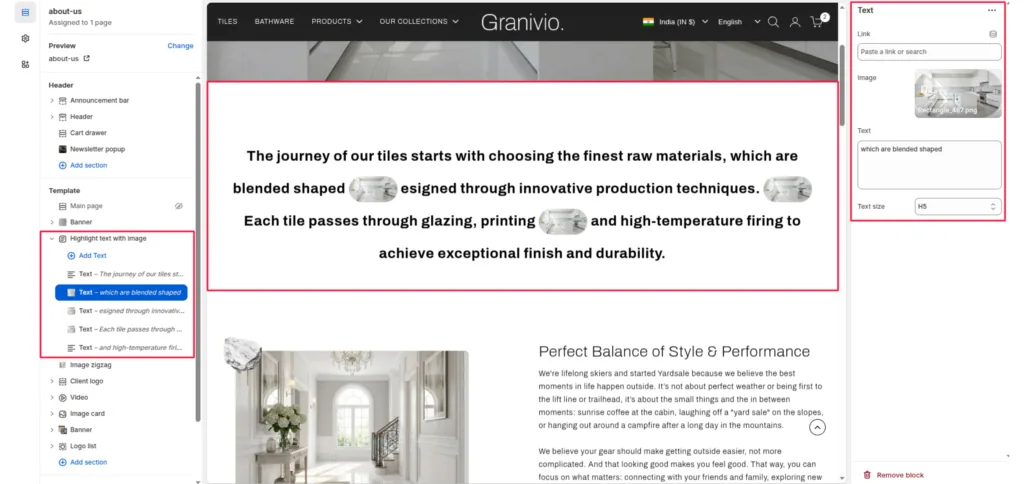
Each “Text” block represents a segment of the overall paragraph. To build a full story, you add multiple blocks that will flow together as one continuous paragraph.
Text
Enter the specific phrase or sentence for this segment of the story.
Image
Upload a small image that will appear at the end of this specific text segment.
- Note: These images are automatically styled as small, rounded thumbnails to sit inline with the text.
Link
Attach a URL to this specific segment of text to make it clickable.
Text size
Adjust the scale of the text (e.g., H5) to ensure it stands out or remains subtle.
Was this article helpful?
Thanks for the feedback.
Still need help?
Can't find what you're looking for? Send us a message and we'll help you out.