

Breadcrumbs
On this page
The Breadcrumbs navigation feature displays a clear hierarchical trail (e.g., Home > Fragrances > Pure Attars > Royal Amber 12ml) across your storefront. In an artisanal perfumery boutique with diverse olfactory families, flacon sizes, and bespoke editions, breadcrumbs orient clients, reduce bounce rates, and make catalog browsing effortless.
In Alembiq’s modular architecture, Breadcrumbs is provided in two flexible ways:
- As a Standalone Section: Place a dedicated full-width or page-width breadcrumb bar anywhere across your page templates.
- As a Modular Theme Block: Drag and drop a breadcrumb block directly into supported parent sections (such as headers, article templates, or custom content blocks).
Key Features
- SEO & Accessibility: Breadcrumbs are rendered with semantic navigation markup and ordered lists paired with SVG arrow separators. This assists screen readers and helps search engines generate rich snippet breadcrumbs in Google Search results.
- Homepage Auto-Suppression: Breadcrumbs automatically remain hidden on the storefront homepage to maintain clean, uninterrupted hero visuals.
- Active Page Accent: The current page item automatically highlights using your chosen color scheme’s highlight text accent.
1. Global Master Switch
Before configuring breadcrumbs in individual sections or blocks, ensure the feature is enabled sitewide:
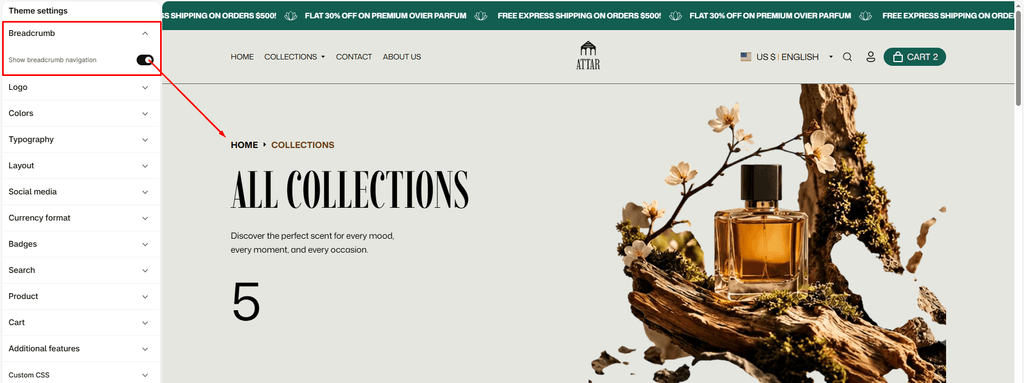
- In the Shopify Theme Editor, click the Theme settings icon (gear icon in the left toolbar).
- Open the Breadcrumb tab.
- Check Show breadcrumb navigation to activate breadcrumbs across your store.
- (Optional) Check border to separate the breadcrumb trail with an underline divider.
- Click Save.
Note: If this setting is unchecked, breadcrumbs are disabled sitewide, even if sections or blocks are placed on a page.
2. Breadcrumbs as a Standalone Section
You can add a dedicated Breadcrumbs section to any template (such as Collection pages, Product pages, or Blog templates):
- Navigate to the desired template in the Theme Editor.
- Click (+) Add section and select Breadcrumbs.
- Customize the section settings below:
| Setting Name | Type | Options / Range | Default | Description |
|---|---|---|---|---|
| Color scheme | Color Scheme Picker | Any configured color scheme | Scheme 1 | Controls the background and text color of the breadcrumb container. |
| Section width | Dropdown | Page width, Full width | Page width | Sets whether breadcrumbs align within the central container or stretch edge-to-edge. |
| Top padding | Slider | 0px to 100px (1px increments) | 0px | Adjusts vertical spacing above the breadcrumb bar. |
| Bottom padding | Slider | 0px to 100px (1px increments) | 0px | Adjusts vertical spacing below the breadcrumb bar. |
3. Breadcrumbs as a Theme Block
When editing sections that support modular theme blocks (such as the standalone Breadcrumbs section or custom container wrappers):
- In the left sidebar of the Theme Editor, click (+) Add block within the parent section.
- Select Breadcrumbs.
- Configuration: The Breadcrumbs block functions as a zero-configuration block—it automatically inherits typography, link styling, and colors from your global Theme Settings and the active section’s color scheme.
4. Dynamic Breadcrumb Trails by Page Type
Alembiq automatically computes the exact navigation path based on the page being viewed:
- Fragrance Product Page:
- If navigated from a collection: Home > [Collection Name] > [Fragrance Title]
- If navigated directly: Home > [Fragrance Title]
- Collection Page:
- Home > [Collection Name] (e.g., Home > Artisanal Pure Attars)
- Collections Catalog (
/collections):- Home > Collections
- Journal Article (Blog Post):
- Home > [Journal Name] > [Article Title] (e.g., Home > Perfumery Journal > The Art of Distilling Pure Oud)
- Blog Archive:
- Standard: Home > [Journal Name]
- With active tag filter: Home > [Journal Name] > [Active Tag]
- Standard Pages (About, Scent Guide, Shipping):
- Home > [Page Title]
- Search & Utility Pages:
- Home > [Page Title]
Best Practices
- Keep Enabled on Fragrance Detail Pages:
Fragrance collectors frequently explore between scent families (e.g., Fragrances > Woody & Smoky > Pure Cambodian Oud). Keeping breadcrumbs active makes it effortless for them to hop back to the collection level with a single click. - Match Color Schemes with Neighboring Sections:
If your collection banner or product gallery uses a specific color scheme, match the Breadcrumbs section to the same color scheme for a unified visual transition. - Maintain Clear Collection Hierarchies:
Ensure your navigation menus and collections reflect an intuitive structure so your breadcrumb trails remain concise and helpful.
Was this article helpful?
Thanks for the feedback.
Still need help?
Can't find what you're looking for? Send us a message and we'll help you out.