

Main 404
On this page
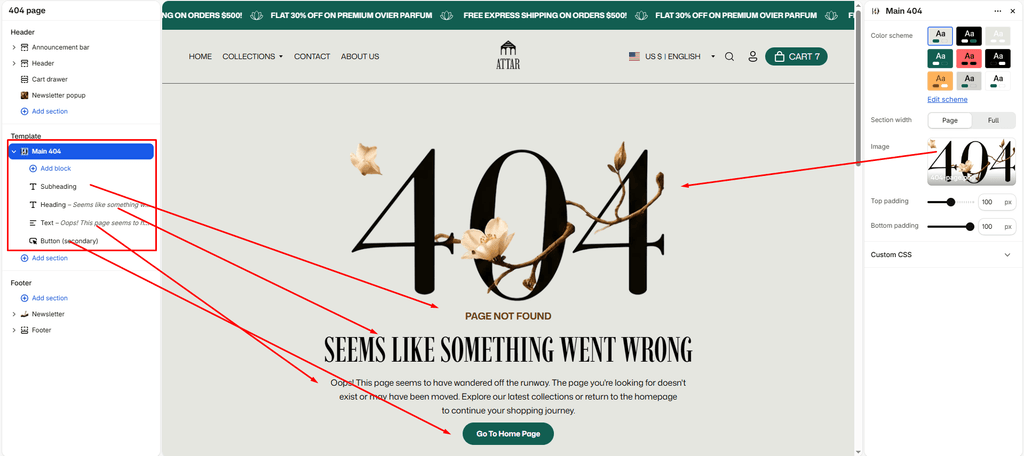
The Main 404 section controls the layout, imagery, and messaging on your store’s 404 Not Found Page (/404). When a visitor mistypes a URL or clicks a link to an archived fragrance edition, this page prevents bounce-offs by preserving your boutique’s luxury aesthetic and gracefully guiding clients back to active perfume collections.
Built using Shopify’s modern Theme Blocks architecture, Alembiq lets you customize editorial imagery, animated typography, explanatory copy, and call-to-action buttons.
How to Access 404 Page Settings
- From your Shopify Admin, navigate to Online Store > Themes.
- Click Customize next to the Alembiq theme.
- In the top template selector dropdown, select Others > 404 page.
- In the left sidebar, click the Main 404 section to configure section-level settings.
- Click (+) Add block beneath Main 404 to add or reorder headings, text, or button blocks.
- Click Save.
Section Settings
| Setting Name | Type | Options / Range | Default | Description |
|---|---|---|---|---|
| Color scheme | Color Scheme Picker | Any configured color scheme | Scheme 1 | Sets the background and typography color palette for the 404 error page. |
| Section width | Dropdown | Page width, Full width | Page width | Choose Page width for an elegant centered layout or Full width to stretch edge-to-edge. |
| Image | Image Picker | Image upload | Empty | Upload custom artwork to visually represent the missing page (e.g., an artisanal flacon illustration or minimalist brand visual). |
| Top padding | Slider | 0px to 200px (5px increments) | 25px | Controls vertical spacing above the section content. (Automatically scales down on mobile). |
| Bottom padding | Slider | 0px to 100px (1px increments) | 24px | Controls vertical spacing below the action buttons. (Automatically scales down on mobile). |
404 Artwork & Minimalist Fallback
- Custom Artwork: When an image is uploaded, Alembiq renders it responsively with full focal point support, keeping your brand imagery perfectly framed on desktop and mobile.
- Minimalist Typographic Fallback: If no image is uploaded, Alembiq automatically renders a bold, modern 404 heading styled according to your theme’s primary typography.
Content Blocks
You can add, reorder, or remove modular blocks beneath the 404 visual:
1. Subtitle Block
Displays a refined eyebrow tag above the main heading.
- Subheading: Text field for category or status context (e.g., “Page Not Found”).
- Subheading size: Select scale from H1 to H6 (Default: H2).
- Text alignment: Align text to Left, Center, or Right (Default: Left).
2. Heading Block
Displays a prominent headline explaining the page status.
- Heading: Multi-line text field (e.g., “Seems like something went wrong” or “A Scent Lost in Time”). Includes built-in cascade reveal animation.
- Heading size: Select scale from H1 to H6 (Default: H2).
- Text alignment: Align text to Left, Center, or Right (Default: Left).
3. Text Block
Provides polite, reassuring context to guide the visitor.
- Text: Multi-line message (e.g., “The fragrance edition or page you are seeking may have been renamed, archived, or temporarily moved. We invite you to explore our signature collections or return to the boutique homepage.”).
- Text size: Select typography scale from H1 to H6 (Default: H2).
- Text alignment: Align text to Left, Center, or Right (Default: Left).
- Text opacity: Slider from 0% to 100% (Default: 100%). Slightly lowering opacity softens body copy for an understated editorial feel.
4. Button Block
Provides a direct recovery link back to your primary storefront pages.
- Link: Destination URL (e.g., your homepage
/or fragrance catalog/collections/all). - Button label: Text for the button (e.g., “Return to Boutique” or “Explore All Fragrances”).
- Button style: Choose between Primary button (solid fill), Secondary button (outline), or Link button (text link with arrow icon).
- Text alignment: Position the button to Left, Center, or Right (Default: Left).
App Blocks
The Main 404 section supports Shopify App Blocks, allowing you to embed third-party tools such as:
- An instant AI fragrance recommendation or customer service chat widget.
- An automatic 404 tracking and redirect tool.
- A newsletter invitation offering a welcome gesture for the inconvenience.
Boutique Best Practices
- Add a Recommended Fragrances Section:
In the Theme Editor, click Add section directly below Main 404 on the 404 template. Add a Featured Collection (e.g., “Signature Attars” or “Best Sellers”) or a Recently Viewed Products section so stranded visitors immediately discover fragrances to explore. - Elevated Brand Voice:
Replace generic error language (“Error 404: Not Found”) with welcoming, brand-aligned copy reflecting your artisanal perfume house.
Was this article helpful?
Thanks for the feedback.
Still need help?
Can't find what you're looking for? Send us a message and we'll help you out.