

Newsletter
On this page
The Newsletter section in Alembiq is a high-conversion lead generation tool designed to grow your private client list. Tailored for luxury perfumeries, it allows you to invite fragrance lovers to join your inner circle for bespoke perfume launches, private reserves, artisanal distillation announcements, and exclusive seasonal offers.
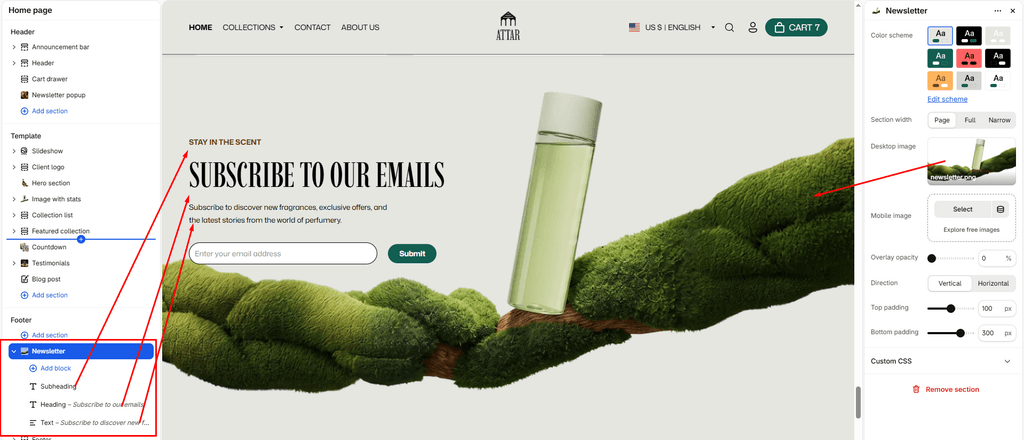
The section supports flexible container sizing, high-resolution desktop and mobile background imagery with adjustable dark overlays, customizable content directions (horizontal or vertical), and modular theme blocks for headings, subheadings, and narrative text.
Accessing the Newsletter Section Settings
- From your Shopify Admin, navigate to Online Store > Themes.
- Click Customize next to your active Alembiq theme.
- In the top dropdown template selector, choose Home page (or any other page template).
- In the left-hand sidebar, locate Newsletter (or click (+) Add section and select Newsletter).
- Click directly on Newsletter to configure section settings, and click (+) Add block under the section to insert or rearrange content blocks (such as Subheading, Heading, or Text).
1. Section Layout & Media Settings
Configure container width, background visuals, and content layout:
| Setting | Type | Default | Options / Range | Description |
|---|---|---|---|---|
| Color scheme | Color Scheme | Scheme 2 | Theme Schemes | Controls the section canvas background color and text contrast scheme. |
| Section width | Select | Page | Page, Full, Narrow | Choose between a standard centered container (Page), an edge-to-edge canvas (Full), or a compact reading container (Narrow). |
| Desktop image | Image Picker | Blank | Image upload | High-resolution background visual displayed on desktop viewports (e.g., botanical ingredients, perfume flacons, or extraction stills). |
| Mobile image | Image Picker | Blank | Image upload | Dedicated portrait visual optimized for mobile screens. If omitted, the desktop image scales responsively. |
| Overlay opacity | Range | 0% | 0% to 100% (5% steps) | Adds a semi-transparent dark tint over your background image to enhance text legibility and form contrast. |
| Direction | Select | Horizontal | Vertical, Horizontal | Sets the layout flow between your text content and the subscription form. Horizontal aligns text and form side by side; Vertical stacks them in a centered single column. |
2. Section Padding
Fine-tune vertical spacing to ensure seamless visual transitions between adjacent sections or above the footer:
| Setting | Type | Default | Options / Range | Description |
|---|---|---|---|---|
| Top padding | Range | 50 px | 0 px to 200 px (5 px steps) | Adjusts empty space above the section content. |
| Bottom padding | Range | 50 px | 0 px to 400 px (5 px steps) | Adjusts empty space below the section content. An expanded bottom padding (e.g., 200 px–300 px) creates an elegant reveal effect when positioned directly above your store footer. |
3. Modular Content Blocks
The Newsletter section uses modular theme blocks in its content column, allowing you to freely add, edit, and reorder text elements:
Subheading
- Subheading: Introductory eyebrow text placed above the main title (e.g., “STAY IN THE SCENT” or “JOIN THE PRIVATE CIRCLE”).
- Subheading size: Choose between H1 through H6 to set font scale and hierarchy.
Heading
- Heading: Primary invitation title (e.g., “SUBSCRIBE TO OUR EMAILS” or “UNLOCK PRIVATE ALEMBIQ VAULTS”).
- Heading size: Choose between H1 through H6 to adjust visual weight.
Text
- Text: Rich-text narrative paragraph explaining the benefits of subscribing (e.g., “Subscribe to discover new fragrances, exclusive offers, and the latest stories from the world of perfumery.”).
- Text size: Choose between H1 through H6 for body typography scaling.
App Blocks
- You can also embed third-party email marketing apps (such as Klaviyo or Omnisend) directly into the content column if your marketing stack requires custom forms.
4. Built-in Form Features
- Native Shopify Customer Sync: Automatically creates or updates customer profiles in your Shopify Admin and tags them with
prospectandnewsletterfor targeted email marketing. - Inline Email Validation: The pill-shaped email input field validates email addresses on submission with a subtle shake animation and clear warning alert if an invalid address is entered.
- Instant Success Confirmation: When submitted successfully, an inline confirmation message displays immediately without refreshing or redirecting the customer away from the page.
Best Practices
- Use Editorial Still-Life Imagery: A clean, atmospheric photograph featuring an alembiq flacon resting on botanical moss, sandalwood logs, or rose petals creates an immersive luxury backdrop.
- Ensure High Contrast with Overlay: If your background photo contains both bright and dark areas, set the Overlay opacity between 15% and 30% to guarantee your headline and form remain effortless to read.
- Incentivize Subscriptions: Use the Text block to offer a tangible reward for joining—such as a 10% welcome privilege on discovery sets or early access to small-batch distillation drops.
Was this article helpful?
Thanks for the feedback.
Still need help?
Can't find what you're looking for? Send us a message and we'll help you out.