

Slide
On this page
The Slide block represents an individual campaign slide within the Slideshow section in Alembiq. Rather than a static image with fixed text captions, each slide functions as a high-end editorial canvas powered by Shopify OS 2.0 nested blocks.
Each slide supports independent desktop and mobile media (both photography and video), signature architectural framing shapes (such as the Oriental Stepped Arch), background ambient imagery with overlay opacity, and drag-and-drop child blocks (including Subtitles, Headings, Descriptions, Countdowns, and Action Buttons).
How to Access Slide Block Settings
- In the Shopify Theme Editor, navigate to any page featuring a Slideshow section (e.g., your Homepage).
- In the left sidebar, expand the Slideshow section to view its individual slides.
- Click on a Slide block to configure its media, architectural shape, video, and background settings.
- Expand the Slide block in the sidebar to reorder, customize, or add nested child blocks inside it.
- Click Save.
1. Media Type & Architectural Framing
Alembiq allows you to frame your hero photography and video in bespoke architectural silhouettes inspired by luxury perfumery heritage:
| Setting Name | Type | Options | Default | Description |
|---|---|---|---|---|
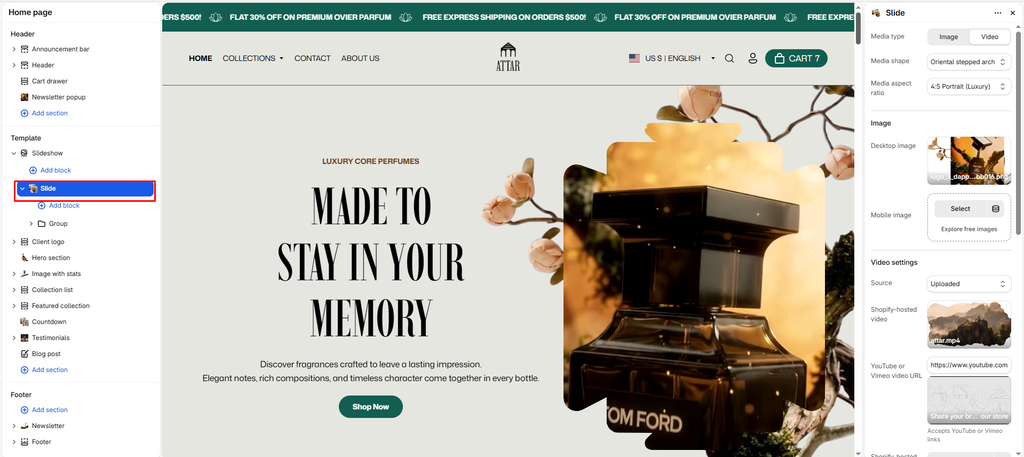
| Media type | Dropdown | Image, Video | Image | Chooses whether to display high-resolution photography or an ambient video loop. |
| Media shape | Dropdown | Default (Rectangle), Oriental stepped arch, Classic arch, Rounded pill | Oriental stepped arch | Applies an iconic architectural mask around your flacon imagery or video. |
| Media aspect ratio | Dropdown | Adapt / Auto, 16:9 Widescreen, 4:5 Portrait (Luxury), 1:1 Square, 4:3 Standard, 9:16 Vertical (Reel) | 4:5 Portrait (Luxury) | Controls the proportional dimensions of the media frame. |
The Oriental Stepped Arch:
Alembiq’s signature framing silhouette. This geometric stepped arch evokes traditional oriental perfumery alcoves, providing an instantly recognizable haute-parfumerie aesthetic.
2. Image Settings
| Setting Name | Type | Options / Range | Default | Description |
|---|---|---|---|---|
| Desktop image | Image Picker | Media Upload | Empty | High-resolution landscape photograph displayed on desktop screens (≥ 750px). |
| Mobile image | Image Picker | Media Upload | Empty | Dedicated portrait or square image displayed on mobile screens (< 750px). |
- Dedicated Mobile Framing: Uploading a dedicated vertical mobile image prevents flacons from being cropped awkwardly on smartphone displays.
- Focal Point Support: Alembiq respects Shopify’s media focal point settings, keeping the flacon cap or label centered across all screen sizes.
- Automatic LCP Performance: The first slide in your slideshow automatically loads with priority execution, ensuring ultra-fast Largest Contentful Paint (LCP) speeds.
3. Video Settings
When Media type is set to Video, you can feature cinematic perfume distillation reels or flacon campaign films:
| Setting Name | Type | Options / Range | Default | Description |
|---|---|---|---|---|
| Video source | Dropdown | Uploaded video, Video URL | Uploaded video | Choose between an MP4 uploaded directly to Shopify or a YouTube / Vimeo link. |
| Video | Video Picker | Shopify Video (.mp4) | Empty | Desktop video file. |
| Video URL | Video URL | YouTube / Vimeo | Default URL | External video URL. |
| Mobile video | Video Picker | Shopify Video (.mp4) | Empty | Vertical video optimized for mobile displays. |
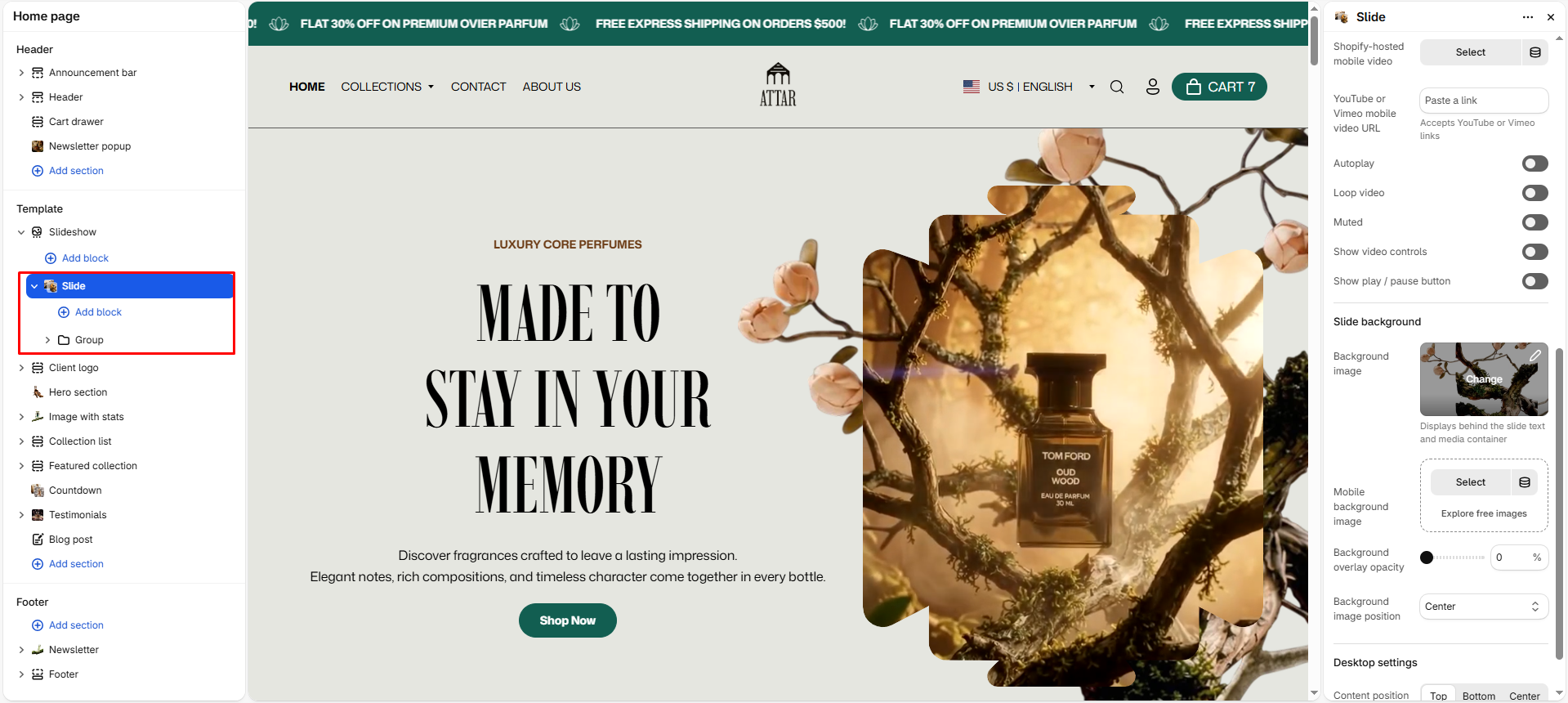
| Autoplay | Checkbox | Checked / Unchecked | Checked | Automatically plays the video on slide entry. |
| Loop | Checkbox | Checked / Unchecked | Checked | Continuously loops video playback. |
| Muted | Checkbox | Checked / Unchecked | Checked | Mutes audio to allow uninterrupted autoplay across modern browsers. |
| Show video controls | Checkbox | Checked / Unchecked | Unchecked | Shows native browser play/pause and progress controls. |
| Show play / pause button | Checkbox | Checked / Unchecked | Checked | Displays an elegant, custom play/pause button overlay. |
4. Slide Background & Atmospheric Overlay
Layer atmospheric textures or ambient distillery imagery behind the main slide content:
| Setting Name | Type | Options / Range | Default | Description |
|---|---|---|---|---|
| Background image | Image Picker | Media Upload | Empty | Background image displayed behind the central text and media container. |
| Mobile background image | Image Picker | Media Upload | Empty | Dedicated background image for mobile viewports. |
| Background overlay opacity | Slider | 0% to 100% (5% increments) | 0% | Adds a darkened gradient tint over the background to ensure high contrast for text. |
| Background image position | Dropdown | Center, Top center, Bottom center, Left center, Right center | Center | Controls the alignment of the background image. |
5. Desktop Content Position
| Setting Name | Type | Options | Default | Description |
|---|---|---|---|---|
| Content position | Dropdown | Left, Center, Right | Center | Controls the horizontal placement of the text and button lockup on desktop displays. |
6. Nested Child Blocks
Because the Slide block is an open container, you can drag and drop child blocks inside it to build custom launch announcements:
- Group: Bundles child blocks together in a clean vertical or horizontal layout.
- Subtitle: Refined category kickers (e.g., “PRIVATE HARVEST 2024”).
- Heading: Prominent serifs with cascade scroll reveal (e.g., “ROYAL CAMBODIAN OUD”).
- Text: Olfactory notes or distillation background with opacity controls.
- Button: Conversion buttons with smooth hover transitions (e.g., “Explore Collection”).
- Countdown: Live ticking timer for private reserve drops.
Best Practices
- Highlight Flacons with the Oriental Stepped Arch:
Set Media shape to Oriental stepped arch and Media aspect ratio to 4:5 Portrait (Luxury). This architectural silhouette creates an immediate impression of bespoke oriental craftsmanship. - Always Provide a Dedicated Mobile Image:
Upload a 4:5 vertical crop in the Mobile image field. This ensures your crystal flacon commands the full mobile screen without shrinking into an undersized letterbox. - Use Ambient Video for Distillation Storytelling:
Set Media type to Video and upload a short, muted 5–10 second looping reel of natural botanicals, incense smoke, or gold flacon hand-filling for captivating visual storytelling.
Was this article helpful?
Thanks for the feedback.
Still need help?
Can't find what you're looking for? Send us a message and we'll help you out.