

Main Cart
On this page
- How to Access Main Cart Settings
- 1. Layout & Styling Settings
- 2. In-Cart Promotion Banner Block
- 3. Built-in Conversion Features
- Free Shipping Progress Bar
- In-Cart Discount Code Entry
- Order Notes & Gift Messages
- Automated Cart Summary
- 4. Fragrance Cart Table & Line Items
- 5. App Blocks
- 6. Empty Cart Experience
- Pro Tips for Stores
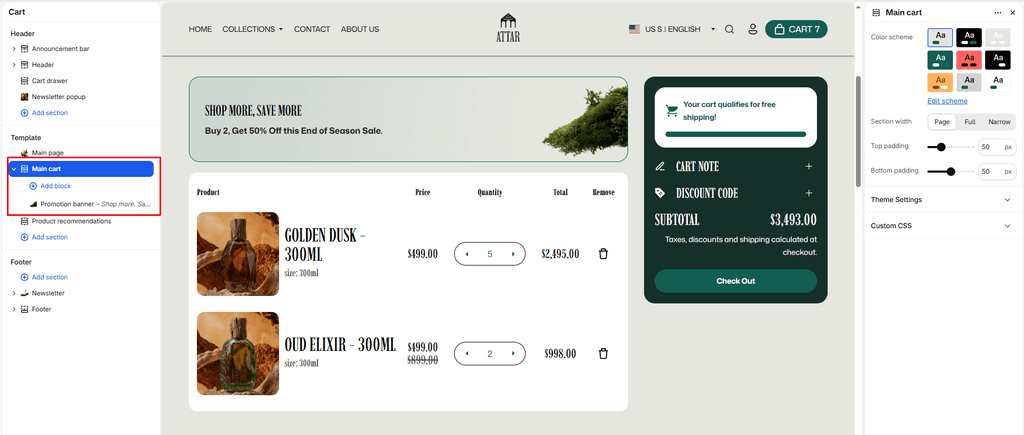
The Main Cart section controls the dedicated Cart Page (/cart) of your store. It provides customers with a transparent, friction-free breakdown of their selected perfumes, bottle sizes, fragrance concentrations, subtotal savings, and express checkout options.
Equipped with conversion-focused tools — such as real-time stock cap validation, an in-cart promo code box, a free shipping progress bar, and an in-cart promotional banner — this page helps reduce cart abandonment and converts tentative shoppers into confirmed buyers.
How to Access Main Cart Settings
- From your Shopify Admin, navigate to Online Store > Themes.
- Click Customize on the Alembiq theme.
- In the top template selector dropdown, select Cart (or navigate to
/cartin the live preview). - In the left sidebar, click on Main cart to configure section settings, or click Add block to add a promotion banner or app block.
- Click Save.
1. Layout & Styling Settings
| Setting Name | Type | Options / Range | Default | Description |
|---|---|---|---|---|
| Color scheme | Color Scheme Picker | Any configured color scheme | Scheme 1 | Controls the background and typography color palette across the entire cart page. |
| Section width | Dropdown | Narrow width, Page width, Full width | Narrow width | Controls the horizontal span of the cart table and order summary sidebar. |
| Top padding | Slider / Range | 0px – 200px (Step: 5px) | 0px | Sets top spacing above the cart container. |
| Bottom padding | Slider / Range | 0px – 100px (Step: 1px) | 0px | Sets bottom spacing below the checkout area. |
2. In-Cart Promotion Banner Block
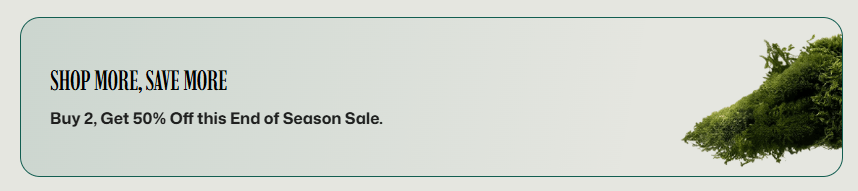
Alembiq includes a built-in Promotion Banner block that can be placed directly above the cart table. This is an exceptional conversion booster for limited batch announcements, coupon codes, or sample tier incentives.
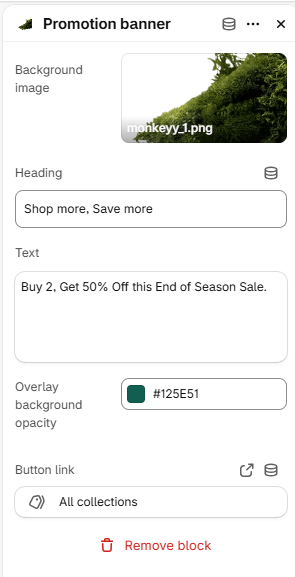
- Limit: Maximum 1 promotion banner per cart page.
- Background image: Upload an editorial lifestyle banner or product visual (e.g., discovery set packaging, travel atomizers).
- Title: Main promo title (default: “Special Offer”).
- Text: Subheading or promotional details (default: “Complete your fragrance collection.”).
- Background color: Custom color picker to control overlay and border accents.
- Banner link: Make the entire banner clickable to direct shoppers to a featured collection or sample discovery page.
3. Built-in Conversion Features
The cart page integrates seamless conversion features that dynamically sync with your global Theme Settings:
Free Shipping Progress Bar
- Displays a visual progress bar tracking how close the customer is to unlocking free delivery (e.g., “Spend $35.00 more and get free shipping!”).
- Once the threshold is crossed, the progress bar reaches 100% and displays your congratulatory message.
- Configured globally in Theme settings > Cart.
In-Cart Discount Code Entry
- Shoppers can apply promotional coupons directly on the cart page without waiting for the final Shopify checkout screen.
- Features real-time validation with instant success messages and immediate total recalculation.
Order Notes & Gift Messages
- A clean, collapsible field that allows buyers to leave special instructions for fulfillment (e.g., “Please package as a gift”, “Include gift card note”).
Automated Cart Summary
- Clearly itemizes subtotal, applied line-level discounts, and estimated taxes.
- Checkout Button: High-contrast primary call-to-action button.
- Express Checkout: Automatically displays accelerated checkout buttons (Shop Pay, Apple Pay, Google Pay, PayPal) when available.
4. Fragrance Cart Table & Line Items
The cart table displays all essential product details so customers can confirm their order before committing:
- Bottle Imagery: High-resolution thumbnail linked directly back to the perfume product page.
- Product Title & Brand: Clear fragrance naming with brand vendor display.
- Variant Options: Clearly lists individual bottle attributes such as Volume (
6ml,12ml,50ml,100ml) or Concentration (Pure Perfume Oil,Extrait de Parfum). - Line-Level Savings: Displays original vs. sale pricing tags with highlighted savings when discounts are applied.
- Real-Time Inventory Cap: Quantity selectors respect live stock levels. If a customer reaches the maximum available bottles of a limited batch, the plus button safely disables to prevent overselling.
- One-Click Item Removal: Accessible remove button to delete an item and update totals via AJAX.
5. App Blocks
Alembiq supports Shopify’s Theme App Extensions. You can integrate third-party apps directly into your Cart Page layout without editing code:
- Delivery Date Pickers: Let customers select preferred delivery dates for gift orders.
- Package Protection: One-click shipping insurance checkboxes.
- Custom Gift Wrapping: Offer luxury gift boxing or wax-sealed personalized notes.
6. Empty Cart Experience
If a visitor arrives at /cart with no items, Alembiq displays a clean, minimalist empty state:
- Displays a friendly “Your cart is empty” message.
- Provides a prominent Continue Shopping button that directs shoppers straight to your primary perfume catalog.
Pro Tips for Stores
- Use the Banner for Discovery Sets: Feature a banner promoting your 2ml discovery sampler pack with a message like: “Add a Discovery Set before checkout and find your next signature scent.”
- Set Section Width to “Narrow width”: On desktop screens, a narrow width keeps the bottle photo, size, quantity, and checkout summary within a comfortable reading eye-line.
- Calibrate Free Shipping Threshold: Set your free shipping threshold slightly above your average order value (AOV) so customers buying a single bottle are motivated to add a pocket Alembiq or travel spray to hit the free shipping goal.
Was this article helpful?
Thanks for the feedback.
Still need help?
Can't find what you're looking for? Send us a message and we'll help you out.