

Countdown
On this page
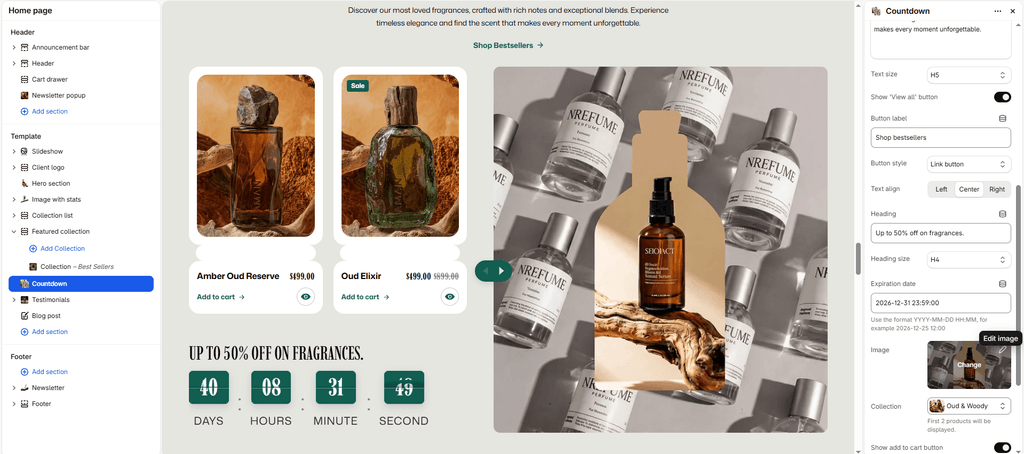
The Countdown section in Alembiq is an urgency and private-reserve merchandising showcase. Tailored for limited-batch harvest releases, rare agarwood distillations, and holiday reserve allocations, this section pairs an attention-grabbing live countdown clock directly with an interactive product carousel.
The section features an integrated split-screen layout: a promotional header with ticking countdown digits (Days, Hours, Minutes, Seconds) leading into a side-by-side display featuring your campaign photography on the left and a swipeable fragrance collection slider on the right.
How to Access Countdown Section Settings
- From your Shopify Admin, navigate to Online Store > Themes.
- Click Customize next to the active Alembiq theme.
- In the top template selector dropdown, select Home page (or any custom landing page).
- In the left sidebar, click (+) Add section and select Countdown (or click on Countdown if already present).
- Configure your expiration date, upload your campaign visual, and select the featured fragrance collection.
- Click Save.
1. Section Header & Timer Settings
| Setting Name | Type | Options / Range | Default | Description |
|---|---|---|---|---|
| Color scheme | Color Scheme Picker | Any configured color scheme | Scheme 2 | Controls the master section background canvas and header text contrast. |
| Section width | Dropdown | Page width, Full width | Page width | Choose between a centered container (Page width) or an edge-to-edge layout (Full width). |
| Subheading | Text | Any text | Subheading | Eyebrow kicker tag displayed above the main heading. |
| Subheading size | Dropdown | H1 to H6 | H2 | Typographic scale of the subheading. |
| Heading | Multiline Textarea | Any text | Empty | Primary release title (e.g., “PRIVATE HARVEST ALLOCATION” or “LIMITED OUD RELEASE”). |
| Heading size | Dropdown | H1 to H6 | H4 | Typographic scale of the main headline. |
| Description | Multiline Textarea | Any text | Empty | Supporting narrative explaining the harvest vintage or allocation terms. |
| Text size | Dropdown | H1 to H6 | H5 | Typographic scale of the description text. |
| Countdown heading | Text | Any text | New arrivals are here. | Subtitle displayed beside the ticking digits. |
| Countdown heading size | Dropdown | H1 to H6 | H4 | Typographic scale of the timer subtitle. |
| Expiration date | Text | Format: YYYY-MM-DD HH:MM:SS | 2026-12-31 23:59:00 | Target expiration timestamp. The clock automatically calculates remaining time and animates downward in real time. |
2. Campaign Media & Shoppable Product Carousel
| Setting Name | Type | Options / Range | Default | Description |
|---|---|---|---|---|
| Image | Image Picker | Media Upload | Empty | Hero campaign photograph anchored on the left side. Includes floating navigation pill buttons that control the adjacent carousel. |
| Collection | Collection Picker | Any store collection | Empty | Selects the fragrance collection to display in the swipeable product carousel. |
| Show add to cart button | Checkbox | Checked / Unchecked | Checked | Displays direct Add to Cart buttons on all product cards in the carousel. |
| Show ‘View all’ button | Checkbox | Checked / Unchecked | Checked | Displays a button linking to the full collection catalog. |
| Button label | Text | Any text | Button label | Call-to-action text for the collection link button. |
| Button style | Dropdown | Primary button, Secondary button, Link button | Primary button | Sets button aesthetic (solid primary, bordered secondary, or link with arrow). |
| Text alignment | Dropdown | Left, Center, Right | Left | Controls horizontal alignment of header text and button. |
3. Section Spacing
| Setting Name | Type | Options / Range | Default | Description |
|---|---|---|---|---|
| Top padding | Slider | 0px to 200px (5px increments) | 80px | Vertical breathing room above the countdown section. |
| Bottom padding | Slider | 0px to 100px (1px increments) | 80px | Vertical breathing room below the countdown section. |
Best Practices
- Strict Timestamp Formatting:
Always enter your target date in the standard 24-hour format:YYYY-MM-DD HH:MM:SS(e.g.,2026-11-28 18:00:00for 6:00 PM on November 28, 2026). - Anchor Flacon Imagery on the Left:
Use the Image slot for an artisanal portrait of your featured flacon or a raw botanical harvest still-life. The floating navigation arrows anchored over this image encourage clients to explore the adjacent product slider. - Keep “Show Add to Cart” Enabled:
During private harvest releases, purchase intent is exceptionally high. Keeping Show add to cart button enabled allows clients to add fragrances to their bag directly from the homepage carousel without extra clicks.
Was this article helpful?
Thanks for the feedback.
Still need help?
Can't find what you're looking for? Send us a message and we'll help you out.