

FAQ
On this page
The FAQ (Frequently Asked Questions) section in Alembiq is an essential pre-purchase reassurance tool designed to build customer confidence and resolve buyer hesitation before checkout. In luxury artisanal perfumery, shoppers often have questions regarding perfume oil concentrations, pure oud aging, application methods, discovery set sampling, international fragrance shipping, and return policies on unsealed flacons.
The section features an interactive accordion system with an optional split-column layout paired with campaign photography, customizable multi-column grids, elegant two-digit numerical indices, and independent or exclusive accordion expand controls.
Accessing the FAQ Section Settings
- From your Shopify Admin, navigate to Online Store > Themes.
- Click Customize next to your active Alembiq theme.
- In the top dropdown template selector, choose Pages > FAQ (or add this section to your Home page, Product pages, or Shipping information page).
- In the left-hand sidebar, click (+) Add section and select FAQ.
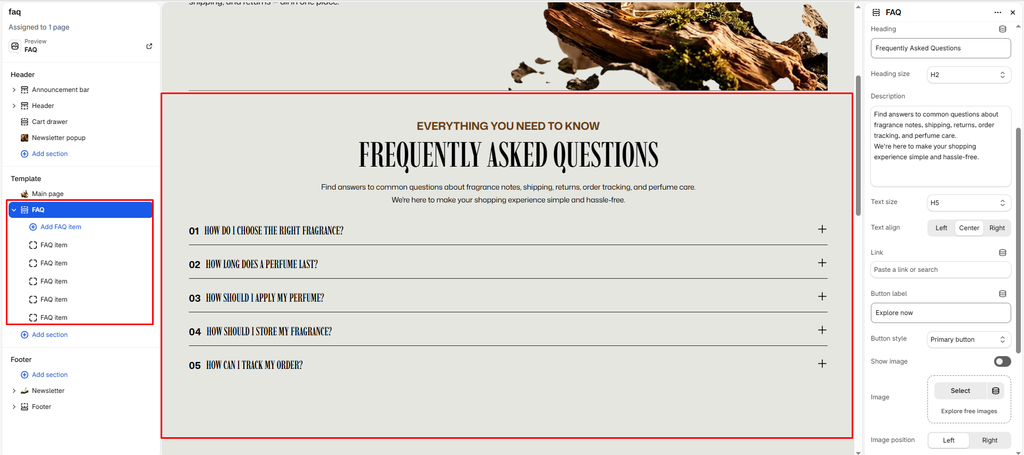
- Click directly on FAQ to configure layout and behavior, and click (+) Add block under the section to insert individual FAQ item blocks.
1. Section Header & Typography Settings
Configure container width, background colors, and header messaging:
| Setting | Type | Default | Options / Range | Description |
|---|---|---|---|---|
| Color scheme | Color Scheme | Scheme 1 | Theme Schemes | Controls the section background canvas color and text contrast scheme. |
| Section width | Select | Page width | Page width, Full width, Narrow width | Choose between a standard container (Page width), an edge-to-edge canvas (Full width), or a centered compact column (Narrow width). |
| Subheading | Text | Subheading | Text string | Small category or kicker label placed above the title (e.g., “CUSTOMER CONCIERGE” or “OLFACTORY GUIDELINES”). |
| Subheading size | Select | H2 | H1 to H6 | Sets the typographic scale of the subheading. |
| Heading | Text | Frequently Asked Questions | Text string | Primary headline displayed above the accordion (e.g., “FRAGRANCE & ORDER FAQ” or “CARE & INGREDIENT ADVICE”). |
| Heading size | Select | H4 | H1 to H6 | Controls heading hierarchy and visual prominence. |
| Description | Textarea | Blank | Multi-line text | Optional introductory text explaining customer support hours or fragrance advice turnaround times. |
| Text size | Select | H5 | H1 to H6 | Sets font size scale for the descriptive paragraph. |
| Text alignment | Select | Left | Left, Center, Right | Sets horizontal alignment for the heading, subheading, and description copy. |
2. Editorial Split Image & Action Button Settings
Pair your FAQ accordion with high-resolution imagery and a direct concierge call-to-action:
| Setting | Type | Default | Options / Range | Description |
|---|---|---|---|---|
| Show image | Checkbox | Enabled | Checked / Unchecked | Toggles the split layout. When enabled, your FAQ questions appear alongside an editorial photograph. When disabled, questions span the full container. |
| Image | Image Picker | Blank | Image upload | Editorial visual displayed in the split column (e.g., an artisanal perfume flacon, botanical still, or distillation scene). |
| Image position | Select | Left | Left, Right | Controls image placement: Left places the photograph on the left and questions on the right; Right places questions on the left and the photo on the right. |
| Button label | Text | Blank | Text string | Action button text placed inside the header (e.g., “Contact Atelier” or “Explore Discovery Sets”). |
| Button link | URL | Blank | Store page or external link | Destination URL when the action button is clicked. |
| Button style | Select | Primary button | Primary button, Secondary button, Button link | Controls button aesthetics: solid fill (Primary button), outlined pill (Secondary button), or minimalist underline link (Button link). |
3. Accordion Structure & Display Behavior
Customize column counts, numbered counters, and expansion modes:
| Setting | Type | Default | Options / Range | Description |
|---|---|---|---|---|
| Columns | Range | 1 | 1 to 3 (step: 1) | Determines how many columns the accordion spans across when Show image is disabled. 2 or 3 columns are ideal for dedicated FAQ resource pages. |
| Show numbers | Checkbox | Disabled | Checked / Unchecked | Prefixes each question with an elegant two-digit counter (e.g., “01”, “02”, “03”), creating a structured editorial lookbook feel. |
| Allow multiple open | Checkbox | Disabled | Checked / Unchecked | When unchecked, expanding an item automatically collapses any other open question. When checked, shoppers can expand and read multiple answers simultaneously. |
4. Section Spacing
Adjust vertical spacing to maintain balanced proportions on desktop and mobile screens:
| Setting | Type | Default | Options / Range | Description |
|---|---|---|---|---|
| Top padding | Range | 35 px | 0 px to 200 px (5 px steps) | Vertical padding above the FAQ container on desktop monitors. |
| Bottom padding | Range | 36 px | 0 px to 100 px (1 px steps) | Vertical padding below the FAQ container on desktop monitors. |
5. FAQ Item Blocks
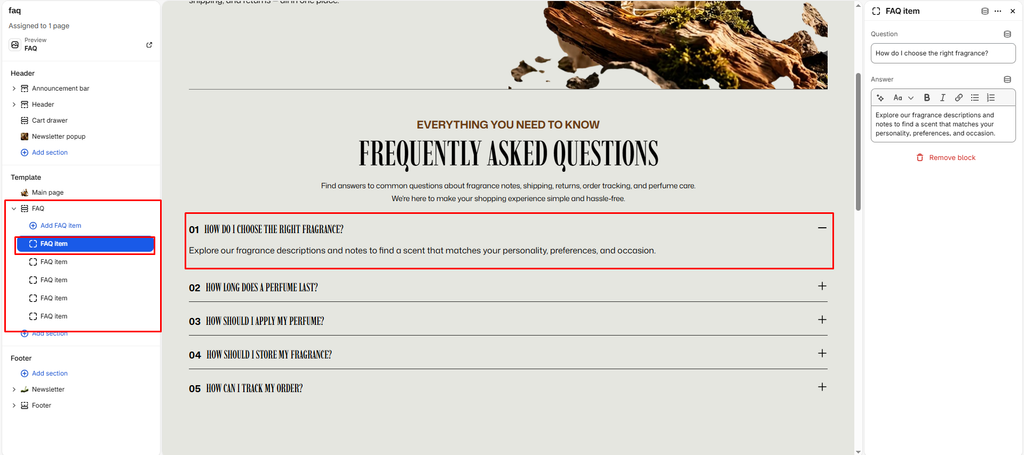
Click (+) Add block to add individual question and answer pairs:
| Setting | Type | Default | Options / Range | Description |
|---|---|---|---|---|
| Question | Text | Add a frequently asked question… | Text string | The question title displayed on the clickable accordion bar (e.g., “What is the difference between an artisanal attar and an Eau de Parfum?”). |
| Answer | Rich Text | Provide a clear and concise answer… | Rich text editor | Formatted answer supporting bold text, bullet points, and links to scent discovery sets, care guides, or return policies. |
Best Practices
- Address Top Scent Concerns Upfront: Organize your first 3 to 4 questions around common fragrance considerations—such as oil concentration, skin longevity and sillage, pulse point application tips, and temperature storage recommendations.
- Use Split Imagery on Home & Product Pages: When featuring FAQs on your homepage or product templates, keep Show image enabled with 1 column. Pairing a striking perfume flacon shot with 4 concise questions keeps the page visually engaging without overwhelming shoppers with text.
- Enable Multi-Column Grids for Dedicated FAQ Pages: On a dedicated
/pages/faqcustomer service template, uncheck Show image and set Columns to 2 or 3. This organizes extensive question libraries across neat vertical rows for quick scanning. - Enable Numbers for an Atelier Editorial Vibe: Checking Show numbers adds refined “01”, “02”, “03” indexes before each question, harmonizing seamlessly with the theme’s editorial aesthetic.
Was this article helpful?
Thanks for the feedback.
Still need help?
Can't find what you're looking for? Send us a message and we'll help you out.