

Multicolumn
On this page
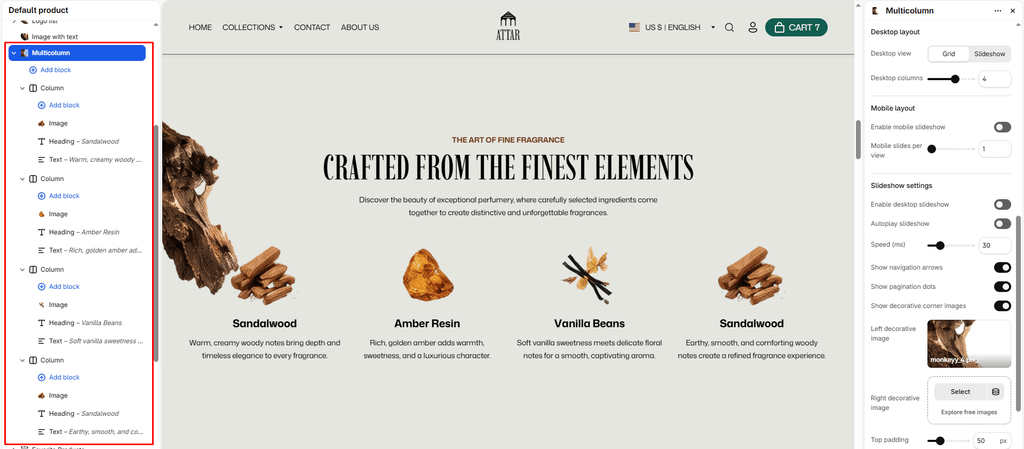
The Multicolumn section in Alembiq is one of the most versatile layout tools in your theme. Whether you wish to educate clients on your multi-stage artisanal hydro-distillation process, communicate core brand pillars (such as 100% pure botanical oils, zero alcohol carriers, and climate-controlled shipping), or showcase physical boutique tasting salons, the Multicolumn section presents complex information in an organized, digestible format.
Merchants enjoy complete control over multi-device layouts—effortlessly switching between a structured desktop Grid (1 to 6 columns) and an interactive Touch Slideshow with progress navigation. Furthermore, each column utilizes nested block architecture, allowing you to combine custom images, headings, descriptive paragraphs, and action buttons.
How to Access Multicolumn Settings
- From your Shopify Admin, navigate to Online Store > Themes.
- Click Customize next to the active Alembiq theme.
- In the top template selector dropdown, select Home page (or any other page template).
- In the left sidebar, click (+) Add section and select Multicolumn.
- Click (+) Add block under the section to add individual Column blocks. Within each column, configure or nest child blocks (Image, Title, Text, Button).
- Click Save.
1. Section Header & Typography Settings
| Setting Name | Type | Options / Range | Default | Description |
|---|---|---|---|---|
| Color scheme | Color Scheme Picker | Any configured color scheme | Scheme 1 | Controls the master background fill and text contrast colors for the section. |
| Section width | Dropdown | Page width, Full width | Page width | Choose between a centered container (Page width) or an edge-to-edge layout (Full width). |
| Subheading | Text | Any text | Subheading | Eyebrow kicker tag displayed above the main heading. |
| Subheading size | Dropdown | H1 to H6 | H2 | Typographic scale of the subheading. |
| Heading | Multiline Textarea | Any text | Section heading | Main headline displayed above the columns (e.g., “THE ARTISANAL DISTILLATION PROCESS”). |
| Heading size | Dropdown | H1 to H6 | H4 | Typographic scale of the main headline. |
| Text alignment | Dropdown | Left, Center, Right | Left | Sets horizontal alignment for the section header text and description. |
| Text | Multiline Textarea | Any text | Empty | Optional narrative paragraph positioned beneath the main headline. |
| Text size | Dropdown | H1 to H6 | H5 | Typographic scale of the description text. |
2. Desktop & Mobile Layout Controls
| Setting Name | Type | Options / Range | Default | Description |
|---|---|---|---|---|
| Desktop view | Dropdown | Grid, Slideshow | Grid | Select Grid for a static multi-column layout, or Slideshow for an interactive horizontal carousel. |
| Desktop columns | Slider | 1 to 6 | 3 | Determines how many columns appear side-by-side on desktop monitors (3 or 4 columns are ideal for features and brand pillars). |
| Mobile slideshow for grid | Checkbox | Checked / Unchecked | Checked | When desktop view is set to Grid, automatically converts mobile screens into a swipeable carousel to prevent lengthy vertical scrolling. |
| Mobile slides per view | Slider | 1 to 3 | 1 | Controls how many column cards are visible at once on mobile viewports. |
3. Slideshow Automation & Navigation Controls
These settings apply when slideshow mode is active:
| Setting Name | Type | Options / Range | Default | Description |
|---|---|---|---|---|
| Enable desktop slideshow | Checkbox | Checked / Unchecked | Unchecked | Activates slideshow carousel mechanics on desktop screens. |
| Autoplay slideshow | Checkbox | Checked / Unchecked | Unchecked | Automatically advances columns continuously without requiring manual user touch. |
| Slideshow speed | Slider | 10 to 100 | 30 | Adjusts slide transition delay (lower values transition faster; higher values keep cards on screen longer). |
| Show navigation arrows | Checkbox | Checked / Unchecked | Checked | Displays circular previous and next navigation arrow buttons. |
| Show pagination | Checkbox | Checked / Unchecked | Checked | Displays progress indicator dots showing active slide position. |
4. Decorative Background Imagery
| Setting Name | Type | Options / Range | Default | Description |
|---|---|---|---|---|
| Show decorative images | Checkbox | Checked / Unchecked | Checked | Toggles subtle ambient illustrations flanking the multicolumn container. |
| Left image | Image Picker | Media Upload | Empty | Left ambient illustration (e.g., botanical branch or oriental motif). |
| Right image | Image Picker | Media Upload | Empty | Right ambient illustration. |
5. Content Blocks: Column Architecture
Each column card within the section operates as a container that houses modular child blocks:
- Image: Top visual element (e.g., close-up botanical photo, flacon silhouette, or purity seal).
- Title (Heading): Feature title (e.g., “100% Pure Distillation”, “Hand-Cut Crystal Flacons”, “Climate-Controlled Shipping”).
- Text: Detailed explanation of the botanical extraction, formulation, or bespoke boutique service.
- Button: Direct action button linking to a dedicated storytelling page or fragrance collection.
6. Section Spacing
| Setting Name | Type | Options / Range | Default | Description |
|---|---|---|---|---|
| Top padding | Slider | 0px to 200px (5px increments) | 0px | Vertical breathing room above the multicolumn section. |
| Bottom padding | Slider | 0px to 100px (1px increments) | 24px | Vertical breathing room below the multicolumn section. |
Best Practices
- Highlight Core Brand Purity Pillars:
Configure Desktop columns to 3 to establish three reassurance pillars:- Column 1: Pure Natural Oils (Hydro-distilled without synthetic carriers or alcohol).
- Column 2: Artisanal Crystal Flacons (Hand-poured into luxury crystal with gold-tipped applicators).
- Column 3: Climate-Protected Dispatch (Shipped in thermal-protective packaging to safeguard delicate scent notes).
- Educate on Application Rituals:
Use four columns to demonstrate the authentic art of wearing pure attars (1. Warm between wrists, 2. Tap pulse points, 3. Allow body heat to bloom the base notes, 4. Store away from direct sunlight). - Keep Mobile Slideshow Enabled:
Always keep Mobile slideshow for grid checked. When clients browse on mobile phones, swipeable horizontal cards provide a much smoother user experience than scrolling past numerous vertical cards.
Was this article helpful?
Thanks for the feedback.
Still need help?
Can't find what you're looking for? Send us a message and we'll help you out.