

Testimonials
On this page
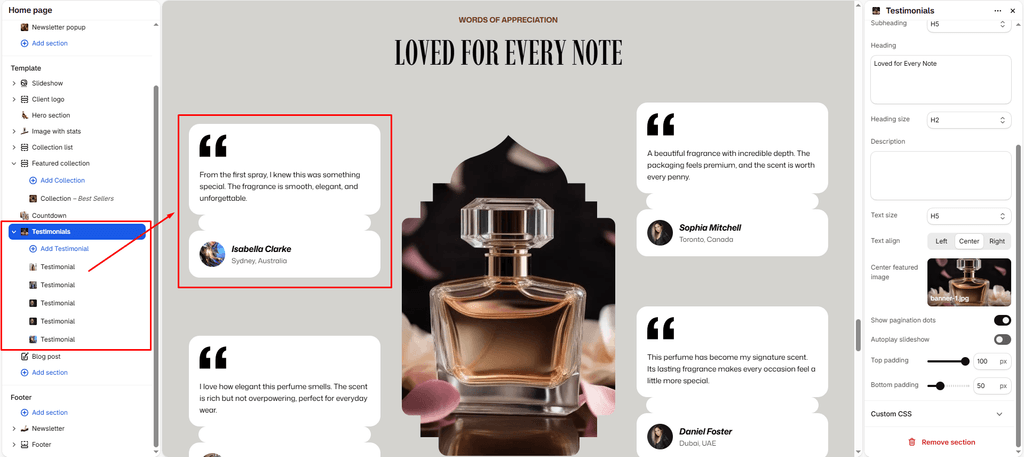
The Testimonials section in Alembiq is an editorial social proof showcase designed to build immense trust with discerning fragrance collectors. Rather than generic review boxes, this section combines verified client reviews, star ratings, and quotation marks with shoppable mini product cards linked directly to the praised fragrance.
At the heart of the section sits a centerpiece visual framed in Alembiq’s signature Oriental Stepped Arch Mask, uniting client feedback with the visual majesty of your artisanal flacons.
How to Access Testimonials Settings
- From your Shopify Admin, navigate to Online Store > Themes.
- Click Customize next to the active Alembiq theme.
- In the top template selector dropdown, select Home page (or any other page template).
- In the left sidebar, click (+) Add section and select Testimonials.
- Configure the header, center arch imagery, and carousel options, then click (+) Add block to add individual Testimonial cards.
- Click Save.
1. Header & Typography Settings
| Setting Name | Type | Options / Range | Default | Description |
|---|---|---|---|---|
| Color scheme | Color Scheme Picker | Any configured color scheme | Scheme 1 | Controls the master background fill and typography color palette. |
| Section width | Dropdown | Page width, Full width | Page width | Sets whether the section is constrained to standard margins (Page width) or spans edge-to-edge (Full width). |
| Subheading | Text | Any text | Luxury core perfumes | Eyebrow kicker tag displayed above the main heading. |
| Subheading size | Dropdown | H1 to H6 | H6 | Typographic scale of the subheading. |
| Heading | Multiline Textarea | Any text | Honest words, meaningful impressions. | Main section headline displayed above the reviews. |
| Heading size | Dropdown | H1 to H6 | H2 | Typographic scale of the main headline. |
| Description | Multiline Textarea | Any text | Empty | Optional supporting narrative or introduction. |
| Text size | Dropdown | H1 to H6 | H5 | Typographic scale of the description text. |
| Text alignment | Dropdown | Left, Center, Right | Center | Horizontal alignment of the header text elements. |
2. Center Architectural Arch Feature
| Setting Name | Type | Options / Range | Default | Description |
|---|---|---|---|---|
| Center image | Image Picker | Media Upload | Empty | Visual displayed at the center of the editorial layout, automatically masked with Alembiq’s iconic geometric oriental arch. |
- Oriental Stepped Arch Mask: Alembiq automatically masks the center image using a geometric oriental stepped arch silhouette, framing your flacon or distillation still in an authentic oriental aesthetic.
- Focal Point Support: Captures Shopify’s media focal point settings to keep key bottle details centered within the arch.
3. Carousel & Slide Controls
| Setting Name | Type | Options / Range | Default | Description |
|---|---|---|---|---|
| Show pagination | Checkbox | Checked / Unchecked | Unchecked | Displays pagination progress dots beneath the review track. |
| Autoplay slideshow | Checkbox | Checked / Unchecked | Unchecked | Automatically cycles through client reviews continuously without manual swiping. |
4. Testimonial Content Blocks
Each client review is added as an individual Testimonial block:
| Setting Name | Type | Options / Range | Default | Description |
|---|---|---|---|---|
| Author name | Text | Any text | Author name | Name of the client or fragrance critic (e.g., “Sophia Al-Mansoor”). |
| Author info | Text | Any text | Author info | Customer title, location, or verified status (e.g., “Verified Collector, Dubai”). |
| Image | Image Picker | Media Upload | Empty | Client profile photo or reviewer avatar. |
| Testimonial title | Text | Any text | Testimonial title | Review headline or excerpt (e.g., “An intoxicating blend of Taif rose and aged oud with 14-hour longevity.”). |
| Icon | Dropdown | None, Quote, 5-stars, 4-stars, 3-stars, 2-stars, 1-star | 5-stars | Displays visual rating stars or an elegant quotation mark above the review. |
| Product | Product Picker | Any store product | Empty | Attaches an interactive shoppable mini card featuring the reviewed fragrance’s photo, title, vendor, and live price. |
Shoppable Review Cards: Selecting a product in the Product field automatically displays a direct product card inside the review. Clients can click the card to navigate straight to that perfume’s purchase page.
5. Section Spacing
| Setting Name | Type | Options / Range | Default | Description |
|---|---|---|---|---|
| Top padding | Slider | 0px to 100px (1px increments) | 80px | Vertical breathing room above the section header. |
| Bottom padding | Slider | 0px to 200px (5px increments) | 80px | Vertical breathing room below the testimonial carousel. |
Best Practices
- Attach the Praised Perfume to Every Review:
Always select the relevant fragrance in the block’s Product setting. When clients read about an enticing olfactory experience, the linked mini card lets them view its price and jump straight to purchasing with zero friction. - Feature High-Impact Longevity Quotes:
In the Testimonial title field, highlight specific sensory details valued by perfume enthusiasts (e.g., projection, longevity, evolution of base notes, or flacon weight). - Showcase a Signature Flacon in the Center Arch:
Upload a high-resolution, dark-backdrop photograph of your premier flacon into the Center image setting. The oriental arch silhouette transforms the center of the reviews section into a luxury centerpiece.
Was this article helpful?
Thanks for the feedback.
Still need help?
Can't find what you're looking for? Send us a message and we'll help you out.