

Subheading
On this page
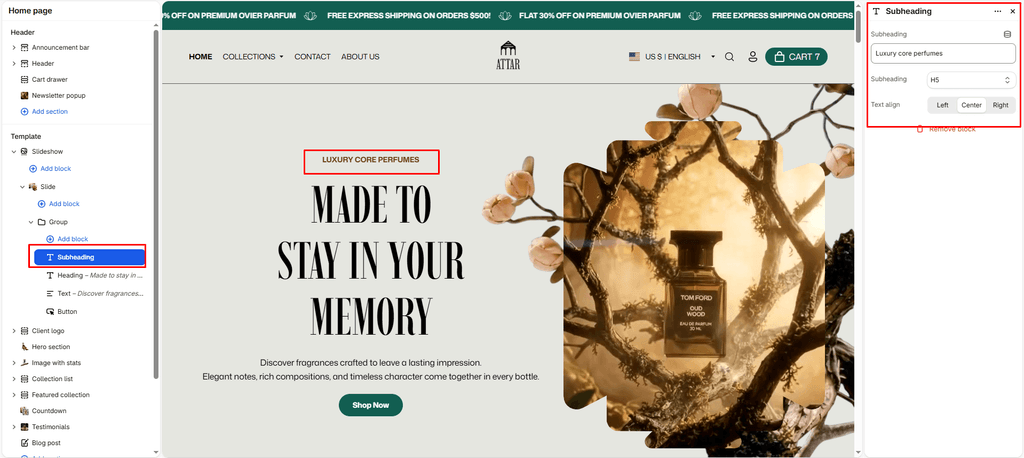
The Subheading block (identified as Subtitle in the block selector) is an elegant typographic element used to provide editorial context, scent category branding, or exclusivity notices.
In a luxury perfume boutique, the Subheading is commonly placed directly above a primary Heading block as an “eyebrow kicker” (e.g., “PRIVATE RESERVE DISTILLATION” or “LIMITED HARVEST 2024”) or directly beneath a title to highlight the geographic origin or extraction technique of a rare alembiq.
Built on Shopify’s modular Theme Blocks architecture, you can drag and drop this block anywhere within compatible sections (such as Slideshow, Banner, Video, Main 404, Main Password, or within Group and Column containers) and position it freely relative to other blocks.
How to Access Subheading Block Settings
- In the Shopify Theme Editor, navigate to any page template containing a compatible section.
- In the left sidebar, click on the parent section or container block (e.g., Banner, Slideshow, or Group).
- Click (+) Add block and select Subtitle (or click on an existing Subheading block).
- Customize your text, typography scale, and alignment in the right-hand panel.
- Click Save.
Block Settings
| Setting Name | Type | Options / Range | Default | Description |
|---|---|---|---|---|
| Subheading | Text | Any text | Subheading | The text to display as a category tag, subtitle, or eyebrow kicker. |
| Subheading size | Dropdown | H1, H2, H3, H4, H5, H6 | H2 | Sets the typographic scale of the subheading. |
| Text alignment | Dropdown | Left, Center, Right | Left | Controls horizontal alignment (Left, Center, or Right). |
Setting Guidance
1. Typographic Scale Hierarchy
Alembiq allows you to fine-tune the size of the subheading from H1 down to H6:
- H4, H5, or H6 (Recommended for Eyebrow Tags): Ideal when placed directly above a prominent serif Heading. A smaller, uppercase subtitle creates an understated luxury contrast against large titles.
- H2 or H3 (Recommended for Prominent Sub-Headers): Best suited when the subtitle serves as an independent intro banner or secondary section headline.
2. Horizontal Alignment
- Left (Default): Traditional luxury magazine layout. Best paired with left-aligned Headings and primary action buttons.
- Center: Classic choice for centered hero banners, countdown drop announcements, newsletter cards, and 404 or password pages.
- Right: Creates an asymmetric, high-fashion layout for boutique lookbooks and feature showcases.
Styling & Inheritance
- Color Contrast: The Subheading automatically adopts the text color defined by the parent section’s active Color scheme, ensuring legible, balanced contrast across both light ivory and dark obsidian backgrounds.
- Spacing: Includes built-in bottom spacing to ensure natural vertical separation between the subtitle and neighboring elements.
Best Practices
- Use Uppercase for Prestige Eyebrow Tags:
Format your text in all caps with spaced lettering (e.g., “ARTISANAL PURE OUD” or “BESPOKE FLACON COLLECTION”) to give product drops an authentic haute-parfumerie aesthetic. - Harmonize Alignment Across Blocks:
When grouping a Subheading, a Heading, and a Button block in the same section, ensure their text alignment settings match (e.g., all set to Center or all set to Left) for visual harmony. - Pair with Serif Headlines for Maximum Contrast:
Placing a concise, clean Subheading above a grand serif Heading (Imbue) creates a striking, balanced visual hierarchy.
Was this article helpful?
Thanks for the feedback.
Still need help?
Can't find what you're looking for? Send us a message and we'll help you out.