

Map
On this page
The Map block is a modular theme block in Alembiq designed for perfume houses and fragrance ateliers with physical retail spaces. It allows merchants to seamlessly embed interactive Google Maps, boutique directions, and showroom locations directly into any block-enabled section or custom layout (such as Contact pages, About pages, or dedicated Store Locator templates).
How to Access and Add the Map Block
- In your Shopify Admin, navigate to Online Store > Themes.
- Click Customize next to the active Alembiq theme.
- Open the page template where you want to display your boutique location (e.g., Pages > Contact).
- Inside a block-enabled section (such as a Custom section, Column block, or Group container), click (+) Add block and select Map.
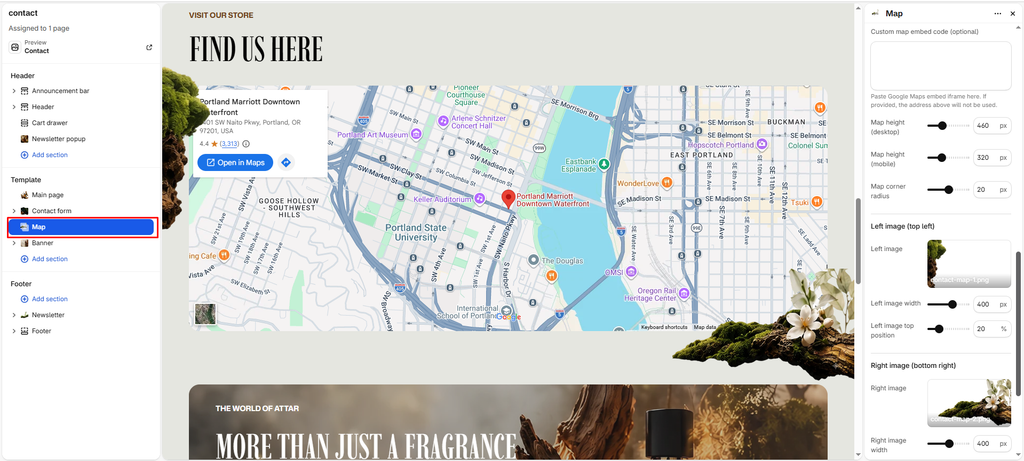
- Configure your embed code and height settings in the right-hand panel.
- Click Save.
Block Settings
| Setting Name | Type | Options / Range | Default | Description |
|---|---|---|---|---|
| Map embed code | Textarea | Raw HTML iframe snippet | None | Paste the full HTML embed snippet generated from Google Maps (or OpenStreetMap). |
| Map height | Slider | 200px to 800px (20px increments) | 400px | Sets the exact pixel height of the map frame. The embedded map automatically scales to fill 100% of this container. |
How to Obtain Your Google Maps Embed Code
Follow these quick steps to get your boutique’s exact map embed snippet:
- Open Google Maps in your desktop browser and search for your boutique address or business name.
- Click the Share button in the business information panel.
- In the popup window that appears, select the Embed a map tab.
- (Optional) Select your preferred preview size (Medium or Custom size).
- Click Copy HTML.
- Return to your Shopify Theme Editor, click on the Map block, and paste the snippet directly into the Map embed code field.
Best Practices
- Pair with Consultation Hours & Atelier Details:
In a two-column section, place the Map block on one side and an informational card on the other side detailing boutique opening hours, private fragrance consultation bookings, and nearest transit options. - Harmonize Layout Heights:
When placing the map side-by-side with a contact form or address card, adjust the Map height slider (typically between 400px and 500px) so both columns align evenly across their bottom borders. - Complementary Map Styling:
When generating your map embed, consider applying a muted or dark-mode color style to seamlessly complement Alembiq’s warm sand and obsidian color schemes.
Was this article helpful?
Thanks for the feedback.
Still need help?
Can't find what you're looking for? Send us a message and we'll help you out.