

Main Password
On this page
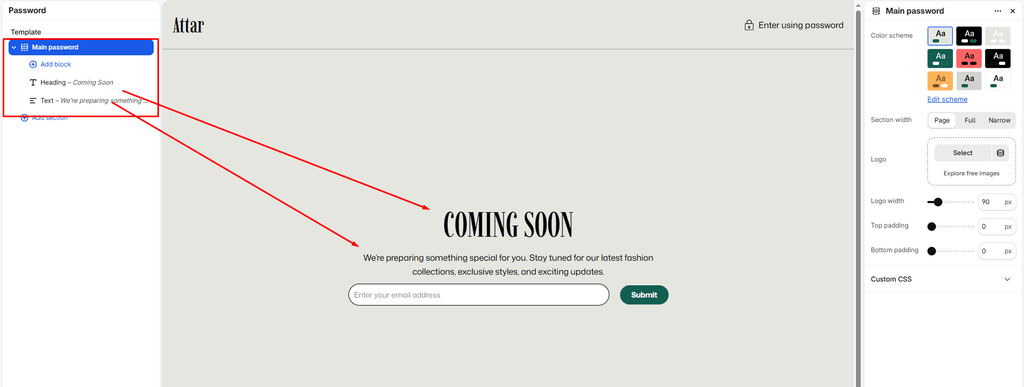
The Main Password section controls the layout and visitor experience on your store’s Password Protection Page (/password). In luxury perfumery, this page is an essential tool for creating anticipation before an official boutique opening, teasing limited harvest distillations (such as rare aged ouds or seasonal floral attars), hosting private pre-launch events, and collecting client email addresses.
Alembiq equips the password page with a dedicated brand header, a discreet password login popup modal, Shopify Theme Blocks support (including headings, descriptive text, and live countdowns), and a built-in email newsletter subscription form.
How to Access Password Page Settings
- From your Shopify Admin, navigate to Online Store > Themes.
- Click Customize next to the Alembiq theme.
- In the top template selector dropdown, switch to Others > Password.
- In the left sidebar, click the Main password section to configure layout, branding, and spacing.
- Click (+) Add block beneath Main password to add custom text, headings, or countdown blocks.
- Click Save.
Note on Enabling Password Protection:
You can activate or deactivate password protection anytime in your Shopify Admin under Online Store > Preferences > Restrict store access.
Layout & Appearance Settings
| Setting Name | Type | Options / Range | Default | Description |
|---|---|---|---|---|
| Color scheme | Color Scheme Picker | Any configured color scheme | Scheme 1 | Sets the background and typography color palette across the entire password page. |
| Section width | Dropdown | Page width, Full width, Narrow width | Page width | Sets the width of the central content column. |
| Top padding | Slider | 0px to 200px (5px increments) | 0px | Adjusts vertical spacing above the password content. |
| Bottom padding | Slider | 0px to 100px (1px increments) | 0px | Adjusts vertical spacing below the newsletter form. |
Logo & Branding Settings
| Setting Name | Type | Options / Range | Default | Description |
|---|---|---|---|---|
| Logo | Image Picker | Image upload | Empty | Upload a dedicated logo image for your password page. If left blank, Alembiq displays your store name in your brand’s primary typography. |
| Logo max width | Slider | 50px to 300px (5px increments) | 140px | Precisely controls the display width of your brand emblem to maintain sharp proportion on all screens. |
Storefront Password Login Modal
In the upper-right corner of the password page, Alembiq includes an Enter using password button:
- Popup Modal: Clicking the button triggers an overlay where private clients, boutique partners, or staff can enter the storefront password to access the store.
- Form Validation: Features secure password entry with instant error feedback if an incorrect password is entered.
- Admin Access: Includes a convenient direct link to your Shopify Admin login for store administrators.
Content Customization with Theme Blocks
You can place and arrange modular content blocks between your brand logo and the email capture form:
1. Heading Block
- Heading: Multi-line announcement text (e.g., “The Reserve Opens Soon” or “A New Chapter in Artisanal Perfumery”). Includes smooth scroll cascade reveal animation.
- Heading size: Choose typography scale from H1 to H6 (Default: H2).
- Text alignment: Align text to Left, Center, or Right (Default: Left).
2. Text Block
- Text: Teaser message providing context (e.g., “We are carefully bottling our latest small-batch distillations and rare perfume oils. Subscribe below to receive private access before the public release.”).
- Text size: Choose typography scale from H1 to H6 (Default: H2).
- Text alignment: Align text to Left, Center, or Right (Default: Left).
- Text opacity: Slider from 0% to 100% (Default: 100%) to soften text tone.
3. Countdown Block
- Add a live ticking countdown clock set to the exact date and hour your boutique or fragrance release goes live, creating immediate anticipation and excitement.
4. App Blocks
- Seamlessly insert third-party Shopify apps, such as SMS marketing widgets, customer concierge tools, or early-access loyalty giveaways.
Built-in Email Capture Form
Directly below your content blocks, Alembiq automatically renders a responsive Newsletter Signup Form:
- Client Lead Generation: Captures customer email addresses directly into your Shopify Customers database under the Accepts Marketing filter.
- Automated Confirmation: Displays an instant, elegant success message once the visitor submits their email.
Shopify Admin Custom Message
If you add a custom note in your Shopify Admin > Online Store > Preferences > Password protection > Message to your visitors, Alembiq automatically renders it in a dedicated banner above your content blocks.
Best Practices
- Pair with a Countdown Timer:
Adding a Countdown block beneath your heading gives clients a clear target date for when rare bottles or the storefront will unlock. - Offer Private Reserve Early Access:
Entice fragrance collectors to subscribe by offering early access (e.g., “Join our Private Client List for 24-hour priority allocation on limited alembiq editions”). - Use Narrow Width with Centered Alignment:
For a clean, artisanal look, set Section width to Narrow width and align headings and text to Center to keep the visitor’s attention focused on your message and subscription form.
Was this article helpful?
Thanks for the feedback.
Still need help?
Can't find what you're looking for? Send us a message and we'll help you out.