

Countdown
On this page
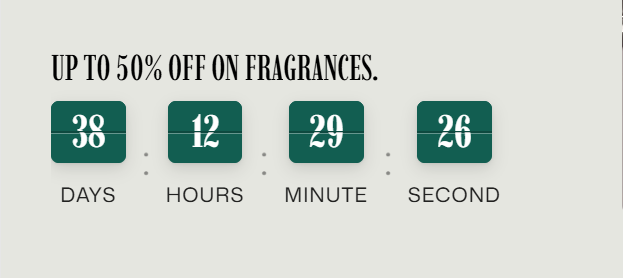
The Countdown feature is an essential urgency engine for luxury fragrance houses. By displaying a real-time ticking clock (Days, Hours, Minutes, Seconds), it creates immediate anticipation for seasonal Alembiq harvests, limited private reserve allocations, holiday offerings, and rare vintage agarwood releases.
In Alembiq, Countdown is available in two powerful implementations:
- The Modular Countdown Block: A flexible theme block that can be inserted into product pages, hero banners, slideshows, or container groups.
- The Standalone Countdown Section: A high-impact promotional section combining a live countdown timer with a split-screen editorial visual and a shoppable fragrance carousel.
1. The Modular Countdown Block
Use the Countdown block to embed a live ticking timer inside existing page sections—such as above the Add to Cart button on single product pages, inside a hero banner, or within a slideshow slide.
Where to Add It
- Product Detail Pages: Pinned near price or buy buttons to emphasize scarcity on limited-edition flacons.
- Hero Banners & Slideshows: Ticking down to an upcoming boutique launch or private reserve release.
- Group Containers: Paired alongside Headings, Subtitles, and Action Buttons.
Block Settings
| Setting Name | Type | Options / Range | Default | Description |
|---|---|---|---|---|
| Expiration date | Text | Format: YYYY-MM-DD HH:MM | 2026-12-25 12:00 | The exact target date and time when the countdown reaches zero. |
| Text size | Dropdown | H1, H2, H3, H4, H5, H6 | H2 | Sets the typography scale of the numbers and unit labels. |
| Expiration behavior | Dropdown | Leave, Hide | Leave | Determines what happens once the timer expires. |
| Background color | Color Picker | Custom Color | Optional | Applies an optional solid background color behind the timer container. |
| Countdown text color | Color Picker | Custom Color | Optional | Sets a specific custom color for the timer numbers and colons. |
Expiration Behaviors Explained
- Leave (Default): When the clock reaches zero, the timer remains visible on the page frozen at
00:00:00:00. Ideal for release events that are currently active. - Hide: The countdown block automatically disappears from the page the second the clock expires, seamlessly removing promotional urgency copy.
2. The Standalone Countdown Section
The standalone Countdown section is a full-width promotional showcase designed for high-traffic pages (such as your Homepage or Seasonal Landing Pages).
It combines a brand heading, an interactive countdown timer, a campaign lifestyle photograph, and an interactive product slider where clients can purchase directly from the grid.
Section Settings
| Setting Name | Type | Options / Range | Default | Description |
|---|---|---|---|---|
| Color scheme | Color Scheme Picker | Any configured color scheme | Scheme 2 | Controls the outer background and text palette of the section. |
| Section width | Dropdown | Page width, Full width | Page width | Sets whether the section is constrained to standard margins or spans edge-to-edge. |
| Subheading | Text | Any text | Subheading | Eyebrow kicker tag above the main promotional headline. |
| Subheading size | Dropdown | H1 to H6 | H2 | Typographic scale of the subheading. |
| Heading | Multiline Textarea | Any text | Empty | Primary promotional headline displayed above the section. |
| Heading size | Dropdown | H1 to H6 | H4 | Typographic scale of the main headline. |
| Description | Multiline Textarea | Any text | Empty | Supporting descriptive narrative explaining the release or allocation. |
| Text size | Dropdown | H1 to H6 | H5 | Typographic scale of the description text. |
| Show ‘View all’ button | Checkbox | Checked / Unchecked | Checked | Toggles a button linking directly to the featured collection. |
| Button label | Text | Any text | Button label | Text for the collection link button. |
| Button style | Dropdown | Primary button, Secondary button, Link button | Primary button | Visual styling of the button. |
| Text alignment | Dropdown | Left, Center, Right | Left | Controls horizontal alignment of headings, text, and button. |
| Countdown heading | Text | Any text | “New arrivals are here.” | Headline displayed directly beside the ticking timer digits. |
| Countdown heading size | Dropdown | H1 to H6 | H4 | Typographic scale of the timer headline. |
| Expiration date | Text | Format: YYYY-MM-DD HH:MM:SS | 2026-12-31 23:59:00 | Target deadline date and time for the promotion. |
| Image | Image Picker | Image upload | Empty | Editorial campaign image or distillation photography shown alongside the carousel. |
| Collection | Collection Picker | Any store collection | Empty | Selects the fragrance collection displayed in the swipeable carousel. |
| Show add to cart button | Checkbox | Checked / Unchecked | Checked | Displays direct Add to Cart buttons on all product cards in the slider. |
| Top padding | Slider | 0px to 200px (5px increments) | 80px | Vertical spacing above the section. |
| Bottom padding | Slider | 0px to 100px (1px increments) | 80px | Vertical spacing below the section. |
Interactive Split-Grid Layout
- Editorial Column: Displays your high-resolution bottle or botanical photography paired with navigation arrows for the product slider.
- Shoppable Carousel: Displays products from your chosen collection. Clients can inspect flacons, review prices, and add fragrances directly to their cart.
- Placeholder Mode: If no collection is selected, Alembiq renders placeholder cards so your layout remains visually balanced during design setup.
3. Date & Time Formatting Rules
To ensure your countdown timer calculates accurately across all global time zones:
- Use standard 24-hour notation:
YYYY-MM-DD HH:MM(e.g.,2026-11-28 18:00for 6:00 PM on November 28, 2026). - For the standalone section requiring seconds:
YYYY-MM-DD HH:MM:SS(e.g.,2026-11-28 18:00:00). - The timer automatically calculates the remaining time relative to the visitor’s local system clock.
Best Practices
- Pin Above Buy Buttons on Small-Batch Distillations:
On rare harvest releases or limited pure Alembiq runs, place the Countdown block directly above the purchase buttons on single product pages. This communicates scarcity and encourages prompt acquisition before stock concludes. - Set Expiration Behavior to “Hide” for Flash Allocations:
When hosting a 48-hour seasonal promotion, set Expiration behavior to Hide. The timer will vanish the moment the period ends, keeping your storefront tidy. - Keep Quick Add Enabled in the Carousel:
Enabling Show add to cart button in the Countdown section allows clients to select flacon sizes and purchase immediately from your homepage without navigation friction.
Was this article helpful?
Thanks for the feedback.
Still need help?
Can't find what you're looking for? Send us a message and we'll help you out.