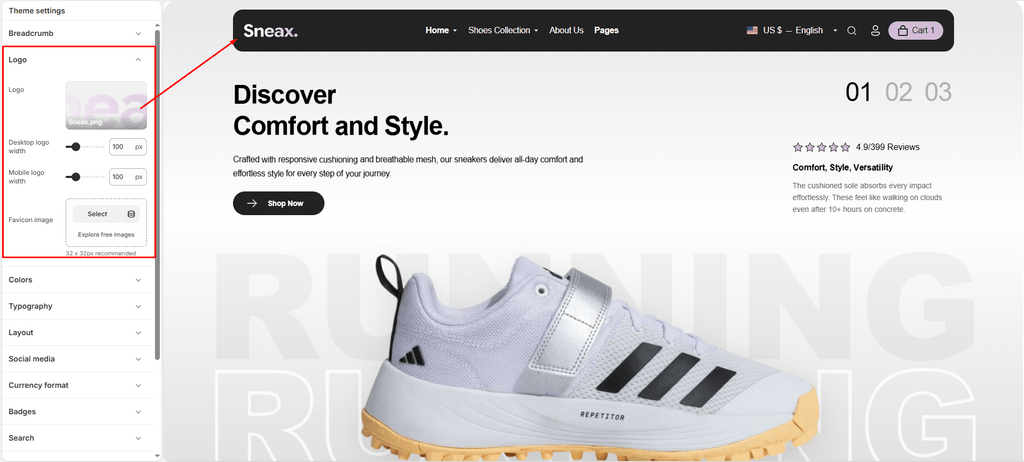
Configure your sneaker brand’s visual identity across your entire store. The Logo & Favicon settings allow you to upload your primary brandmark, control separate sizing for desktop and mobile displays, and configure the browser tab icon.
How to Access Logo Settings #
- From your Shopify Admin, navigate to Online Store > Themes.
- Click Customize on your active Sneax theme.
- Click the Theme settings (⚙️ gear icon) in the left sidebar.
- Select Logo from the settings menu.
Detailed Settings Breakdown #
1. Logo #
Upload your brand’s main emblem or wordmark.
- SEO & Performance Optimized: On your homepage, Sneax wraps your logo inside a semantic tag with dynamic alt-text for search engine ranking, while loading eagerly to improve site load speed and Core Web Vitals.
- Text Fallback: If you haven’t finalized your shoe brand’s graphic logo yet, leaving this empty will seamlessly display your store name in clean, theme-matched typography.
2. Desktop Logo Width (50px to 300px) #
Fine-tune your brandmark’s presence in the desktop header. Sneax automatically balances your logo height based on its original aspect ratio, ensuring no distortion occurs.
3. Mobile Logo Width (50px to 300px) #
Mobile shoppers represent a huge portion of sneaker drops and footwear purchases. This setting allows you to size down your logo independently so your mobile menu toggle, search bar, and cart icons fit comfortably on a single line.
4. Favicon Image #
Upload an icon that represents your footwear brand in browser tabs.
- Recommended Size: 32 x 32px or 48 x 48px.
- Format: Square .png with a transparent background or high-contrast background for dark mode tabs.
Available Settings & Configuration #
| Setting Name | Type | Options / Range | Default | Description |
|---|---|---|---|---|
| Logo | Image Picker | Image upload (PNG, SVG, JPG, WebP) | None | Upload your primary sneaker brand logo. If left blank, your store name will automatically display as crisp typography text. |
| Desktop logo width | Slider / Range | 50px – 300px (Step: 10px) | 100px | Controls the maximum display width of your logo on desktop, laptop, and tablet screens (screens wider than 767px). |
| Mobile logo width | Slider / Range | 50px – 300px (Step: 10px) | 100px | Fine-tunes your logo sizing specifically for smartphones and handheld devices to keep your mobile header compact and clean. |
| Favicon image | Image Picker | Image upload (PNG) | None | Sets the mini brand icon displayed in browser tabs, bookmarks, and mobile search results next to your site title. |
Pro Tips for Sneax Footwear Stores #
- Use Transparent SVGs or 2x PNGs: For razor-sharp display on modern Retina displays and mobile OLED screens, upload an SVG or a high-resolution PNG (at least 600px wide) with a transparent background. This guarantees that your sneaker brandmark remains ultra-crisp whether your header has a light or dark background.
- Keep Mobile Header Balanced: For high-conversion sneaker drops, setting the Mobile logo width between 80px and 110px typically offers the best balance between brand visibility and navigation accessibility.