Table of Contents
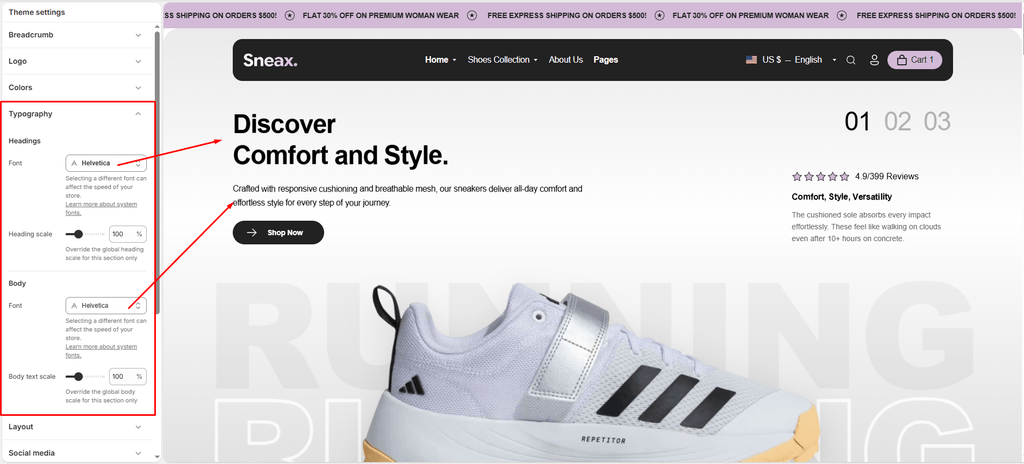
Typography sets the mood and attitude of your footwear brand. Whether you want bold, high-impact athletic lettering for limited sneaker drops or clean, technical typography for performance footwear specs, Sneax gives you complete control over your store’s font pairings and scaling.
Sneax uses Shopify’s hosted font library, ensuring fast load times, zero third-party font hosting costs, and automatic font-display optimization (font-display: swap) for high Core Web Vitals scores.
How to Access Typography Settings #
- From your Shopify Admin, navigate to Online Store > Themes.
- Click Customize on the Sneax theme.
- Click the Theme settings (⚙️ gear icon) in the left sidebar.
- Select the Typography tab.
Available Settings & Configuration #
| Setting Name | Type | Range / Options | Default | Description |
|---|---|---|---|---|
| Headings Font | Font Picker | All Shopify Library Fonts | Assistant (Regular 400) | Sets the global font family for all section headings, product titles, banner headlines, and collection titles. |
| Heading Scale | Slider / Range | 80% – 150% (Step: 5%) | 100% | Proportionally scales all headings (h1 through h6) up or down across desktop and mobile devices. |
| Body Font | Font Picker | All Shopify Library Fonts | Assistant (Regular 400) | Sets the primary font family for body copy, shoe descriptions, navigation menus, badges, and button labels. |
| Body Scale | Slider / Range | 80% – 150% (Step: 5%) | 100% | Proportionally scales regular paragraph text and UI labels across the entire store. |
Detailed Settings Breakdown #
1. Headings Font & Heading Scale #
- Headings Font: Choose the primary display typeface for your sneaker store. When you select a font, Sneax automatically generates the normal, bold, italic, and bold-italic weights needed for your headlines.
- Heading Scale (
80%–150%): Fine-tunes headline proportions. If your chosen typeface has naturally compact or elongated letterforms, adjust this slider to achieve the perfect visual impact without breaking your layout.
2. Body Font & Body Scale #
- Body Font: Controls the typography for product descriptions, shoe size charts, customer reviews, blog articles, and checkout buttons.
- Body Scale (
80%–150%): Controls base readability. Increasing body scale (e.g., 105% – 110%) can make shoe size details and technical specifications easier to read on mobile screens.
Pro Font Recommendations for Sneax Footwear Stores #
- Streetwear & Limited Drops: Pair a bold, condensed, or uppercase-friendly sans-serif for headings (e.g., Oswald, Anton, Montserrat Bold, or Archivo Black) with a clean, neutral body font (Inter, Roboto, or Assistant) to create high energy and urban appeal.
- Athletic & Performance Runners: Use modern geometric sans-serif typefaces (e.g., Futura, Century Gothic, or Nunito Sans) to project engineering precision and speed.
- Luxury Sneaker Boutiques: Pair a refined modern serif headline (Playfair Display, Cormorant Garamond) with a sleek geometric body font (Assistant, Lato) for a high-end designer sneaker aesthetic.