Table of Contents
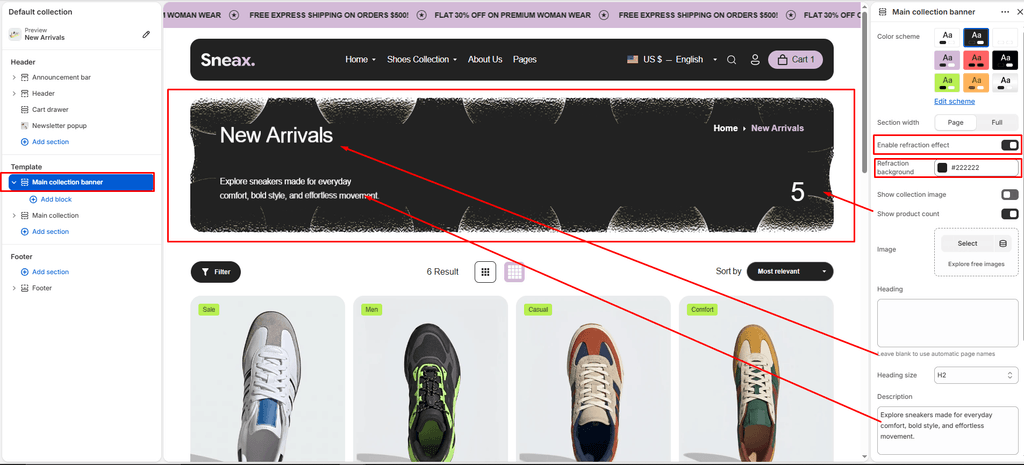
The Main Collection Banner section commands the top of your collection catalog pages (e.g., Men’s Running Shoes, Retro High-Tops, Limited Drops, or All Footwear).
In Sneax, this banner delivers a cutting-edge street-culture presentation—featuring an Interactive Liquid Refraction Canvas, high-definition hero photography, live collection count stats, and integrated breadcrumbs.
How to Access Main Collection Banner Settings #
- From your Shopify Admin, navigate to Online Store > Themes.
- Click Customize on the Sneax theme.
- In the top template selector dropdown, select Collections > Default collection.
- In the left sidebar, click the Main collection banner section.
- Configure your background imagery, refraction shader, and typography options.
- Click Save.
Layout & Appearance Settings #
| Setting Name | Type | Options / Range | Default | Description |
|---|---|---|---|---|
| Color scheme | Color Scheme Picker | Any configured color scheme | Scheme 1 | Sets the background and typography color palette for the banner section. |
| Section width | Dropdown | Page width, Full width | Page width | Determines whether the banner is contained within the standard site margins or stretches edge-to-edge. |
| Text align | Dropdown | Left, Center, Right | Left | Sets horizontal alignment for the collection title and description copy. |
| Top padding | Slider / Range | 0px – 200px (Step: 5px) | 35px | Vertical whitespace above the banner content. |
| Bottom padding | Slider / Range | 0px – 100px (Step: 1px) | 36px | Vertical whitespace below the banner content. |
Interactive Canvas & Liquid Refraction (Exclusive Feature) #
| Setting Name | Type | Options / State | Default | Description |
|---|---|---|---|---|
| Enable refraction | Checkbox | Enabled / Disabled | Enabled (true) | Activates an interactive WebGL liquid refraction canvas shader over the banner image. |
| Refraction color | Color Picker | Hex color code | #222222 | Sets the tint and refraction accent color used by the shader animation. |
Imagery & Merchandising Settings #
| Setting Name | Type | Default | Description |
|---|---|---|---|
| Show collection image | Checkbox | Enabled (true) | Uses the collection’s featured image set in your Shopify Admin (Products > Collections). |
| Custom fallback image | Image Picker | None | Fallback image displayed if a specific collection does not have a featured photo uploaded. |
| Show collection count | Checkbox | Enabled (true) | Displays a bold statistical counter showing the total count in your catalog. |
| Heading | Textarea | None (Defaults to Title) | Optional custom headline override. If left empty, automatically displays the Shopify collection title. |
| Heading size | Dropdown (H1 – H6) | H2 | Typography size scale for the collection headline. |
| Description | Textarea | None (Defaults to Desc) | Optional custom text override. If left empty, displays the collection description. |
| Text size | Dropdown (H1 – H6) | H5 | Typography size scale for the description paragraph. |
Key Built-In Features in Sneax #
- Interactive Canvas Shader: When Enable refraction is active, Sneax executes an ambient, interactive distortion canvas over the banner. Moving the cursor or scrolling generates fluid liquid ripples across the footwear photo.
- Integrated Breadcrumb Trail: If Show breadcrumb navigation is enabled in Theme settings, Sneax automatically embeds accessible breadcrumb links directly within the collection header.
- Core Web Vitals & LCP Optimized: Sneax detects if the banner is the primary viewport element and loads the footwear image with
fetchpriority="high"andloading="eager", guaranteeing fast Largest Contentful Paint (LCP) scores. - Focal Point Recognition: Supports Shopify’s image presentation focal points, ensuring the sneaker silhouette remains perfectly framed regardless of screen orientation.
Pro Tips for Sneax Footwear Stores #
- Cinematic Sneaker Photography: Upload high-resolution 1800px wide landscape lifestyle shots for your collections (e.g., an on-court shot for Basketball Shoes, or an urban trail for Running Sneakers).
- Refraction Tint Matching: Pair the Refraction color with your shoe line’s mood—use a dark
#121212for stealth streetwear collections or a vibrant tone matching your flagship sneaker drop.