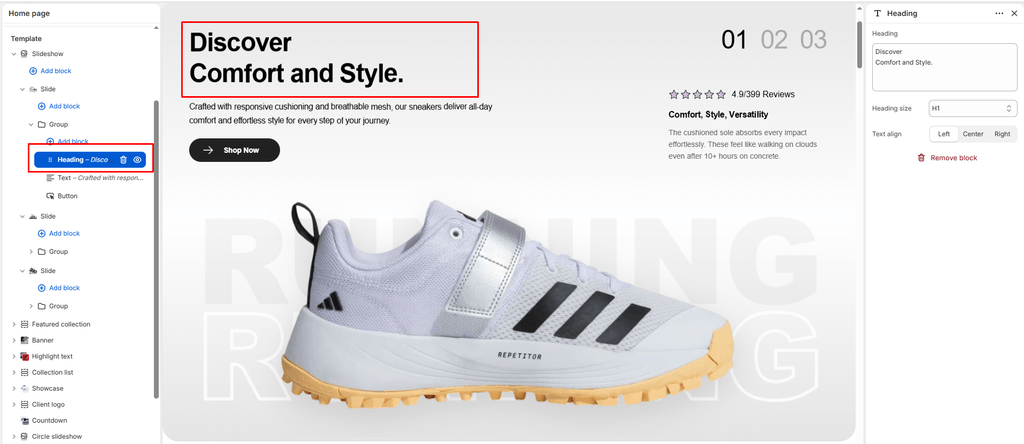
The Heading block (identified as Title in the block catalog) is the core typographic element used to anchor sections, introduce sneaker drops, highlight seasonal capsule collections, or announce limited-edition collaborations.
Built on Shopify’s modern modular OS 2.0 block architecture, the Heading block can be placed directly inside any compatible section (such as Banner, Slideshow, Video, Main 404, Main Password, or Custom Section) or nested within container blocks like Group or Column.
Built-in Cascade Scroll Animation:
Sneax equips every Heading block with smooth entrance animations (has-scroll-text-anim / data-scroll-text-cascade). As the visitor scrolls down the page, each line cascades smoothly into view for an editorial, high-energy streetwear feel.
Accessing the Heading Block Settings #
- In the Shopify Theme Editor, navigate to any page template containing a compatible section.
- In the left-hand sidebar, locate the parent section (e.g., Banner or Slideshow).
- If not already present, click (+) Add block under the section and select Heading (or click on an existing Heading block).
- Customize the settings in the right-hand panel.
Block Settings #
| Setting | Type | Default | Options / Range | Description |
|---|---|---|---|---|
| Heading | Textarea | Heading | Multiline Text | The headline text to display. Supports line breaks for editorial stacked headlines. |
| Heading size | Select | H2 | H1, H2, H3, H4, H5, H6 | Sets the typographic scale of the heading. |
| Text align | Select | Left | Left, Center, Right | Controls the horizontal alignment of the text. |
Detailed Setting Explanations #
1. Multiline & Stacked Headlines (heading) #
Because this setting uses a multiline textarea, pressing Enter creates clean, natural line breaks (rendered automatically via newline_to_br). This allows you to create bold, stacked typography reminiscent of modern sneaker magazines and launch lookbooks:
2. Typographic Hierarchy (heading_size) #
Sneax gives you six distinct size classes (H1 through H6) to establish clear hierarchy across your storefront:
- H1 or H2 (Recommended for Hero Headlines): Ideal for primary section titles in full-screen Slideshows, Hero Banners, and Collection Banners.
- H3 or H4 (Recommended for Columns & Secondary Blocks): Perfect for nested titles inside a 2-column or 3-column layout, announcement cards, or the Main 404 / Password pages.
- H5 or H6 (Recommended for Accents): Great for compact category headers, in-drawer promotions, or minor editorial callouts.
3. Horizontal Alignment (text_align) #
- Left (Default): Creates an asymmetric, editorial magazine layout. Pair with left-aligned subheadings and buttons.
- Center: Ideal for symmetric layouts, standalone hero announcements, countdown blocks, and 404/password pages.
- Right: Offers an avant-garde editorial alignment for creative lookbooks.
Styling & Inheritance #
The Heading block dynamically inherits its typographic parameters from your global and section-level configurations:
- Font Family & Scale: Governed sitewide by your selections in Theme Settings > Typography (
type_header_fontandheading_scale). - Color Contrast: Automatically matches the
textcolor or gradient defined by the parent section’s active Color scheme, ensuring seamless contrast on both light and dark backgrounds.
Sneaker Store Best Practices #
- Stack Your Release Names:
- Use uppercase text with line breaks (e.g., line 1: silhouette name, line 2: colorway or edition) to give sneaker drops dramatic weight on mobile screens.
- Align Matching Blocks Uniformly:
- When placing a Heading, a Subtitle, and a Button (Link) block together in a container, ensure their
text_alignsettings match (e.g., all set toCenteror all set toLeft) for a clean, intentional look.
- When placing a Heading, a Subtitle, and a Button (Link) block together in a container, ensure their
- Keep Mobile Readability in Mind:
- If using
H1for massive hero headlines, limit your text to 2–4 impactful words so the cascade animation feels punchy and doesn’t push important call-to-action buttons below the mobile fold.
- If using