Table of Contents
The Article section controls the layout, reading experience, and merchandising elements of individual blog posts in your store (such as Sneaker Wear-Test Reviews, Release Guides, Shoe Cleaning Tutorials, or Brand Stories).
Sneax elevates the editorial experience by combining magazine-grade hero headers with a conversion-focused sidebar that allows you to recommend the exact sneakers discussed in your article directly to your readers.
How to Access Article Settings #
- From your Shopify Admin, navigate to Online Store > Themes.
- Click Customize on the Sneax theme.
- In the top template selector dropdown, select Blogs > Default article.
- In the left sidebar, click the Article section.
- Configure your header style, metadata toggles, and sidebar options.
- Click Save.
Header Layout & Appearance Settings #
| Setting Name | Type | Options / Range | Default | Description |
|---|---|---|---|---|
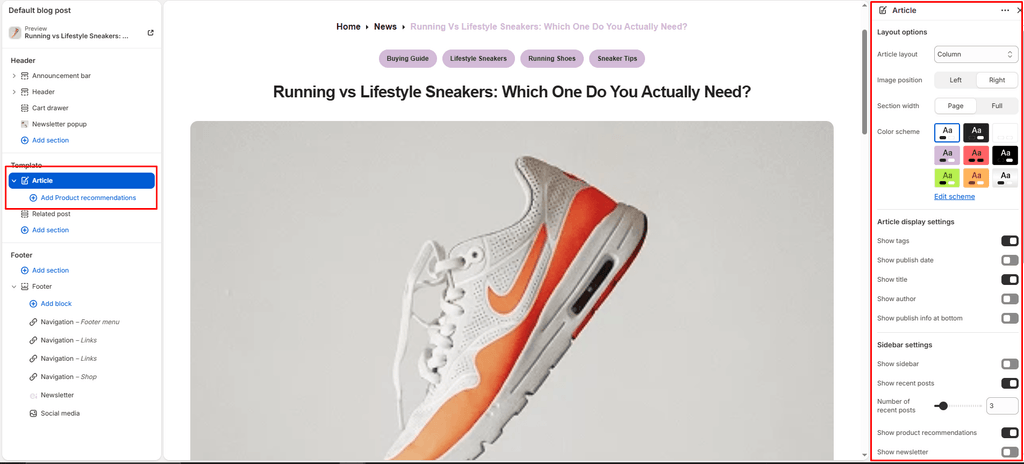
| Layout | Dropdown | Row, Column, Overlay | Column | Determines how the featured sneaker photo and the article title are composed at the top of the page. |
| Image position | Dropdown | Left, Right | Left | Anchors the featured image to the left or right side (active when Layout is set to Row). |
| Section width | Dropdown | Page width, Full width | Page width | Chooses between standard boxed reading container or expansive edge-to-edge layout. |
| Color scheme | Color Scheme Picker | Any configured color scheme | Scheme 1 | Sets the background and typography color palette for the reading experience. |
| Top padding | Slider / Range | 0px – 200px (Step: 5px) | 40px | Top whitespace spacing (automatically scaled on mobile devices). |
| Bottom padding | Slider / Range | 0px – 200px (Step: 5px) | 40px | Bottom whitespace spacing (automatically scaled on mobile devices). |
Header Layout Styles Explained #
- Column (Default): Clean editorial layout. Centers the headline and metadata neatly stacked with your featured footwear imagery.
- Row: Modern side-by-side format where the featured sneaker photo sits alongside the article title and byline.
- Overlay (Cinematic): Transforms your featured shoe photograph into an edge-to-edge hero banner with the article title overlaid in bold typography directly on top.
Article Metadata Toggles #
| Setting Name | Type | Default | Description |
|---|---|---|---|
| Show title | Checkbox | Enabled (true) | Displays the article headline. |
| Show tag | Checkbox | Disabled (false) | Displays the primary category tag (e.g., Performance Review, Drop Guide). |
| Show date | Checkbox | Disabled (false) | Displays the publication date. |
| Show author | Checkbox | Disabled (false) | Displays the author/editor byline. |
| Show publish info | Checkbox | Disabled (false) | Displays a summary publication credit badge at the bottom of the article. |
The Conversion Sidebar (Sell While They Read) #
Sneax includes a multi-functional sticky sidebar designed to capture newsletter leads and drive footwear sales directly from your articles:
| Setting Name | Type | Default | Description |
|---|---|---|---|
| Show sidebar | Checkbox | Disabled (false) | Master toggle to enable or disable the article sidebar. |
| Show recent posts | Checkbox | Disabled (false) | Displays a curated feed of latest articles to keep shoppers reading. |
| Recent posts count | Slider (2 – 10) | 5 | Number of recent articles displayed in the sidebar list. |
| Show newsletter | Checkbox | Disabled (false) | Embeds an inline email subscription box inside the reading sidebar. |
| Newsletter title | Text | Subscribe to Newsletter | Heading for the in-article subscription box. |
| Newsletter description | Textarea | Get the latest updates... | Explanatory subtext encouraging readers to subscribe. |
| Show products | Checkbox | Disabled (false) | Enables the featured product upsell module inside the sidebar. |
Adding Product Upsells to Articles #
When Show products is enabled, you can add up to 6 featured Product blocks to the article:
- Under the Article section in the Theme Editor sidebar, click Add Product.
- Select the specific sneaker or shoe care product reviewed in the article.
- Readers can now view the shoe’s price, photo, and click straight to the product page without having to search your store!
Navigation & Comments Settings #
| Setting Name | Type | Default | Description |
|---|---|---|---|
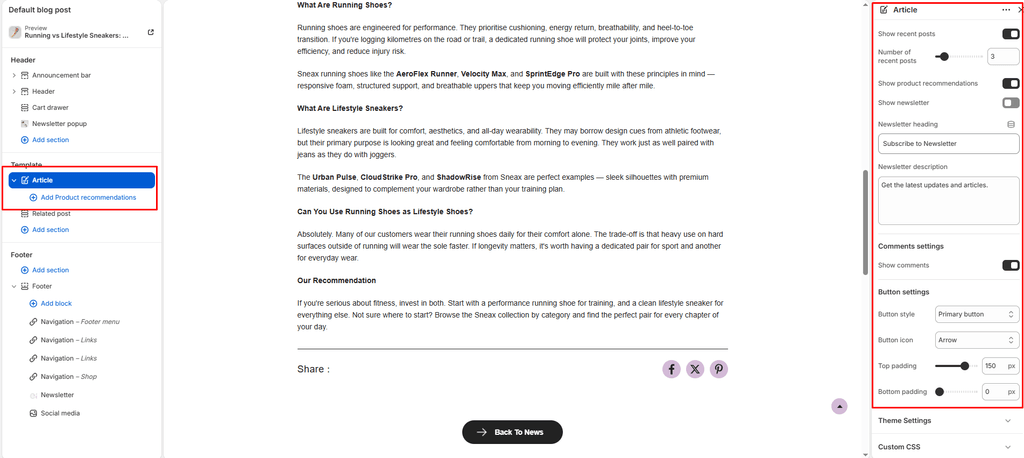
| Show comments | Checkbox | Enabled (true) | Displays customer comments and discussion threads (managed in Shopify Admin > Online Store > Blog posts). |
| Button style | Dropdown | Button primary | Chooses the visual style for the “Back to blog” button (Primary, Secondary, Link). |
| Button icon | Dropdown | Cart | Selects a vector icon to display on the navigation button (Arrow, Cart, Quickview, Heart, etc.). |
Pro Tips for Sneax Footwear Stores #
- Direct Footwear Monetization: When publishing a sneaker review (e.g., “Sneax Runner Pro: 100-Mile Wear Test”), always add that shoe using the Product block. Readers can see live inventory and purchase immediately after reading your breakdown.
- Breadcrumb Navigation: If Show breadcrumb navigation is enabled in Theme settings, Sneax automatically outputs a clean
Home > Blog > Articletrail at the top of the post for seamless backtracking.