Table of Contents
Building a dedicated subscriber list is one of the highest-converting strategies in the sneaker and streetwear industry. Direct email marketing drives VIP early-access sneaker drops, shock restock alerts, raffle announcements, and first-time buyer discounts.
Sneax includes a built-in, hardware-accelerated Newsletter Popup powered by GSAP spring animations, smart visitor targeting, and adaptive layout configurations.
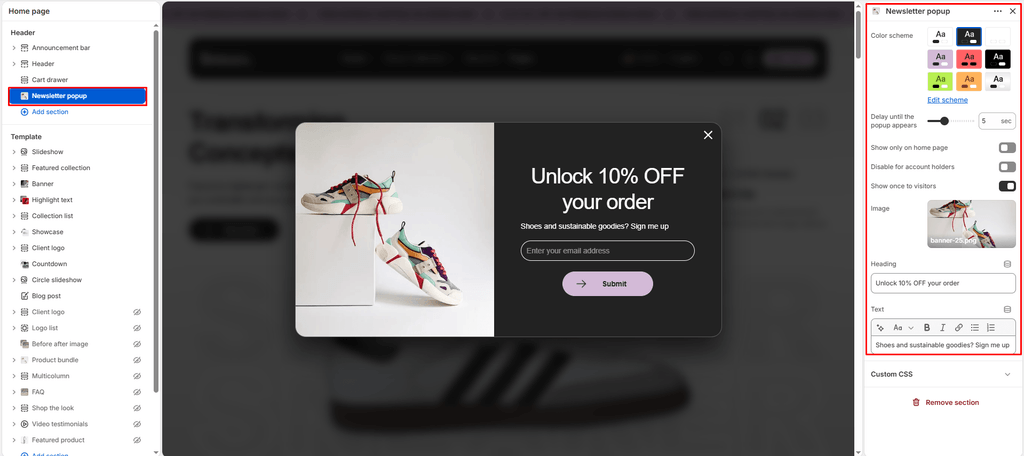
How to Access Newsletter Popup Settings #
- From your Shopify Admin, navigate to Online Store > Themes.
- Click Customize on the Sneax theme.
- In the left sidebar under the Header group, click Newsletter popup (or click Add section > Newsletter popup).
- Configure your timing, targeting rules, and promotional content.
- Click Save.
Available Settings & Configuration #
| Setting Name | Type | Options / Range | Default | Description |
|---|---|---|---|---|
| Color scheme | Color Scheme Picker | Any configured color scheme | Scheme 1 | Sets the background, typography, button, and input field colors for the modal card. |
| Apparition delay | Slider / Range | 0 – 15 sec (Step: 1s) | 5 sec | Sets how many seconds after page load the popup springs into view. |
| Show only on index | Checkbox | Enabled / Disabled | Enabled (true) | Restricts the popup exclusively to your homepage, keeping product pages distraction-free. |
| Show only for visitors | Checkbox | Enabled / Disabled | Enabled (true) | Prevents the popup from showing to existing, logged-in account customers. |
| Show only once | Checkbox | Enabled / Disabled | Enabled (true) | Uses browser localStorage to prevent annoying repeat impressions for the same shopper. |
| Image | Image Picker | Image upload | None | Optional promotional photo (e.g., shoe drop photography, lifestyle shot, or brand emblem). |
| Heading | Text | e.g., “Get 10% Off” | Get 10% off | Main bold headline displayed at the top of the form. |
| Content | Rich Text | HTML / Formatted text | Promotions, new products... | Explains the benefits of joining your sneaker subscriber community. |
Detailed Settings & Technical Breakdown #
1. Timing & Targeting Logic #
- Apparition Delay (
0to15s): Giving shoppers 4 to 7 seconds allows them to appreciate your hero sneaker visuals and brand identity before receiving a subscription prompt, leading to higher conversion rates. - Homepage Restriction (
show_only_on_index): Ensures customers who land directly on a single shoe detail page from social media ads or Google search can immediately check sizing and buy without interruption. - Zero-Spam Memory (
show_only_once): When closed or submitted, Sneax marks the user’s browser storage (localStorage: popup_shown). Returning visitors will not see the modal again during their shopping session.
2. Adaptive Responsive Layout #
- With Image: Sneax automatically formats the modal into a sleek 50/50 split layout on desktop (campaign photography on the left, email form on the right) and stacks vertically on mobile screens.
- Without Image: If left blank, Sneax automatically scales the modal down to a compact, centered
500pxcard with balanced50pxpadding.
3. High-Performance GSAP Animation #
- Smooth Spring Physics: Powered by GSAP
back.out(1.8)easing, the modal emerges with an organic, subtle scale bounce (0.75to1.0) that feels high-end and polished. - Effortless Dismissal: Shoppers can dismiss the popup by clicking the top X close button, clicking anywhere on the darkened backdrop overlay, or simply hitting the Escape (
Esc) key on their keyboard.
Pro Tips for Sneax Footwear Stores #
- Incentivize with Shoe Drops & First-Order Savings: Sneakerheads gladly exchange their email for tangible perks. Strong headlines include:
- “Join the Sneax Club: 10% Off Your First Pair”
- “Unlock VIP Early Access to Limited Sneaker Drops & Restocks”
- “Get Free Sneaker Care Kit on Orders Over $100”
- Use High-Contrast Product Photography: Upload a clean, transparent or high-contrast photo of your flagship sneaker silhouette as the Image to instantly command attention.