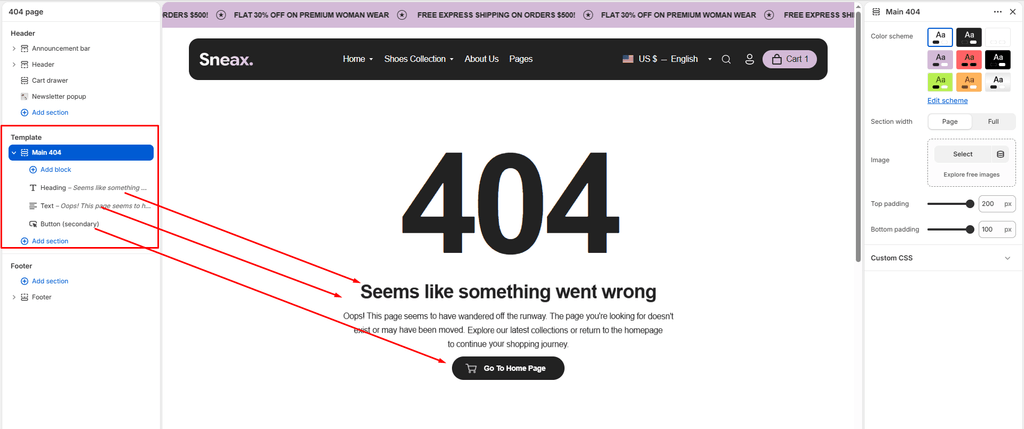
The Main 404 section controls the layout and messaging on your store’s 404 Not Found Page (/404). When a visitor mistypes a URL or clicks a broken link to an expired sneaker drop or archived collection, this page prevents bounce-offs by maintaining your brand’s streetwear aesthetic and seamlessly guiding customers back to active footwear releases.
Built with Shopify’s modern Theme Blocks (@theme) architecture, Sneax allows you to pair custom editorial graphics with interactive animated headings, body descriptions, and action buttons equipped with customizable icons.
Accessing the 404 Page Settings #
- In your Shopify Admin, go to Online Store > Themes.
- Click Customize next to Sneax.
- In the top template selector dropdown, select Others > 404 page.
- In the left-hand sidebar, click on Main 404 to adjust layout and imagery settings, or click (+) Add block to add headings, text, or action buttons.
1. Layout & Appearance Settings #
Configure container width, color scheme, and responsive vertical spacing:
| Setting | Type | Default | Options / Range | Description |
|---|---|---|---|---|
| Color scheme | Color Scheme | scheme-1 | Theme Schemes | Sets the background and typography color palette for the 404 error template. |
| Section width | Select | Page-width | Page-width, Full-width | Choose Page-width for a clean, centered container or Full-width for an edge-to-edge layout. |
| Top padding | Range Slider | 25px | 0px – 200px (step 5px) | Vertical spacing above the 404 image or content. (Default in template: 200px). |
| Bottom padding | Range Slider | 24px | 0px – 100px (step 1px) | Vertical spacing below the 404 action buttons. (Default in template: 100px). |
Responsive Mobile Padding:
On mobile devices (< 767px), Sneax automatically reduces top and bottom padding values by 50% to keep content visible without excessive scrolling.
2. Custom 404 Artwork & Fallback Heading #
- Image (
image):- Upload custom artwork to visually communicate that the page is missing (e.g., an empty sneaker shoebox, an “out of bounds” basketball court graphic, or an unreleased silhouette teaser).
- Focal Point Support: Respects Shopify’s image presentation focal point adjustments to ensure the most important visual detail stays centered on all screens.
- Minimalist Fallback (
404):- If no custom image is uploaded, Sneax automatically renders a bold, modern
404typographic heading (<h2 class="main-404-heading">404</h2>) styled according to your theme typography.
- If no custom image is uploaded, Sneax automatically renders a bold, modern
3. Theme Content Blocks (@theme) #
Customize your messaging by adding modular blocks directly beneath the 404 artwork:
A. Heading Block (title) #
Adds an animated error headline to clarify what happened.
- Heading (
heading): Multiline text input (e.g., “Lost in the Drop?” or “Seems Like Something Went Wrong”). - Heading size (
heading_size): Choose typography scale fromH1down toH6(Default:H2, Template Preset:H3). - Text align (
text_align): Align text toLeft,Center, orRight(Template Preset:Center). - Text Animation: Includes built-in cascade text reveal animations (
data-scroll-text-cascade).
B. Text / Description Block (text) #
Provides helpful context and reassures the customer.
- Text (
text): Multiline textarea (e.g., “The release or page you’re searching for might have sold out, been renamed, or temporarily moved off the runway. Head back to explore our latest kicks.”). - Text size (
text_size): Typography scale fromH1toH6(Template Preset:H4). - Text align (
text_align): Align text toLeft,Center, orRight(Template Preset:Center). - Text opacity (
text_opacity): Slider from0%to100%(Default:100%). Lowering slightly (e.g., to85%) adds subtle editorial elegance.
C. Button / Link Block (link) #
Directs stranded shoppers back to your money pages.
- Button label (
label): Call-to-action text (e.g., “Explore New Drops”, “Back to Homepage”, “Browse All Kicks”). - Link (
link): Target destination URL (e.g.,/for homepage, or/collections/allfor catalog). - Button style (
style_class):Primary button: Solid high-contrast fill.Secondary button: Subtle outline/secondary treatment.Link button: Clean underlined text link.
- Enable animation (
enable_animation): Checkbox (Default:Enabled). Activates interactive hover animations. - Button icon (
button_icon): Pair your CTA with an accompanying SVG icon:- Options:
Cart,Arrow,Quickview,Search,Heart,Account,Location,Phone,Email(Default:Cart).
- Options:
- Text align (
text_align): Position the button container toLeft,Center, orRight.
4. App Blocks (@app) #
The Main 404 section supports Shopify App Blocks (@app), allowing you to integrate third-party utilities such as:
- An instant AI search assistant or chat widget.
- An automatic redirect helper.
- A newsletter signup form offering a discount for the inconvenience.
Sneaker Store Best Practices #
- Feature a “Trending Drops” Section Below 404:
- In Shopify’s Theme Editor, you can click Add section directly beneath Main 404 on the 404 template. Add a Featured Collection (e.g., “Top Trending Releases”) or a Recently Viewed Products section so visitors instantly find alternative sneakers to browse.
- Use Sneaker-Centric Creative Copy:
- Replace standard technical jargon (“Error 404: File Not Found”) with brand-aligned streetwear terminology like “Looks like these kicks walked away” or “Out of stock & off the shelf”.
- Use the Arrow or Cart Button Icon:
- Setting the button style to Primary button with the
ArroworCarticon provides an intuitive, high-visibility visual cue that invites immediate interaction.
- Setting the button style to Primary button with the