

Table of Contents
The Announcement Bar sits at the very top of your storefront, serving as the first touchpoint for visiting shoppers.
Unlike ordinary themes that use slow, clunky slide transitions, Sneax features a dynamic, continuous Infinite Marquee Ticker. This gives your sneaker store a high-energy, modern streetwear vibe—perfect for highlighting limited shoe drops, sitewide discount codes, restock alerts, and free shipping thresholds.
How to Access Announcement Bar Settings #
- From your Shopify Admin, navigate to Online Store > Themes.
- Click Customize on the Sneax theme.
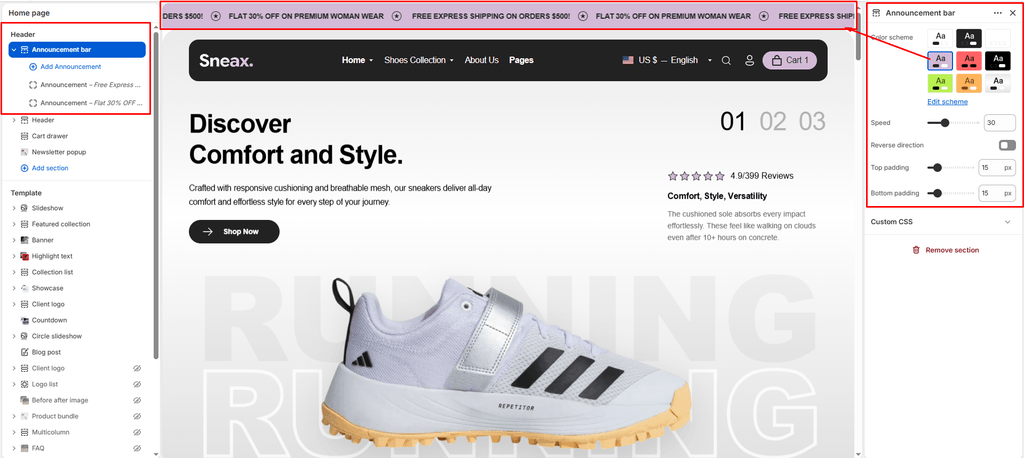
- In the left sidebar under the Header group, click Announcement bar.
- Configure your section settings and manage your announcement blocks.
- Click Save.
Available Section Settings & Configuration #
| Setting Name | Type | Options / Range | Default | Description |
|---|---|---|---|---|
| Color scheme | Color Scheme Picker | Any configured color scheme | Scheme 1 | Sets the background and text color palette for the entire announcement bar banner. |
| Marquee speed | Slider / Range | 0 – 100 (Step: 1) | 30 | Adjusts the horizontal scrolling speed of the continuous ticker ribbon. |
| Reverse direction | Checkbox | Enabled / Disabled | Disabled (false) | Reverses the ticker animation direction (toggles between scrolling left or scrolling right). |
| Top padding | Slider / Range | 0px – 100px (Step: 1px) | 10px | Controls top whitespace above the ticker text (automatically halved on mobile screens). |
| Bottom padding | Slider / Range | 0px – 100px (Step: 1px) | 10px | Controls bottom whitespace below the ticker text (automatically halved on mobile screens). |
Managing Announcement Blocks #
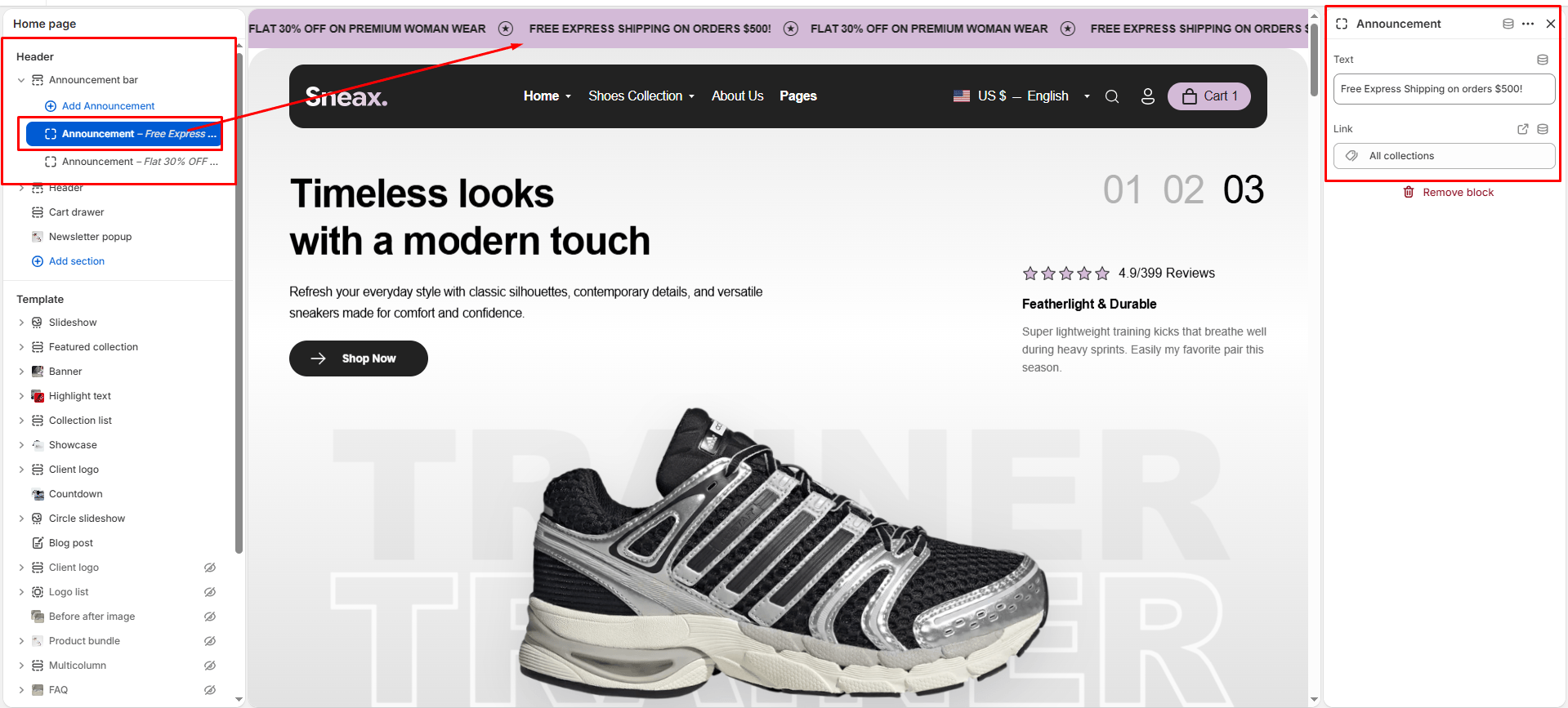
Inside the Announcement bar section, you can add multiple Announcement blocks. Sneax loops these announcements together into an infinite seamless ribbon, automatically separating each message with an elegant star icon divider.
To add an announcement:
- Under Announcement bar, click Add Announcement.
- Configure the block settings:
- Text: Enter your promotional message (e.g., “Free Worldwide Shipping on Orders Over $150”, “Limited Sneaker Drop Live Now”, or “Use Code SNEAX10 for 10% Off”).
- Link: (Optional) Paste or select a link (e.g., link directly to your New Drops Collection, Shipping Policy, or Sale Catalog). If a link is added, that announcement becomes interactive and clickable.
- Add as many blocks as you need to build your scrolling marquee.
Key Built-In Features in Sneax #
- Interactive Pause on Hover: When a shopper hovers their cursor over any part of the scrolling announcement bar, the animation automatically pauses. This allows customers to easily read long announcements or click promotional links without chasing moving text.
- Branded Star Separator: Sneax automatically renders an embedded vector star icon between each announcement block, creating a polished, streetwear-grade visual rhythm.
- Hardware-Accelerated Smoothness: The ticker uses lightweight CSS transforms (
translate3d) and linear infinite keyframe animation, ensuring silky-smooth 60fps scrolling on both mobile smartphones and high-refresh-rate desktop displays without draining battery.
Pro Tips for Sneax Footwear Stores #
- High-Impact Contrast: Pair a bold dark color scheme (e.g., black background with electric lime or neon orange text) for your announcement bar to immediately hook customer eyes before they view your main hero banner.
- Ideal Speed Setting: A Marquee speed setting between
25and35provides the optimal reading pace for footwear promotions.