

Table of Contents
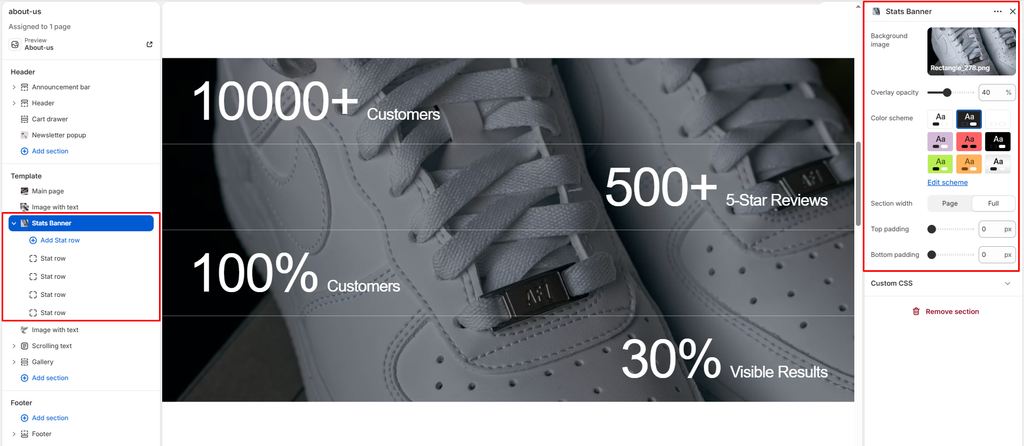
The Stats Banner section is an imposing, high-voltage brand authority and social proof banner in the Sneax theme. Designed to communicate marketplace scale, authenticity metrics, and global community reach, it pairs an edge-to-edge ambient background image with stacked, hairline-bordered metric rows.
Accessing the Stats Banner Section Settings #
- Open your Shopify Admin and navigate to Online Store > Themes.
- Click Customize next to your active Sneax theme.
- Choose the template where you wish to add or edit the banner (e.g., Home page, About us, or a Brand Heritage / Authenticity Guarantee page).
- In the left-hand sidebar, click Add section and select Stats banner (or select an existing Stats banner section).
- The right sidebar will display all background image, tint opacity, container width, and nested Stat row blocks.
1. General & Visual Style #
Configure the overall theme scheme and container grid boundary.
| Setting | Type | Default | Options / Range | Description |
|---|---|---|---|---|
| Color scheme | Color Scheme | scheme-1 | Theme Color Schemes | Sets the foreground text and border tint palette across the banner rows. |
| Section width | Select | Full width | Page width, Full width | Controls whether the stat rows sit bounded within the standard layout grid (page-width) or stretch edge-to-edge (full-width). |
2. Hero Background Image & Tint Overlay #
A full-bleed responsive image layer sits beneath the metric rows, softened by an adjustable darkening overlay to guarantee crisp text legibility.
| Setting | Type | Default | Options / Range | Description |
|---|---|---|---|---|
| Image | Image Picker | None | Image file (.png, .webp, .jpg) | Full-width atmospheric background image (delivering responsive image widths up to 2000px). Works best with wide-angle lifestyle street shots, stadium crowds, or moody sneaker close-ups. |
| Image overlay opacity | Range | 60% | 0% to 100% (step: 5%) | Controls the darkness of the black tint overlay (rgba(0, 0, 0, opacity)). Higher opacity (50%–70%) ensures pure white numbers pop with high contrast regardless of the background photograph. |
3. Stat Row Content Blocks #
Add individual stacked milestone rows. Each row is partitioned by elegant semi-transparent hairline borders.
- Block Name: Stat
- Block Limit: Flexible.
| Setting | Type | Default | Options / Range | Description |
|---|---|---|---|---|
| Large text | Text | 10000+ | Text input (e.g., 10000+, 500+, 100%, 4.9/5) | The oversized primary number. The GSAP animation engine automatically parses digits from attached symbols, counts smoothly from 0 to the target value with easing (power3.out), and seamlessly re-attaches any suffix. |
| Small text | Text | Customers | Text input | The descriptive label displayed immediately beside the large animated number (e.g., Pairs Authenticated, 5-Star Reviews, Verified Deadstock, Global Sneakerheads). |
| Alignment | Select | Left | Left, Center, Right | Controls horizontal alignment for this specific row within the container. |
Spacing & Mobile Optimization #
Fine-tune vertical spacing above and below the banner.
| Setting | Type | Default | Options / Range | Description |
|---|---|---|---|---|
| Top padding | Range | 40px | 0px to 200px (step: 5px) | Top vertical padding on desktop. Automatically scaled to 75% on mobile viewports (< 768px). |
| Bottom padding | Range | 40px | 0px to 200px (step: 5px) | Bottom vertical padding on desktop. Automatically scaled to 75% on mobile viewports (< 768px). |
Sneaker Store Best Practices #
- Create a Dynamic Zigzag Alignment Flow: Rather than setting all rows to left alignment, alternate row alignments across consecutive blocks. This creates an edgy, asymmetric editorial layout that guides the reader’s eye back and forth down the screen.
- Showcase Trust & Authenticity Proof: For resale or hype sneaker boutiques, customer trust is paramount. Use this section to showcase undeniable credibility metrics: