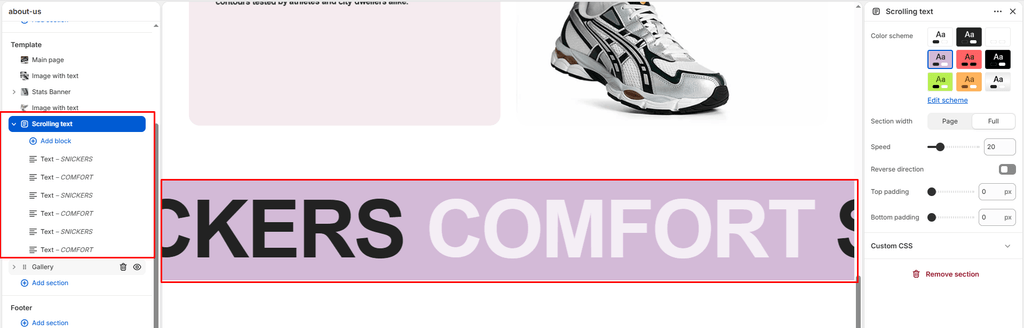
The Scrolling Text section (commonly known as a Marquee) is an impactful, high-energy typographic ticker banner engineered for modern sneaker stores and luxury streetwear brands. Inspired by bold runway graphics and hype culture storefronts, it continuously glides text across the screen to announce flash drops, sitewide discounts, shipping thresholds, and core brand mantras.
In Sneax, the Scrolling Text section features a dual-track typographic engine: standard Text blocks render as massive 150px statement headlines with built-in color rhythms, while Textarea blocks render as refined 38px editorial subtitles.
Accessing the Scrolling Text Section Settings #
- From your Shopify Admin, navigate to Online Store > Themes.
- Click Customize next to Sneax.
- In the left-hand sidebar, open the template where you want the marquee banner (e.g., Home page).
- Click (+) Add section and select Scrolling text (or click an existing Scrolling text section).
- Add individual Text or Textarea blocks underneath the section to input your phrases.
1. Section Layout & Theme Color Settings #
Configure container width, background contrast, and vertical spacing:
| Setting | Type | Default | Options / Range | Description |
|---|---|---|---|---|
| Color scheme | Color Scheme | scheme-1 | Theme Schemes | Sets background and text contrast across the entire scrolling banner. |
| Section width | Select | Page-width | Page-width, Full-width | Controls horizontal margins. Full-width is recommended for an edge-to-edge ribbon. |
| Top padding | Range Slider | 100px | 0px – 200px (step 5px) | Vertical spacing above the scrolling text. |
| Bottom padding | Range Slider | 100px | 0px – 100px (step 1px) | Vertical spacing below the scrolling text. |
Color Scheme & Contrast #
Marquee banners have the strongest visual impact when styled with high contrast. Selecting your store’s dark mode scheme or an electric neon accent scheme (e.g., pure white text on deep black, or black text on electric lime) turns the ticker into an unmissable focal point between product grids.
Full-Width Recommendation #
By default, Sneax allows you to choose between Page-width and Full-width. For an authentic brutalist streetwear feel, set the width to Full-width so the typography scrolls edge-to-edge from the extreme left to the extreme right of the monitor without side cutoffs.
2. Motion, Speed & Direction Controls #
Customize the tempo and animation flow of your scrolling marquee:
| Setting | Type | Default | Options / Range | Description |
|---|---|---|---|---|
| Speed (marquee_speed) | Range Slider | 11 | 0 – 100 (step 1) | Controls how many seconds it takes for a full scroll cycle. |
| Reverse direction | Checkbox | Disabled | Toggle | Reverses the animation flow from left-to-right instead of the default right-to-left. |
Speed Tuning Guidelines #
- Urgent / High-Energy (
8to12seconds): Perfect for flash sales, midnight sneaker drops, and limited-hour discount codes. - Moderate / Editorial (
18to28seconds): Best for lifestyle mantras, brand manifestos, and multi-word sentences. - Static (
0seconds): Halts all animation completely, turning the marquee into a stationary typography banner.
Interactive Pause on Hover #
Sneax features built-in hover detection. When a customer moves their cursor over any part of the scrolling text, the animation smoothly pauses. This allows shoppers to comfortably read longer phrases or click linked promotions without chasing moving words across the screen.
3. Content Customization with Modular Blocks #
The text inside the marquee is managed using modular blocks. You can mix and match two distinct block types:
1. Text Block (text) — Giant Statement Headline #
Used for bold, clickable promotional headlines and drop alerts:
| Setting | Type | Default | Description |
|---|---|---|---|
| Text | Textarea | Scrolling text | Primary headline text displayed in bold, uppercase typography (150px on desktop). |
| Link | URL | Blank | Optional destination link (directs shoppers straight to a collection or product page). |
- Automatic Alternating Color Contrast: Sneax automatically applies a subtle contrasting color tone to every even-numbered (
nth-child(even)) slide block, generating a rhythmic visual contrast between phrases without requiring custom code. - Clickable Promotions: Adding a URL to this block turns the entire phrase into a clickable link, perfect for phrases like “SHOP THE SNEAX RETRO ARCHIVE”.
2. Textarea Block (textare) — Subtitle / Editorial Body Copy #
Used for smaller-scale brand copy, release terms, or secondary announcements that do not require links:
| Setting | Type | Default | Description |
|---|---|---|---|
| Text | Textarea | Add your scrolling text here | Editorial text displayed at a secondary scale. |
- Dual-Track Marquee Layout: If you add both Text and Textarea blocks within the same section, Sneax renders them as two separate, stacked scrolling tracks, creating an impressive multi-tiered typography marquee.
4. Spacing & Mobile Optimization #
- Desktop Spacing: Fully adjustable top padding and bottom padding.
- Mobile Auto-Halving: On smartphone screens (
< 767px), Sneax automatically scales down your top and bottom padding by 50% to conserve vertical space. - Responsive Typography Downscaling:
- Desktop: Giant
150pxheadlines /38pxsubtitles. - Tablet (
≤ 1024px): Automatically scales to100pxheadlines /28pxsubtitles. - Mobile (
≤ 767px): Comfortably adapts to60pxheadlines /20pxsubtitles for seamless readability on handheld screens.
- Desktop: Giant
Sneaker Store Best Practices #
- The Counter-Rotating Dual Marquee:
- Add two Scrolling Text sections directly on top of each other.
- Set the top marquee to scroll right-to-left with your primary dark color scheme (e.g., “100% DEADSTOCK • AUTHENTICITY VERIFIED”).
- Set the bottom marquee to Reverse direction (left-to-right) with an accent color scheme (e.g., “FREE WORLDWIDE SHIPPING • EXCLUSIVE DROPS”).
- Incorporate Graphic Separator Glyphs:
- When building a sequence of text blocks, insert small standalone blocks containing symbols such as
★,///,®,✦, or●between your phrases to create professional streetwear breathing room.
- When building a sequence of text blocks, insert small standalone blocks containing symbols such as
- Link High-Intent Announcements:
- If your marquee announces a specific promotion, always attach a direct collection link in the Text block so mobile and desktop shoppers can tap through immediately.