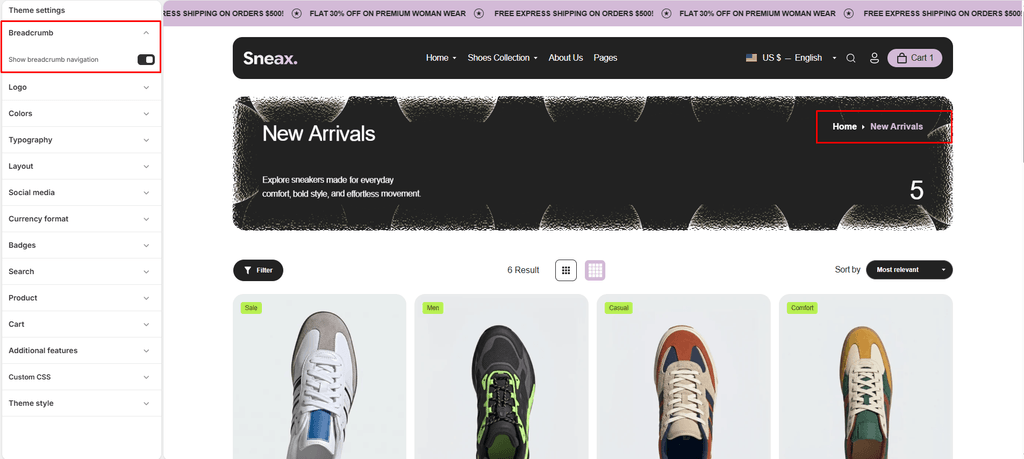
The Breadcrumbs component provides clear hierarchical navigation for your sneaker and footwear store. It displays the customer’s exact journey through your site (for example: Home > Men's Footwear > Running Sneakers > Sneax Air Flow Pro).
Breadcrumbs improve store usability, make it effortless for sneakerheads to navigate back to broader footwear collections, and boost your store’s SEO by structuring internal links with accessible ARIA tags and semantic HTML.
How Breadcrumbs Work in Sneax #
Breadcrumbs in the Sneax theme operate on a 2-tier system:
- Master Global Switch: Controls whether breadcrumbs are active storewide.
- Template Integration & Custom Section/Block: Auto-displays on key pages, and can be placed anywhere using the dedicated Breadcrumbs Section or Breadcrumbs Block.
Step 1: Enable the Master Global Setting #
Before breadcrumbs can appear on any page or section, the global setting must be turned on:
- From your Shopify Admin, go to Online Store > Themes.
- Click Customize on the Sneax theme.
- Click the Theme settings (⚙️ gear icon) in the left sidebar.
- Expand the Breadcrumbs tab.
- Check the box for Show breadcrumb navigation.
- Click Save.
(Note: If this option is unchecked, breadcrumbs will remain hidden across all pages and sections).
Where Breadcrumbs Appear Automatically #
When the master setting is enabled, Sneax automatically renders breadcrumbs on:
- Product Pages: Displays
Home > [Collection Name] > [Product Title]. Customers viewing a sneaker can immediately click back to its parent category. - Collection Pages: Displays
Home > [Collection Title]directly within the collection header banner. - Blog & Article Pages: Displays
Home > [Blog Name] > [Article Title]or tagged sneaker drop filters. - Standard Pages: Displays
Home > [Page Title](e.g., Size Guides, Store Policies, About Us).
Step 2: Using the Breadcrumbs Section & Block #
Sneax also includes a standalone Breadcrumbs Section and Theme Block that you can position anywhere on your page layouts:
Breadcrumbs Section Settings #
To add the section, go to the Theme Editor, click Add section, and choose Breadcrumbs.
| Setting Name | Type | Options / Range | Default | Description |
|---|---|---|---|---|
| Color scheme | Color Scheme Picker | Any configured color scheme | scheme-1 | Sets the background and text color scheme for the breadcrumb bar to match your brand style. |
| Section width | Dropdown | Page width, Full width | Page width | Choose whether breadcrumbs align with your site’s standard container or span full edge-to-edge. |
| Padding top | Slider / Range | 0px – 100px (Step: 1px) | 0px | Adjusts top whitespace above the breadcrumb trail (automatically scaled for mobile). |
| Padding bottom | Slider / Range | 0px – 100px (Step: 1px) | 0px | Adjusts bottom whitespace below the breadcrumb trail (automatically scaled for mobile). |
Breadcrumbs Theme Block #
- If you are building custom page sections or modular group blocks, click Add block and select Breadcrumbs.
- It inherits the master global toggle and instantly outputs clean, accessible breadcrumb links.
Navigation Paths Supported by Sneax #
| Page Type | Breadcrumb Hierarchy Example |
|---|---|
| Sneaker Product | Home › Basketball Sneakers › Sneax High-Top Retro |
| Footwear Collection | Home › Women's Running Shoes |
| Blog Journal | Home › Sneaker Release News |
| Tagged Blog Feed | Home › Sneaker Release News › Collabs |
| Journal Article | Home › Sneaker Release News › How to Clean Leather Sneakers |
| Custom Page | Home › Shoe Sizing & Fit Guide |
Pro Tips for Sneax Footwear Stores #
- Always Link Collections to Products: In Shopify, when a customer enters a product page from a collection URL, Sneax automatically shows that collection in the breadcrumb trail. Ensure your navigation menus link to
/collections/[collection-name]/products/[product-name]so shoppers can seamlessly backtrack. - Ideal for Shoe Sizing & Policies: Adding breadcrumbs to informational pages (such as your “Shoe Size Conversion Chart” or “Return Policy”) allows sneaker buyers to quickly jump back to the store homepage or catalog with a single tap.