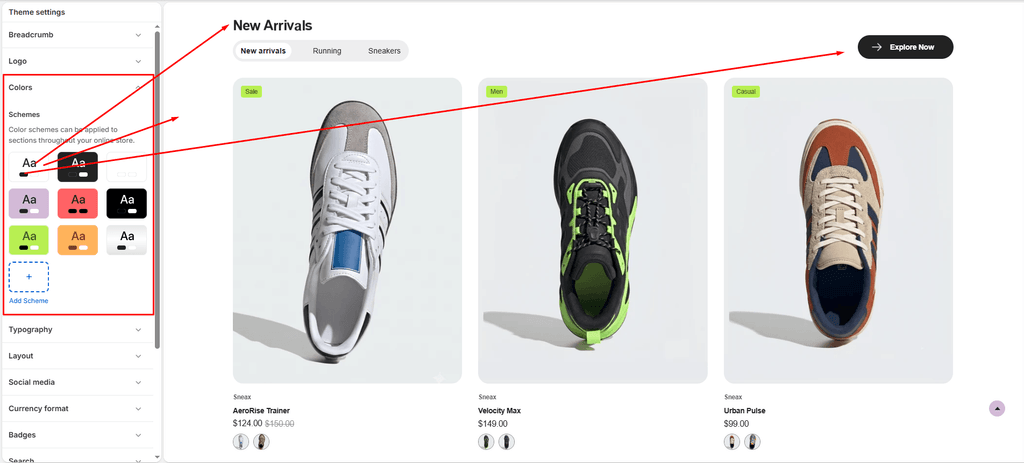
Color is one of the most impactful elements in sneaker and streetwear branding. Sneax leverages Shopify’s modern Color Schemes engine, allowing you to establish cohesive color palettes and apply them across individual sections with a single click.
Whether you want a high-contrast dark theme for an exclusive sneaker drop or a crisp, minimalist aesthetic for athletic performance runners, color schemes ensure effortless brand consistency throughout your store.
How to Access Color Settings #
- From your Shopify Admin, navigate to Online Store > Themes.
- Click Customize on the Sneax theme.
- Click the Theme settings (⚙️ gear icon) in the left sidebar.
- Select the Colors tab to view and customize your color schemes.
Understanding Color Schemes in Sneax #
Instead of manually picking background and button colors for every single section on your site, Sneax allows you to create global Color Schemes (e.g., Scheme 1, Scheme 2, Scheme 3).
Once configured:
- You can assign any color scheme to any section via the section’s Color scheme dropdown setting.
- Sneax comes pre-loaded with optimized palettes crafted specifically for modern sneaker, athletic footwear, and streetwear aesthetics.
- You can create and configure up to 21 custom color schemes for your store.
Color Scheme Settings Breakdown #
Each color scheme in Sneax includes granular controls for typography, backgrounds, and interactive button styles:
| Color Option | Setting Key | Description |
|---|---|---|
| Background | background | Sets the solid base background color for the section or page container. |
| Background gradient | background_gradient | Optional gradient overlay for dynamic, modern sneaker landing pages. Overrides solid background when set. |
| Text | text | Sets the primary text, description, and standard heading color. |
| Highlight text | highlight_text | Sets the signature accent color used when words in headings are wrapped in highlight tags (e.g., spotlighting sneaker tech or sale announcements). |
| Primary button | primary_button | Sets the background fill color of primary call-to-action buttons (e.g., “Add to Cart”, “Shop Drop”). |
| Primary button label | primary_button_label | Sets the font and icon color on primary buttons. |
| Secondary button | secondary_button | Sets the background fill color for secondary/outline buttons (e.g., “View Size Guide”, “Learn More”). |
| Secondary button label | secondary_button_label | Sets the font color on secondary buttons. |
| Link button & label | link_button / link_button_label | Controls inline hyperlinks and standalone text-link buttons. |
| Full width button | full_width_button | Background color for full-width promotional call-to-action buttons. |
| Full width button label | full_width_button_label | Text color on full-width promotional buttons. |
| Full width button icon bg | full_width_button_icon_background | Background circle/pill color for the icon inside full-width action buttons. |
| Full width button icon | full_width_button_icon | Foreground fill color for the SVG icon inside full-width action buttons. |
How to Apply a Color Scheme to a Section #
- In the Shopify Theme Editor preview, select the section you want to customize (e.g., Featured Collection, Image with Text, or Slideshow).
- Look for the Color scheme dropdown in the section settings on the right panel.
- Select your desired scheme (e.g.,
Scheme 2for a bold dark drop section, orScheme 1for a clean white grid). - Sneax instantly adapts all backgrounds, text colors, and button styles within that section.
Pro Tips for Sneax Footwear Stores #
- High-Energy Contrast: For limited sneaker drops and countdown timers, create a dedicated dark color scheme (e.g.,
#121212background with#FFFFFFtext and a vivid neon accent like#E6FF00or#FF3366forHighlight text). - Accessible Contrast: Ensure your button labels and body text maintain strong contrast against their backgrounds so shoe specs and sizing options are easily readable on all screens and lighting conditions.
- Highlight Text for Footwear Features: Use the Highlight text color strategically to draw immediate customer attention to key sneaker specs (e.g., “Engineered for Speed“ or “Featuring CushionAir™ Technology”).