Table of Contents
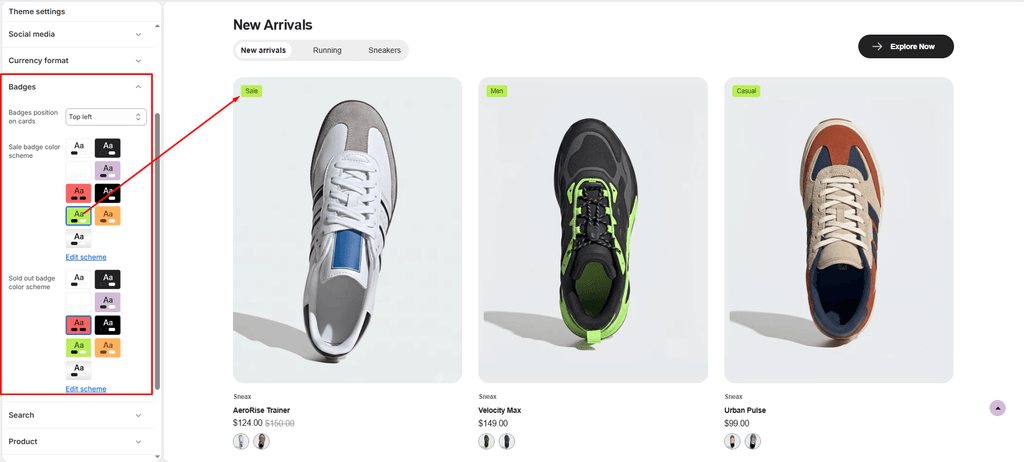
Badges are high-visibility visual indicators layered directly over product imagery on collection grids, search results, and featured product carousels.
In the footwear and sneaker industry, badges are crucial for driving instant purchase decisions—highlighting limited sneaker drops, flash discounts, new silhouettes, and sold-out releases so shoppers can scan availability at a glance.
How to Access Badge Settings #
- From your Shopify Admin, navigate to Online Store > Themes.
- Click Customize on the Sneax theme.
- Click the Theme settings (⚙️ gear icon) in the left sidebar.
- Select the Badges tab.
- Configure your badge position and color schemes.
- Click Save.
Available Settings & Configuration #
| Setting Name | Type | Options / Range | Default | Description |
|---|---|---|---|---|
| Badges position on cards | Dropdown | Top left, Top right, Bottom left, Bottom right | Top left | Anchors the badge to your chosen corner over the footwear photo without obscuring shoe details. |
| Sale badge color scheme | Color Scheme Picker | Any configured color scheme | Scheme 4 | Controls the background, text, and border colors of “Sale” badges and custom drop tags. |
| Sold out badge color scheme | Color Scheme Picker | Any configured color scheme | Scheme 5 | Controls the colors of the “Sold Out” indicator, signaling out-of-stock sizes or archived drops. |
Types of Badges Supported in Sneax #
Sneax automatically renders three distinct badge states based on product inventory and tags:
1. Sold Out Badge #
- Condition: Triggered automatically when all variants and shoe sizes for a product have
0inventory and are not set to continue selling when out of stock. - Styling: Adopts the Sold out badge color scheme (typically a muted grey or high-contrast dark tone) to clearly signal that a drop is currently unavailable.
2. Sale Badge #
- Condition: Triggered automatically whenever a shoe has a
Compare-at pricethat is higher than its active selling price. - Styling: Adopts the Sale badge color scheme (often a high-visibility accent color like red, bright green, or neon yellow) to maximize click-through rates on clearance footwear.
3. Custom Product Tag Badges (Special Sneax Feature) #
- Condition: If a product is available and not on sale, but contains tags in Shopify Admin (for example:
NEW,LIMITED,RETRO,COLLAB, orRESTOCK), Sneax automatically grabs the first tag and displays it as a badge! - (Note: Internal Shopify tags prefixed with an underscore, such as
_filter, are automatically excluded). - Styling: Inherits the Sale badge color scheme to highlight exclusive sneaker releases.
Pro Tips for Sneax Footwear Stores #
- Strategic Corner Positioning: If your shoe photography places the toe of the sneaker pointing left, anchoring badges to the Top Right or Bottom Right ensures the front profile and silhouette of the shoe remain completely visible.
- Create Contrast with Schemes: Use a vibrant scheme for Sale & Tags (e.g., black background with neon green or electric blue text) and a neutral scheme for Sold Out (e.g., dark slate or light grey) so shoppers immediately understand stock status while scanning large collection grids.
- Tag-Driven Sneaker Hype: Tag upcoming drops with tags like
LIMITED DROPorEXCLUSIVEin your Shopify product admin. Sneax will instantly feature them as stylish custom badges without needing third-party apps.