Table of Contents
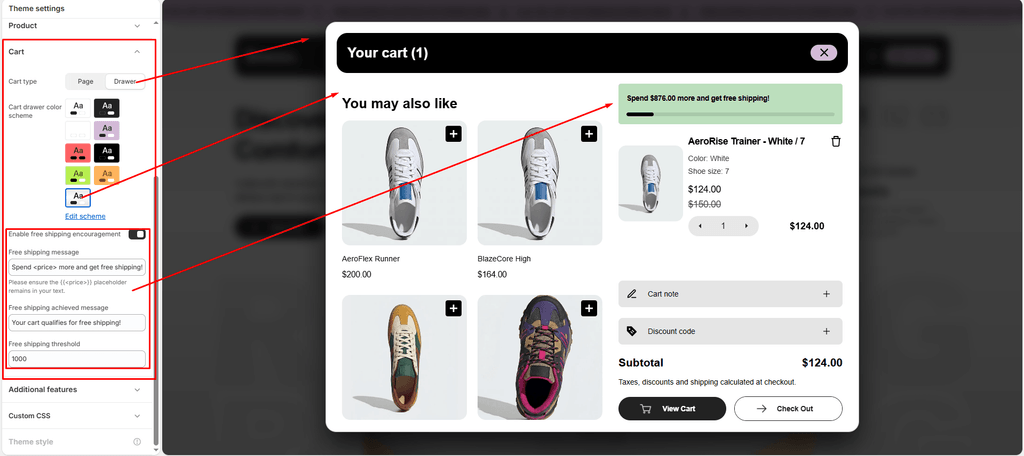
The cart experience is a pivotal step in converting footwear shoppers into paying customers. Sneax features a high-performance slide-out AJAX Cart Drawer alongside an interactive Free Shipping Progress Bar designed to elevate Average Order Value (AOV).
How to Access Cart Settings #
- From your Shopify Admin, navigate to Online Store > Themes.
- Click Customize on the Sneax theme.
- Click the Theme settings (⚙️ gear icon) in the left sidebar.
- Select the Cart tab.
- Configure your cart preferences and click Save.
Available Settings & Configuration #
| Setting Name | Type | Options / Range | Default | Description |
|---|---|---|---|---|
| Cart type | Dropdown | Drawer, Page | Drawer | Chooses between an animated slide-out side drawer or redirecting shoppers to the standalone /cart page. |
| Cart drawer color scheme | Color Scheme Picker | Any configured color scheme | Scheme 1 | Sets the background, typography, button, and divider colors for the cart drawer panel. |
| Enable free shipping encouragement | Checkbox | Enabled / Disabled | Enabled (true) | Activates an interactive real-time progress bar that gamifies the path to free shipping. |
| Free shipping threshold | Text / Number | Numeric amount (e.g., 150 or 300) | 300 | The qualifying cart subtotal required to trigger free shipping for your footwear store. |
| Free shipping message | Text | Text containing <price> | Spend <price> more and get free shipping! | The encouragement message shown while the cart total is below your threshold. |
| Free shipping achieved message | Text | Text | Your cart qualifies for free shipping! | The congratulatory message displayed once the customer reaches or exceeds the threshold. |
Detailed Settings Breakdown #
1. Cart Type (cart_type) #
- Drawer (Recommended for Footwear): When customers click “Add to Cart” on a pair of sneakers or shoe accessories, a sleek drawer smoothly glides in from the right edge of the screen. Shoppers can update quantities, remove items, or proceed directly to checkout without ever losing their place in your footwear catalog.
- Page: Redirects shoppers to the dedicated full-page cart template after each addition.
2. Cart Drawer Color Scheme (color_scheme) #
Allows you to apply a distinct color scheme to the cart drawer (e.g., an athletic high-contrast dark aesthetic with bright checkout buttons), creating clear separation from the background catalog.
3. Free Shipping Encouragement Bar #
Gamifying checkout incentives is one of the highest-converting strategies in footwear e-commerce:
- Live Visual Progress Bar: As sneakers or accessories are added, the visual bar animates forward, reflecting the exact percentage completed toward the threshold.
- Dynamic
<price>Replacement: You must include the<price>tag inside your Free shipping message. Sneax automatically replaces<price>with the exact remaining formatted currency (for example: “Spend $30.00 USD more and get free shipping!”). - Goal Reached Celebration: Once the threshold is met, the progress bar reaches 100% and displays your Free shipping achieved message.
Pro Tips for Sneax Footwear Stores #
- Boost AOV with Footwear Accessories: Set your free shipping threshold slightly above your average shoe price (for example, if your average sneaker is $130, set the threshold to $160). When shoppers see they only need $30 more, they are incentivized to add sneaker cleaner, premium replacement laces, or performance athletic socks to qualify!
- Match Your Shopify Shipping Rates: Ensure the numeric value entered in Free shipping threshold matches your store’s actual free shipping profile configured under Shopify Admin > Settings > Shipping and delivery.