Table of Contents
The Main Blog section powers your store’s primary editorial index (the /blogs/[blog-name] page).
For modern footwear and streetwear brands, a dedicated blog journal builds brand authority, engages the sneaker community, and drives organic SEO—showcasing sneaker drop calendars, on-foot styling reviews, athlete interviews, and shoe care guides.
Sneax presents your articles in an adaptive, high-performance CSS grid featuring hardware-accelerated card animations, granular metadata controls, and automatic pagination.
How to Access Main Blog Settings #
- From your Shopify Admin, navigate to Online Store > Themes.
- Click Customize on the Sneax theme.
- In the top template selector dropdown, select Blogs > Default blog.
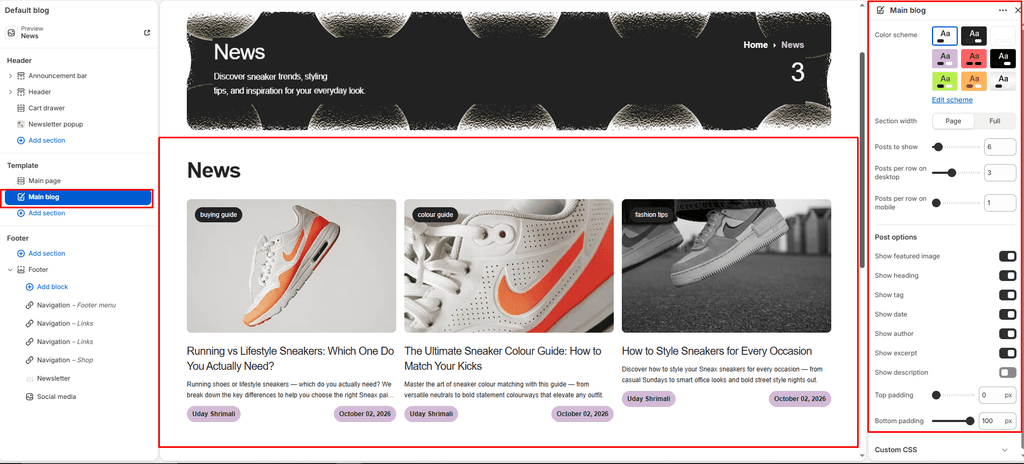
- In the left sidebar, click the Main blog section.
- Configure your grid and post card options.
- Click Save.
Layout & Grid Settings #
| Setting Name | Type | Options / Range | Default | Description |
|---|---|---|---|---|
| Color scheme | Color Scheme Picker | Any configured color scheme | Scheme 1 | Sets the background, text, and card color scheme for the blog index page. |
| Section width | Dropdown | Page width, Full width | Page width | Determines whether the blog grid stays within your store’s container or spans edge-to-edge. |
| Posts per page | Slider / Range | 1 – 100 (Step: 1) | 9 | Maximum number of articles displayed before automatic pagination links appear. |
| Desktop posts per row | Slider / Range | 1 – 6 (Step: 1) | 4 | Controls how many article cards appear side-by-side on desktop monitors and laptops. |
| Mobile posts per row | Slider / Range | 1 – 3 (Step: 1) | 2 | Controls columns on mobile devices (automatically collapses to 1 column on screens under 450px). |
| Top padding | Slider / Range | 0px – 100px (Step: 1px) | 100px | Top whitespace spacing (automatically halved on mobile phones). |
| Bottom padding | Slider / Range | 0px – 100px (Step: 1px) | 100px | Bottom whitespace spacing (automatically halved on mobile phones). |
Article Card Content Toggles #
Customize exactly which metadata and content elements display on individual blog tiles:
| Setting Name | Type | Default | Description |
|---|---|---|---|
| Show image | Checkbox | Enabled (true) | Displays the article’s featured hero image with responsive loading. |
| Show title | Checkbox | Enabled (true) | Displays the article headline. |
| Show tag | Checkbox | Disabled (false) | Displays the article’s primary tag as a category badge (e.g., Drop Alert, Review, Maintenance). |
| Show date | Checkbox | Enabled (true) | Shows the publication date (essential for timely sneaker drop news). |
| Show author | Checkbox | Enabled (true) | Displays the author/editor byline. |
| Show excerpt | Checkbox | Enabled (true) | Renders the short, custom summary excerpt written in the Shopify article editor. |
| Show description | Checkbox | Disabled (false) | Outputs the full body copy preview if you prefer longer text cards without excerpts. |
Pro Tips for Sneax Footwear Stores #
- Use Tags for Sneaker Categorization: Enable Show tag and tag your articles consistently (such as
DROP CALENDAR,SHOE CARE,STYLING TIPS, orCOLLABS). Shoppers can instantly identify the topic while browsing your editorial feed. - Recommended Grid Layout: Setting Desktop posts per row to
3or4with Posts per page set to9or12creates a visually balanced, magazine-style layout for sneaker lookbooks. - High-Impact Photography: Use a consistent aspect ratio (such as 16:9 landscape or 4:5 vertical) for all featured article images to ensure uniform alignment across each row of the grid.