Table of Contents
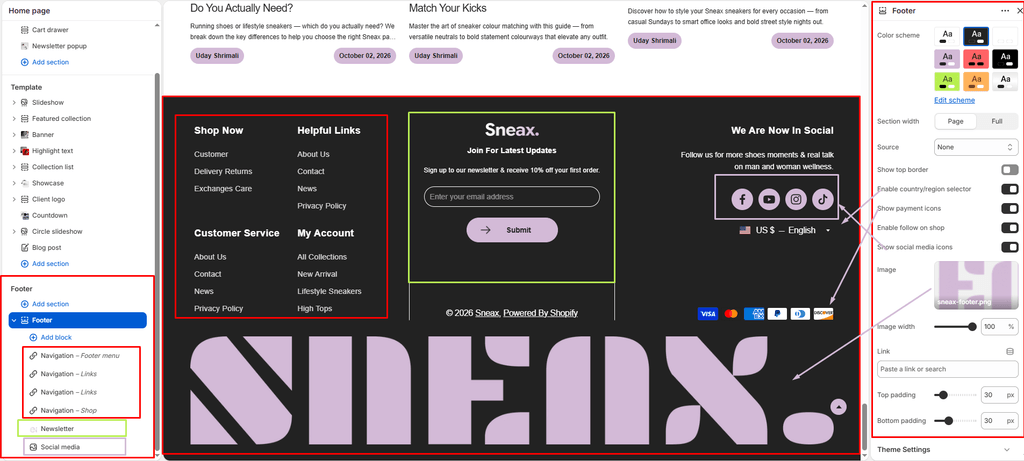
The Footer anchors the bottom of every page on your storefront, serving as the ultimate credibility and navigation zone for sneaker collectors and footwear buyers.
Sneax takes the footer experience to a premium level by supporting auto-playing background campaign videos, high-resolution footwear branding banners, modular navigation blocks, newsletter sign-ups, and international payment badges.
How to Access Footer Settings #
- From your Shopify Admin, navigate to Online Store > Themes.
- Click Customize on the Sneax theme.
- In the left sidebar under the Footer group, click Footer.
- Configure your layout, background media, and toggles, or click Add block to manage content columns.
- Click Save.
Layout & Background Settings #
| Setting Name | Type | Options / Range | Default | Description |
|---|---|---|---|---|
| Color scheme | Color Scheme Picker | Any configured color scheme | Scheme 1 | Sets the background and typography color palette for the footer section. |
| Section width | Dropdown | Page width, Full width | Page width | Determines whether footer content is bounded by your standard page container or spans full screen width. |
| Background source | Dropdown | Uploaded (Video), Image, None | Uploaded | Sets the visual background style behind your footer links. |
| Video | Video Picker | Shopify hosted .mp4 video | None | Displays an ambient, looping background video behind the footer (active when Source is Uploaded). |
| Fallback image | Image Picker | Image upload | None | Displays a high-resolution background photo (active when Source is Image). |
| Top border | Checkbox | Enabled / Disabled | Enabled (true) | Adds a clean dividing line between the main page content and the footer. |
| Footer image | Image Picker | Image upload | None | Upload a large brand watermark, shoe graphic, or typography logo to anchor the footer. |
| Image width | Slider / Range | 10% – 100% (Step: 2%) | 100% | Controls the display width percentage of the footer brand image. |
| Image link | URL | URL / Page link | None | Makes the footer image clickable, directing users back to your homepage or a featured drop. |
| Top padding | Slider / Range | 0px – 200px (Step: 5px) | 0px | Adjusts vertical spacing above the footer content. |
| Bottom padding | Slider / Range | 0px – 100px (Step: 1px) | 24px | Adjusts vertical spacing below the footer content. |
Utilities, Trust Badges & Localization #
| Setting Name | Type | Description |
|---|---|---|
| Enable country/region selector | Checkbox | Displays Shopify’s native currency and language dropdown for international sneaker shoppers. |
| Show payment icons | Checkbox | Renders official payment method badges (Visa, Mastercard, Amex, Apple Pay, Google Pay, PayPal) to reinforce checkout security. |
| Enable ‘Follow on Shop’ | Checkbox | Displays the 1-click Shop Pay follow button to allow customers to track shoe orders via the Shop app. |
| Show social media icons | Checkbox | Displays links to your active social networks (configured in Theme settings > Social media). |
Managing Footer Blocks #
You can organize your footer into multiple modular columns by adding blocks:
1. Link List (link) #
- Menu: Select a Shopify navigation menu (e.g., Customer Care, Sizing Guides, Return Policies, Drop Calendar).
- Show menu title: Toggles the header title above your link column on or off.
- Menu title: Optional custom title override for the menu column.
2. Newsletter (newsletter) #
- Logo: Upload a dedicated sneaker brandmark or emblem directly within the newsletter signup card.
- Newsletter title: Headline prompting shoppers to subscribe (default: “Subscribe to Our Newsletter”).
- Social links title: Subtitle above social icons inside the newsletter column.
3. Social Media (social) #
- Social title: Main heading for your social community column (default: “Connect with us”).
- Subtitle: Informational description encouraging customers to join your sneakerhead community.
4. About Brand / Text (text) #
- Heading: Block title (default: “About our store”).
- Content: Rich text editor for your footwear brand’s story, vision, or sustainable materials pledge.
- Text size: Choose heading hierarchy from
H1down toH6(default:H5) to match your layout balance.
Pro Tips for Sneax Footwear Stores #
- High-Impact Background Video: Upload a short, high-energy 1080p looping video of sneakers in motion, urban street runs, or shoe manufacturing close-ups. It gives the bottom of your store an unforgettable cinematic finish.
- Crucial Footwear Links: Always include links to your Shoe Sizing Chart, Authenticity Guarantee, and Exchange/Return Policy in your footer menus to address common buyer questions and boost conversion confidence.