

The Main Cart section controls the dedicated Cart Page (/cart) of your sneaker store. It provides customers with a transparent, friction-free breakdown of their selected footwear, sizing details, colorways, subtotal savings, and express checkout options.
Equipped with conversion-focused tools—such as real-time stock cap validation, an in-cart promo code applier, a free shipping progress bar, and an in-cart promotional banner—this section helps reduce cart abandonment and turns tentative shoppers into confirmed buyers.
Accessing the Main Cart Settings #
- From your Shopify Admin, go to Online Store > Themes.
- Click Customize next to Sneax.
- In the top template selector dropdown, select Cart (or navigate to
/cartin the live preview). - In the left-hand sidebar, click on Main cart to configure section settings, or click (+) Add block to add a promotion banner or third-party app block.
1. Layout & Styling Settings #
Customize the section’s background contrast, layout width, and responsive vertical spacing:
| Setting | Type | Default | Options / Range | Description |
|---|---|---|---|---|
| Color scheme | Color Scheme | scheme-1 | Theme Schemes | Controls the overall background and typography color palette across the entire cart page. |
| Section width | Select | Narrow-width | Narrow-width, Page-width, Full-width | Controls the horizontal span of the cart table and summary sidebar. |
| Top padding | Range Slider | 0px | 0px – 200px (step 5px) | Sets top spacing above the cart container. |
| Bottom padding | Range Slider | 0px | 0px – 100px (step 1px) | Sets bottom spacing below the checkout area. |
Narrow-Width Recommendation:
Setting the section width to Narrow-width keeps the cart centered with tight margins, creating a sleek, high-end boutique look that makes the checkout button and order summary instantly prominent on wide desktop screens.
Mobile Padding Scale:
On mobile devices (< 767px), Sneax automatically reduces the top and bottom padding values by 50% to keep content compact and readable.
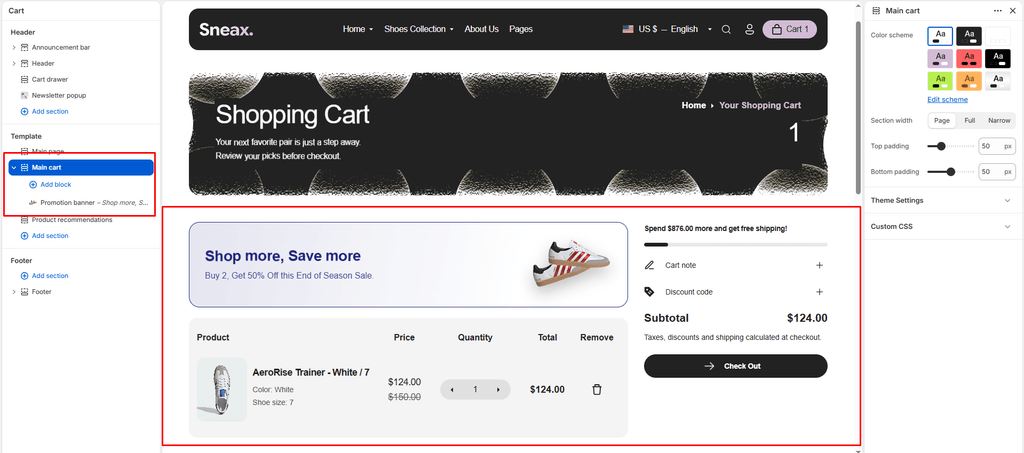
2. In-Cart Promotion Banner (Block) #
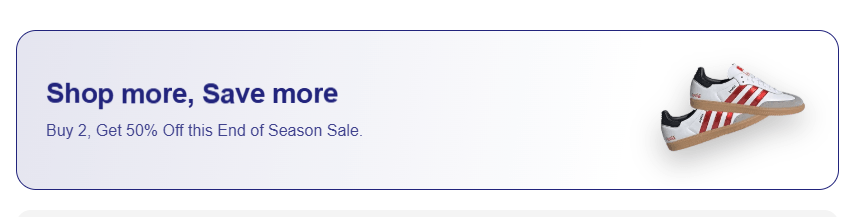
Sneax includes a built-in Promotion Banner block that can be placed directly above the cart table. This is an exceptional conversion booster for high-demand sneaker drops, limited-time coupon announcements, or threshold incentives.
- Limit: Maximum
1promotion banner per cart page. - Dynamic Styling: The banner automatically generates a translucent gradient matching your chosen text color:
background: linear-gradient(100deg, color-mix(in srgb, [text_color] 12%, transparent), transparent 75%).
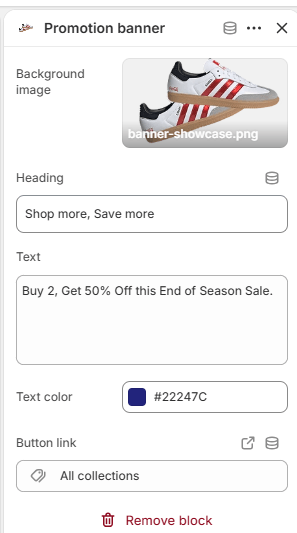
Promotion Banner Settings: #
- Background Image (
image): Upload an editorial lifestyle banner or product visual (e.g., shoe care accessories, special box packaging). If left empty, a placeholder visual will display. - Title (
title): Main promo title (e.g., “Weekend Sneaker Drop” or “Free Crease Protectors”). Default:Special Offer. - Text (
text): Subheading or promotional details (e.g., “Order 2 pairs and get free standard express delivery across the nation.”). - Text Color (
text_color): Custom color picker (Default:#000000). Directly controls both text and border accents. - Banner Link (
banner_link): Make the entire banner clickable to direct shoppers to a sale collection, special release, or accessories page.
3. Built-in Conversion Features #
The cart page integrates seamless conversion features that dynamically sync with your global Theme Settings > Cart:
Free Shipping Progress Bar #
- Displays a visual tier bar tracking how close the customer is to unlocking free shipping (e.g., “Add $35.00 more to unlock Free Express Shipping!”).
- Once the threshold is crossed, the progress bar turns green and displays a celebratory unlock message.
- Configured globally in Theme Settings > Cart > Free Shipping Bar.
In-Cart Discount Code Entry #
- Shoppers can apply promotional coupons and drop codes directly on the cart page without waiting for the final Shopify checkout screen.
- Features real-time validation with instant success messages, error feedback, and immediate cart total recalculation.
Order Notes & Delivery Instructions #
- A clean, collapsible accordion with a pencil icon that allows buyers to leave special instructions for fulfillment (e.g., “Please deliver in discreet packaging”, “Hold for Saturday delivery”).
Automated Cart Summary & Tax Notes #
- Clearly itemizes:
- Subtotal & Original Total Price
- Applied Line-Item & Order-Level Discounts (showing exact dollar savings)
- Dynamic Tax & Duties Statements (automatically links to your store’s legal shipping policy if configured in Shopify Admin).
- Checkout Button: High-contrast primary CTA button with hover micro-animations and a directional arrow.
- Additional Checkout Buttons: Automatically shows accelerated express checkout buttons (Shop Pay, Apple Pay, Google Pay, PayPal) when available.
4. Footwear Cart Table & Line Items #
The cart table displays all critical footwear data so shoppers can confirm their orders before committing:
- Sneaker Imagery: High-resolution thumbnail linked directly back to the product page.
- Product Title & Silhouettes: Clear product naming with brand vendor display.
- Variant Options: Clearly lists individual attributes such as Colorway, US/UK/EU Shoe Size, and Width.
- Line-Level Savings: Shows regular vs. discounted pricing tags and highlighted savings when coupons or automatic volume pricing are active.
- Real-Time Inventory Cap: The
+and-quantity steppers respect live inventory quantities (item.variant.inventory_quantity). If a customer reaches the maximum stock available for a rare sneaker size, the+button automatically disables to prevent overselling. - One-Click Item Removal: Clean, accessible remove button to delete an item and update the cart totals via AJAX.
5. App Blocks (@app) #
Sneax fully supports Shopify’s Theme App Extensions. You can easily integrate third-party apps directly into your Cart Page layout without modifying code:
- Delivery Date & Time Pickers: Let customers select preferred delivery dates for gift releases.
- Package Protection & Insurance: One-click insurance checkboxes (e.g., Route, Navidium).
- Custom Gift Wrapping: Add custom shoe box wrap or personalized gift notes.
- Terms & Conditions Checkboxes: Require agreement before moving to checkout.
To add an app block, click (+) Add block under the Main cart section in the Theme Editor sidebar and choose your installed app extension.
6. Empty Cart Experience #
If a visitor arrives at /cart with no items, Sneax displays an uncluttered, modern empty state:
- Displays a clean “Your cart is empty” message.
- Provides a prominent Continue Shopping button with a hover arrow animation that directs shoppers straight to your primary footwear catalog (
/collections/all).
Pro Tips for Sneaker Retailers #
- Leverage the Promotion Banner for Accessory Cross-Sells:
- Use the in-cart Promotion Banner to promote shoe cleaners, crease protectors, or extra lace packs with a CTA like “Grab a Sneaker Care Kit before checkout”.
- Set Section Width to “Narrow-width”:
- Wide cart tables can make line items look distant and scattered on ultra-wide desktop monitors. Narrow-width keeps the product photo, size, quantity, and checkout summary within a focused reading eye-line.
- Keep Free Shipping Realistic:
- Set your free shipping threshold slightly above your average order value (AOV) so customers buying a single pair of sneakers are motivated to add socks or sneaker cleaner to hit the free shipping goal.