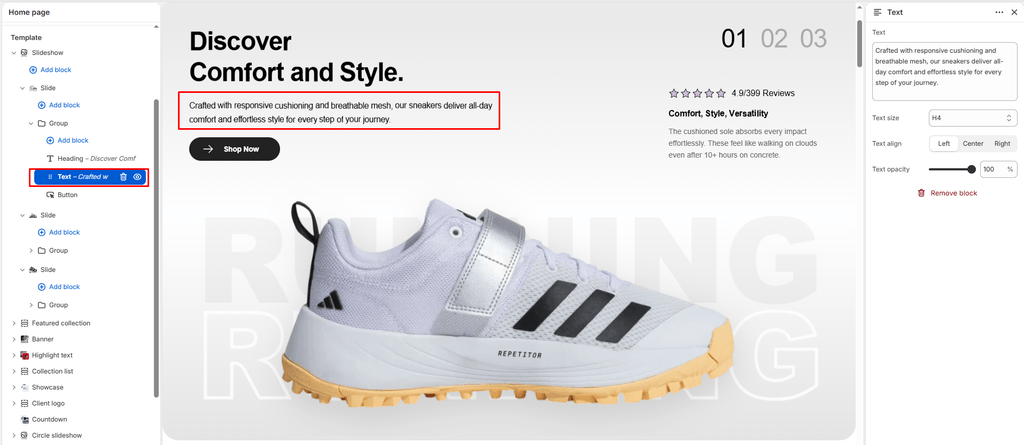
The Text block is the primary modular tool for adding descriptive paragraphs, technical footwear breakdowns, release mechanics, or brand storytelling to your store. Whether you are detailing the premium materials of a limited leather high-top, explaining outsole traction technology, or sharing raffle instructions for an upcoming drop, the Text block provides clean, responsive typography.
Because Sneax is built on Shopify’s modular OS 2.0 block architecture, you can add this block to any compatible section (such as Banner, Slideshow, Video, Newsletter, Main 404, Main Password, or Custom Section) or nest it within container blocks like Group and Column.
Accessing the Text Block Settings #
- In your Shopify Theme Editor, navigate to any page template containing a compatible section.
- In the left-hand sidebar, locate your target section or container block (e.g., Banner or Group).
- Click (+) Add block and select Text (or click on an existing Text block to edit).
- Customize the settings in the right-hand panel.
Block Settings #
| Setting | Type | Default | Options / Range | Description |
|---|---|---|---|---|
| Text | Textarea | Write a short description explaining this section | Multiline Text | The body copy, paragraph, or descriptive statement to display. |
| Text size | Select | H2 | H1, H2, H3, H4, H5, H6 | Sets the typographic scale of the text. |
| Text align | Select | Left | Left, Center, Right | Controls the horizontal text alignment. |
| Text opacity | Range Slider | 100% | 0% – 100% (step 1%) | Adjusts transparency for elegant typographic hierarchy. |
Detailed Setting Explanations #
1. Multiline Body Copy (text) #
The multiline textarea allows you to compose clean paragraphs and line breaks simply by pressing Enter (rendered seamlessly using newline_to_br). This makes it easy to format shoe specifications or raffle details:
2. Typographic Scale (text_size) #
Sneax allows you to set the visual scale of your paragraph text from H1 down to H6:
- H5 or H6 (Recommended for Standard Body Copy): Ideal for multi-sentence descriptions, sneaker care guides, sizing notes, or shipping FAQs.
- H3 or H4 (Recommended for Impact Statements & Pull Quotes): Perfect for bold one-line teasers under a hero headline (e.g., “Engineered for ultimate street comfort and all-day endurance”).
- H1 or H2 (Recommended for Stylistic Display Statements): Best used when the text itself acts as a large editorial accent.
3. Horizontal Alignment (text_align) #
- Left (Default): Traditional editorial alignment. Pairs perfectly with left-aligned Heading and Button blocks.
- Center: Standard choice for hero banners, drop announcement sliders, newsletter signups, or 404/password pages.
- Right: Asymmetric, high-fashion streetwear lookbook alignment.
4. Text Opacity Slider (text_opacity) #
A signature design feature in Sneax! The opacity slider (0% to 100%) dynamically adjusts text transparency (opacity: [value]% !important;):
- 100% (Solid): High contrast, maximum legibility for critical terms, raffle rules, or pricing notes.
- 70% – 85% (Editorial Hierarchy – Recommended): Softens the body text slightly against the background. This creates visual depth, ensuring your primary Heading stays bold and prominent while the supporting copy feels refined and unobtrusive.
Styling & Inheritance #
The Text block automatically inherits its typographic characteristics from your global store settings and active section:
- Font Family & Base Scale: Governed sitewide in Theme Settings > Typography (
type_body_fontandbody_scale). - Color Contrast: Matches the
textcolor defined by the parent section’s active Color scheme, guaranteeing legibility across both dark vault themes and clean white layouts.
Sneaker Store Best Practices #
- Create Visual Hierarchy with Opacity:
- Set your Heading (Title) block to 100% opaque, and set your Text block to 80% opacity. This gives your storefront a professional, designer aesthetic.
- Use for Sneaker Sizing Recommendations:
- Add a compact Text block (
H6) right below product titles or in promotional banners with quick advice: “Fit Note: This silhouette runs true to size. For wide feet, consider going up half a size.”
- Add a compact Text block (
- Keep Mobile Paragraphs Concise:
- Limit body copy to 2–3 sentences on mobile hero slides to prevent pushing your call-to-action button below the phone’s viewport.