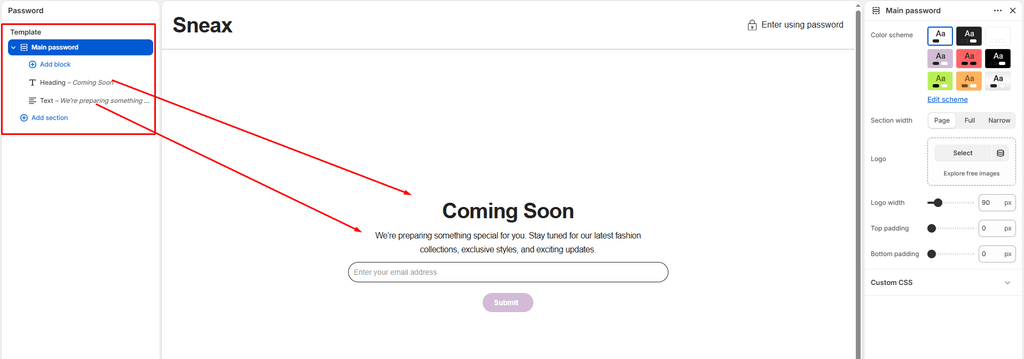
The Main Password section controls the layout and visitor experience on your store’s Password Protection Page (/password). In the sneaker and streetwear industry, this page is an essential tool for building massive drop hype, hosting private VIP pre-sales, teasing upcoming releases, and collecting customer emails prior to an official store launch.
Sneax equips the password page with a dedicated brand header, a discreet password login popup modal, Shopify Theme Blocks support (including headings, text, and countdowns), and a built-in email newsletter capture form.
Accessing the Password Page Settings #
- From your Shopify Admin, go to Online Store > Themes.
- Click Customize next to Sneax.
- In the top template selector, switch to Others > Password.
- In the left sidebar, click on Main password to configure layout, branding, and spacing, or click (+) Add block to add custom content blocks.
Note on Enabling the Password Page:
You can toggle password protection on or off at any time in your Shopify Admin > Online Store > Preferences > Restrict store access.
1. Layout & Styling Settings #
Customize the container boundaries, color scheme, and responsive vertical spacing:
| Setting | Type | Default | Options / Range | Description |
|---|---|---|---|---|
| Color scheme | Color Scheme | scheme-1 | Theme Schemes | Sets the background and typography color contrast across the entire password page. |
| Section width | Select | Page-width | Page-width, Full-width, Narrow-width | Controls the horizontal span of the content container. |
| Top padding | Range Slider | 0px | 0px – 200px (step 5px) | Vertical spacing above the password content. |
| Bottom padding | Range Slider | 0px | 0px – 100px (step 1px) | Vertical spacing below the newsletter form. |
Narrow-Width Recommendation:
Selecting Narrow-width centers your drop announcement, countdown, and email input into a tight, editorial column—ideal for high-converting “Coming Soon” splash pages on desktop displays.
Responsive Mobile Optimization:
On mobile screens (< 767px), Sneax automatically reduces the top and bottom padding values by 50% to keep the logo and email capture field immediately visible above the fold.
2. Logo & Branding Customization #
Ensure your footwear brand or boutique emblem is prominently displayed:
- Logo (
logo):- Upload a dedicated logo image for your password page.
- If left blank, Sneax displays your store name in your brand’s primary typography.
- Logo max width (
logo_max_width):- Default:
140px(Range:50pxto300pxin5pxincrements) - Precisely scale your logo size to maintain crispness and visual balance across desktop and mobile devices.
- Default:
3. Storefront Password Login Modal #
In the top header bar, Sneax includes an Enter using password button featuring a lock icon (icon-password):
- Popup Modal: Clicking the button opens a clean modal overlay where staff, collaborators, or VIP members can enter the storefront password.
- Frictionless Login: Features a secure password input field and submit button with error validation.
- Admin Access: Includes direct convenience links to your Shopify Admin login for staff members.
4. Content Customization with Theme Blocks (@theme) #
Between your logo and the email capture form, you can arrange modular content blocks to communicate launch dates or drop details:
Heading Block (title) #
- Heading: Multiline announcement text (e.g., “The Next Drop Is Almost Here”, “Sneax Vault Opening 11.11”, or “Coming Soon”).
- Heading size: Choose from
H1down toH6(Template Preset:H2). - Text align: Align text to
Left,Center, orRight(Template Preset:Center). - Cascade Animation: Features subtle scroll text cascade animations (
data-scroll-text-cascade).
Text Block (text) #
- Text: Subheading or teaser copy (e.g., “We’re prepping the rarest footwear silhouettes and limited-edition colorways. Sign up below to get early access before general release.”).
- Text size: Choose from
H1down toH6(Template Preset:H4). - Text align: Align text to
Left,Center, orRight(Template Preset:Center). - Text opacity: Adjust opacity from
0%to100%for a sleek editorial aesthetic.
Additional Blocks (Drop Countdown, Image, App) #
- Countdown Block: Add a live countdown clock ticking down to the exact second your shoe drop or store launch goes live.
- App Blocks (
@app): Seamlessly connect third-party SMS marketing apps (e.g., Klaviyo SMS, Attentive) or early-bird giveaway widgets.
5. Built-in Email Capture (Newsletter Form) #
Directly below your content blocks, Sneax automatically renders a responsive Newsletter Signup Form:
- Lead Generation: Captures customer email addresses directly into your Shopify Customers database under the
accepts_marketingfilter. - Drop Notifications: Allows sneaker enthusiasts to subscribe and be notified the exact moment your store unlocks.
- Success & Error States: Automatically displays clean confirmation feedback upon successful subscription.
6. Shopify Admin Password Message #
If you enter a custom message in your Shopify Admin > Preferences > Password protection > Message to your visitors, Sneax automatically renders it inside a formatted container above your content blocks.
Sneaker Store Best Practices #
- Pair with a Drop Countdown Block:
- Add a
countdownblock right below your headline. An active ticking timer creates urgency and signals to collectors that high-heat silhouettes are dropping soon.
- Add a
- Offer VIP Early Access for Email Subscriptions:
- Use copy that promises tangible perks: “Subscribe for 15-minute early access to our limited sneaker drop before public release”. This dramatically increases email opt-in conversion rates.
- Use “Narrow-width” with Centered Alignment:
- For minimalist streetwear branding, configure the section to Narrow-width with Center text alignment to keep eyes focused directly on the logo and subscription box.