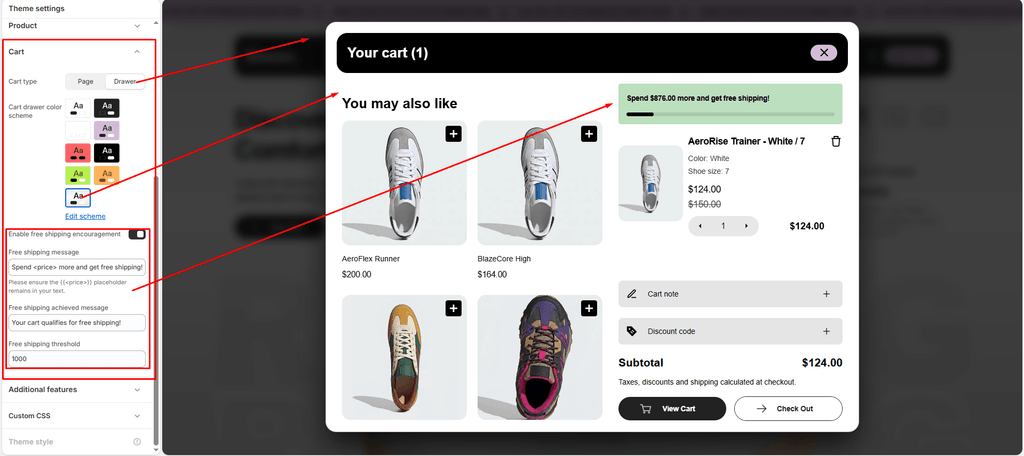
The Cart Drawer in Sneax is an interactive, slide-out shopping cart engineered to keep footwear buyers immersed in their browsing journey. Instead of redirecting customers away to a standard cart page every time they add a pair of sneakers, the drawer smoothly slides in from the right edge of the screen.
It is packed with built-in conversion tools: cross-sell footwear recommendations, in-drawer discount code inputs, order notes, inventory cap protection, and a real-time free shipping progress bar.
Step 1: Verify the Cart Drawer Section #
In Sneax’s modern architecture, the Cart Drawer exists as a dedicated utility section inside the Header group:
- From your Shopify Admin, go to Online Store > Themes.
- Click Customize on the Sneax theme.
- In the left sidebar, look under the Header group.
- You should see the Cart drawer section listed.
(If not present, click “Add section” within the Header group and select Cart drawer).
Step 2: Set Global Cart Behavior to Drawer #
To ensure the slide-out drawer triggers whenever an item is added to cart:
- Click the Theme settings (⚙️ gear icon) in the far-left sidebar.
- Open the Cart tab.
- Ensure Cart type is set to Drawer.
- Choose your preferred Cart drawer color scheme (e.g.,
Scheme 1orScheme 2). - Verify that Enable free shipping encouragement is checked if you want the gamified shipping bar active.
- Click Save.
Step 3: Enable the Header Cart Icon #
To allow shoppers to manually open their cart drawer at any time:
- In the Theme Editor, click on the Header section in the left sidebar.
- Under general settings, make sure Show cart icon is checked (
Enabled). - Sneax displays the shopping bag icon along with a real-time numerical badge showing the total items currently in the cart
(0).
Built-in Features of the Sneax Cart Drawer #
| Feature | Description |
|---|---|
| In-Drawer Product Recommendations | Automatically displays curated cross-sell footwear or accessories (like shoe cleaner kits, athletic socks, or replacement laces) based on items currently in the cart. |
| Real-Time Free Shipping Meter | Visually animates remaining dollar amounts required to unlock free shipping right at the top of the drawer. |
| Live Inventory Protection | The quantity selectors dynamically check available variant stock (item.variant.inventory_quantity). If a customer reaches the maximum available pairs of a limited sneaker drop, the plus button safely disables to prevent overselling. |
| In-Drawer Promo & Discount Codes | Shoppers can enter and apply promotional coupons directly inside the drawer without navigating to the checkout screen first. |
| Cart Notes | Allows customers to leave custom delivery instructions, sizing requests, or gift notes before proceeding to checkout. |
| Multi-Currency Pricing | Automatically displays item prices and subtotal in the customer’s selected local currency with ISO codes (when Show currency codes is active). |
Pro Tips for Sneax Footwear Stores #
- Drive Up-Sells with Accessories: Sneaker shoppers frequently buy shoe care accessories when prompted. Use Shopify’s Search & Discovery app to pair popular sneakers with matching shoe cleaner, waterproofing spray, and extra laces so they appear directly in the drawer’s recommendation slot.
- Prevent Cart Abandonment: Allowing shoppers to apply discount codes directly in the drawer eliminates the common issue where customers leave the store to search for coupon boxes at checkout.