

Table of Contents
The Map Block is a modular Shopify OS 2.0 theme block in the Sneax theme. Built for footwear brands and streetwear boutiques with physical retail spaces, it allows merchants to seamlessly embed interactive Google Maps, Store Locator pins, or pop-up sneaker drop pickup locations directly into any block-enabled section or custom layout.
Accessing and Adding the Map Block #
- Open your Shopify Admin and navigate to Online Store > Themes.
- Click Customize next to your active Sneax theme.
- Open the template where you want to display your store location (e.g., Contact, About, or a dedicated Store Locator page).
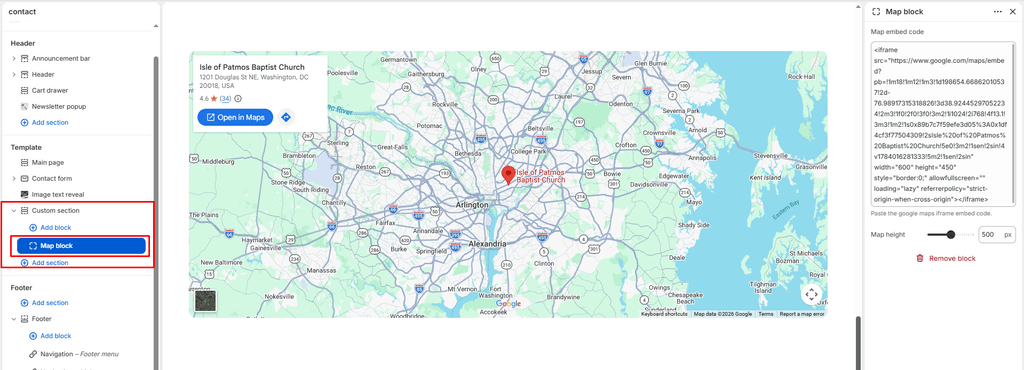
- Inside a block-enabled section (such as Custom section, Group block, or Column block), click Add block and select Map.
- The block configuration settings will appear in the right-hand inspector panel.
1. Block Settings #
Configure your map embed code and frame dimensions.
| Setting | Type | Default | Options / Range | Description |
|---|---|---|---|---|
| Map embed | Textarea | None | Raw HTML <iframe> embed code | Paste the full HTML embed snippet generated from Google Maps (or compatible mapping services like Mapbox or OpenStreetMap). |
| Height | Range | 400px | 200px to 800px (step: 20px) | Sets the exact pixel height of the map viewport. The embedded iframe automatically scales to fill 100% of this container height and width. |
2. How to Obtain Your Google Maps Embed Code #
Follow these quick steps to get the exact embed snippet for your sneaker boutique or warehouse:
- Open Google Maps in your browser and search for your physical store address or business name.
- Click the Share button located in the business information panel.
- In the popup window that appears, select the Embed a map tab.
- (Optional) Choose your preferred preview size (Medium or Custom size).
- Return to your Shopify Theme Editor, select the Map block, and paste the code directly into the Map embed field.
Sneaker Store Best Practices #
- Flagship In-Store Pickup & Raffle Drops: If your store hosts in-person sneaker raffles or local order pickups for hype releases, pair the Map block inside a two-column Custom section with your boutique opening hours, subway/metro transit tips, and pickup window guidelines on the opposite side.
- Harmonize Layout Heights: When placing the map side-by-side with a contact form or boutique address column, adjust the Height slider (e.g., between
400pxand500px) so both columns align evenly across the bottom edge. - Custom Google Map Styling: For a sleek streetwear aesthetic, consider generating a desaturated or dark-mode themed map embed using Google Maps styling or Mapbox to seamlessly match your theme’s dark color schemes (
scheme-2,scheme-3, orscheme-4).